
What is Video Transcriber AI?
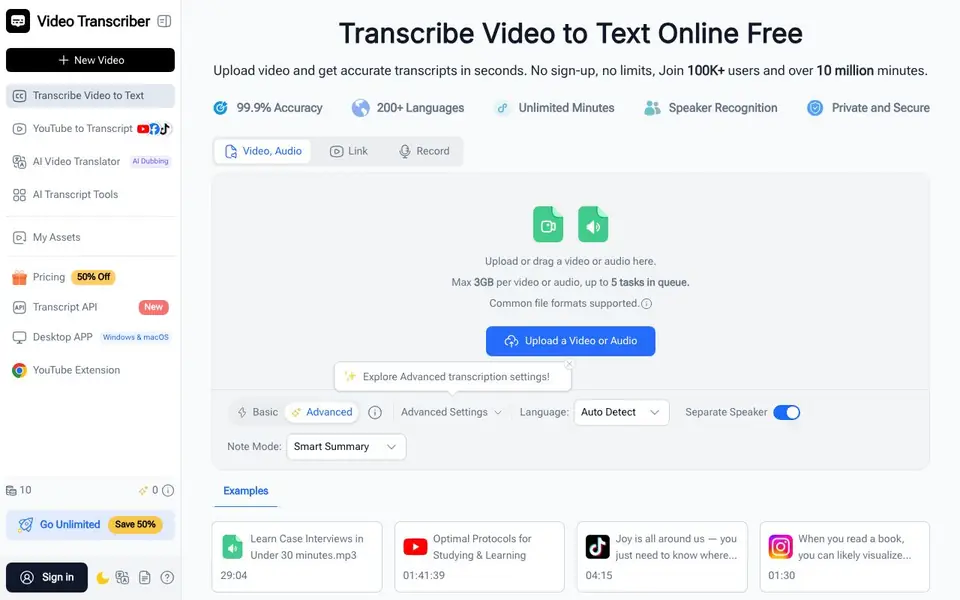
Video Transcriber AI is an online platform that converts video and audio into text. It works with uploaded files, YouTube links, Zoom recordings, and other common formats. You can get transcripts in seconds without signing up, and the service supports over 200 languages with claimed 99.9% accuracy.
To use it, you upload or drag a file into the upload box, or paste a link. The AI processes the file automatically, and you can choose options like speaker recognition, language detection, and smart summaries. Once ready, you can copy, download, or share the transcript directly.
It suits students turning lectures into notes, teachers making captions, professionals capturing meetings, and creators repurposing content. The site also offers AI dubbing, subtitle translation, and a transcript API. Free use has limits, and paid plans are available for more features.
Video Transcriber AI features
- Fast transcription: Get transcripts from any video in seconds without downloads.
- Speaker recognition: Automatically labels who said what in your transcript.
- Multi-language support: Transcribe audio and video in over 200 languages.
- Multiple accuracy modes: Choose between speed and precision for your transcripts.
- Export and share: Copy, download, or share transcripts easily for study or work.
What you can do with Video Transcriber AI
- Turn lecture recordings into searchable study notes.
- Create captions for YouTube videos or podcasts.
- Capture meeting and webinar discussions for team records.
- Convert interviews into text for research or articles.
How to get started with Video Transcriber AI
- Upload a video or audio file, or paste a link from YouTube or Zoom.
- Let the AI process the file, with options for speaker labels and language.
- Copy, download, or share your transcript once it's ready.
Tips for better results with Video Transcriber AI
- Upload files under 3GB and keep only 5 tasks in the queue to avoid processing delays, since the site states these limits explicitly.
- Use the Advanced settings to enable speaker recognition and smart summaries before transcribing, so you get labeled speakers and a concise overview in one pass.
- For long recordings, choose the accuracy mode that balances speed and precision, as Video Transcriber AI offers multiple modes to match your needs.
- Paste a YouTube link directly instead of downloading the video first, since Video Transcriber AI accepts links from major platforms without extra steps.
Video Transcriber AI pricing
Video Transcriber AI has a free way to start, with paid plans for heavier use. Check videotranscriber.ai for current limits and prices.
What to check before you rely on Video Transcriber AI
- Verify whether the free tier truly offers unlimited minutes, as the site claims both 'no limits' and 'unlimited minutes' but also lists paid plans.
- Confirm the 99.9% accuracy claim on your own files, since real-world results vary with audio quality, accents, and background noise.
- Check the export formats available for transcripts, as the site mentions copy, download, and share but does not list specific file types.
- Review the privacy policy for how your uploaded files are stored and used, since the site says 'private and secure' but gives no details.
Who Video Transcriber AI is for
Video Transcriber AI suits students, teachers, professionals, content creators and researchers. If that is not you, the AI transcription tools below may fit better.
Similar tools compared with Video Transcriber AI
| Tool | What it is | Pricing |
|---|---|---|
| Video Transcriber AI | AI video and audio transcription platform | Freemium |
| Otter.ai | AI meeting notetaker and transcription tool | Freemium |
| Fireflies.ai | AI meeting assistant for transcription and notes | Freemium |
| Fathom | AI notetaker for online meetings | Freemium |
| Turboscribe | Unlimited audio and video transcription | Freemium |
Video Transcriber AI FAQ
Is Video Transcriber AI free to use?
The site says you can start transcribing without sign-up and with no limits, but it also offers paid plans and a 50% off promotion. So it's free to try, with paid options for more features.
What file formats and sources does it support?
It supports common video and audio formats, plus links from YouTube, TikTok, Instagram, Facebook, X, and Bilibili, as well as Zoom recordings. You can upload files up to 3GB each.
Can I get speaker labels in my transcript?
Yes, there's an option to separate speakers, so you can see who said what. This is useful for meetings, interviews, and lectures.
Does it work with languages other than English?
Yes, it supports over 200 languages and can auto-detect the language in your video or audio. You can also translate subtitles into other languages.
Can Video Transcriber AI export transcripts to Word, PDF, or other formats?
Video Transcriber AI lets you copy, download, or share transcripts directly from the site. The website does not specify which file formats are available for export, so check the download options after generating a transcript to see what is offered.
Does Video Transcriber AI have a desktop app for Windows or macOS?
Yes, the website mentions a Desktop APP for Windows and macOS. You can find it in the main navigation, likely under a dedicated section. The site does not provide further details about the app's features, so visit that page for specifics.
What does the free plan of Video Transcriber AI include, and are there limits?
Video Transcriber AI is free to use without signing up, and the homepage says 'no limits' and 'unlimited minutes.' However, the pricing label is freemium, and the site mentions paid plans for more features. For exact free limits, check the Pricing page.


