
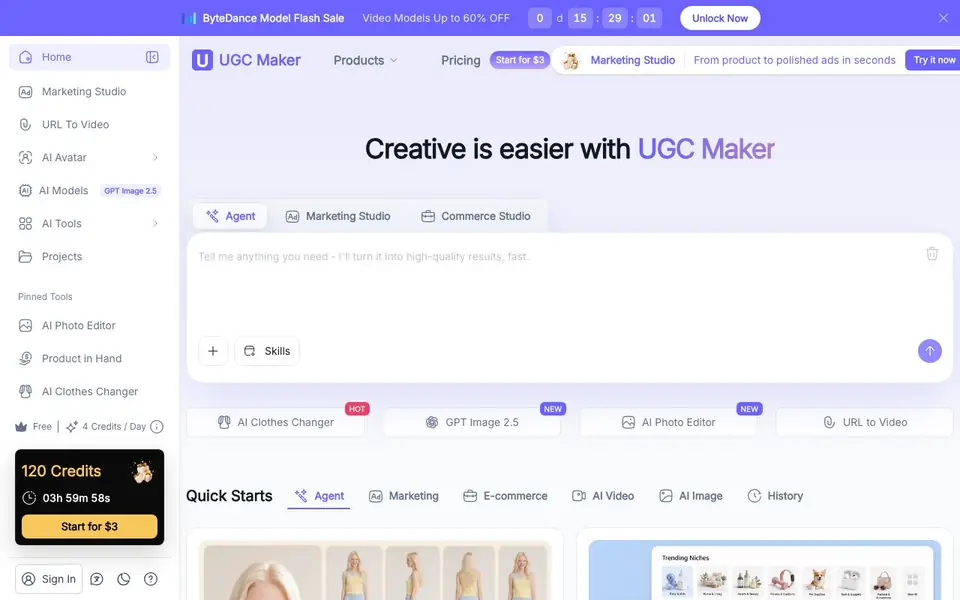
What is UGC Maker?
UGC Maker is an all-in-one AI platform for creating user-generated content (UGC) style videos and ads. You paste a product link or describe your product, and the AI pulls images, writes scripts, and generates multiple video variations. It uses human-like avatars and natural voiceovers to simulate authentic customer testimonials, reviews, and product showcases.
You start by entering a product URL or using the Marketing Studio. The AI automatically extracts product details, writes a script, and produces videos with hooks, CTAs, and platform-specific formats. You can generate dozens of variations in one click, changing voice, script, or layout. It supports 140+ voices and accents, and exports ready for TikTok, Instagram, YouTube Shorts, and Meta.
The tool is built for e-commerce brands, marketing agencies, content creators, startups, and even real estate agents. It includes a built-in ad library with thousands of high-performing examples for inspiration. The site mentions a free plan with daily credits, plus paid options starting at $3, and no sign-up is required to start.
UGC Maker features
- URL to Video: Paste a product link and get images, scripts, and video ads generated automatically.
- AI Avatars: Use lifelike human avatars to create authentic UGC-style testimonials without filming.
- Multi-Language Voices: Choose from 140+ voices and accents for natural-sounding voiceovers.
- Variation Generation: Create multiple video versions in one click to test different scripts and layouts.
- Ad Library: Browse thousands of high-performing video ads with filters and benchmarks for inspiration.
What you can do with UGC Maker
- Turn a Shopify product page into a video ad in minutes.
- Create customer testimonial videos for a DTC brand without actors.
- Generate multiple video variations for A/B testing ad campaigns.
- Produce property tour videos for real estate listings using avatars.
How to get started with UGC Maker
- Go to UGC Maker's website and start for free, no sign-up needed.
- Paste a product link or use the Marketing Studio to describe what you need.
- Pick an avatar and voice, then generate and export your video for your platform.
Tips for better results with UGC Maker
- Paste a full product URL with clear images and descriptions so UGC Maker can extract accurate details and generate more relevant scripts and visuals for your ads.
- Use the variation generation feature to create multiple versions in one click, then test different voices, scripts, and layouts to find what resonates with your audience.
- Browse the built-in ad library for high-performing examples in your niche, then adapt those hooks and CTAs when writing your product description to improve UGC Maker's output.
- Start with the free daily credits to experiment with different product types and avatar styles, so you learn which formats work best before committing to paid plans.
UGC Maker pricing
UGC Maker has a free way to start, with paid plans for heavier use. Check ugcmaker.io for current limits and prices.
What to check before you rely on UGC Maker
- Check the free plan's daily credit limit and what actions consume credits, since the website mentions 4 credits per day but does not specify how many videos each credit covers.
- Verify whether the $3 starting price is a one-time payment, a monthly subscription, or a trial, as the website does not clearly state the billing structure.
- Review the export formats and platform compatibility for your intended use, since the site lists TikTok, Instagram, YouTube Shorts, and Meta but does not detail file types or resolution options.
Who UGC Maker is for
UGC Maker suits e-commerce brands, marketing agencies, content creators and startups. If that is not you, the AI video generators below may fit better.
Similar tools compared with UGC Maker
| Tool | What it is | Pricing |
|---|---|---|
| UGC Maker | AI UGC video and ad maker | Freemium |
| SiVideoGen | AI video generator with multiple models | Freemium |
| FreeSiTools | Free AI image prompt generator | Free |
| SiVideoAPI | Unified API for top AI video models | Freemium |
| Runway | AI video, image, and audio creation suite | Freemium |
UGC Maker FAQ
Is UGC Maker free to use?
Yes, the site says it's free online with no sign-up. It also mentions a free plan with daily credits, and paid options starting at $3 for more credits.
How does the URL to Video feature work?
You paste a product link, and UGC Maker automatically pulls images, writes a script, and generates multiple video ads. It's designed to save time for e-commerce sellers.
What can I create with UGC Maker?
You can create UGC-style videos, ads, product showcases, testimonials, tutorials, and promos. It supports avatars, voiceovers, and exports for TikTok, Instagram, YouTube Shorts, and Meta.
Who is UGC Maker for?
It's for e-commerce brands, DTC sellers, marketing teams, agencies, content creators, educators, startups, and real estate professionals who need video content without filming.
Does UGC Maker work on mobile devices or only on desktop?
The UGC Maker website does not specify whether it works on mobile devices or only on desktop. For the most accurate information, check the website's help center or contact their support team directly.
What integrations does UGC Maker offer with platforms like Shopify or Amazon?
UGC Maker's website mentions that it is suitable for Shopify, Amazon, and DTC stores, but it does not list specific integrations or export connections. To see if it connects directly to your platform, review the website's feature details or contact support.
What does the free plan of UGC Maker include, and are there any limitations?
UGC Maker offers a free plan with daily credits, but the website does not specify how many credits or what features are included. For exact details on the free plan's limitations, check the pricing page or sign up to see what you get.


