

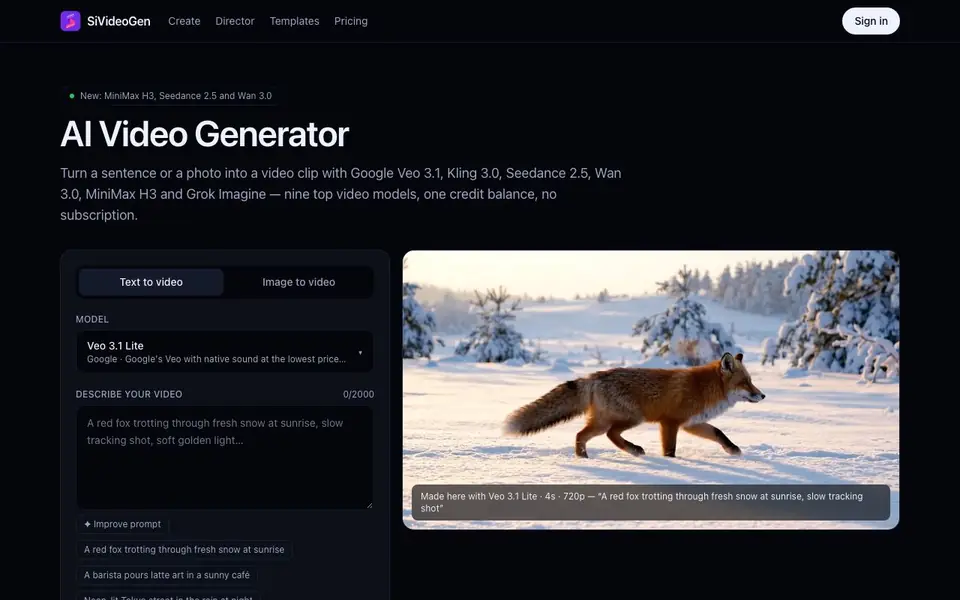
What is SiVideoGen?
SiVideoGen is a web-based AI video generator that lets you create short clips from a text description or a starting photo. It gives you access to nine leading video models, including Google's Veo 3.1, Kling 3.0, Seedance 2.5, Wan 3.0, MiniMax H3, and Grok Imagine, all in one place. You pay per clip with a single credit balance, so there is no need for separate subscriptions.
To get started, you choose a model from the list, with Veo 3.1 Lite selected by default as the most affordable option that also generates sound. Then you either write a description of the shot or upload a photo and describe the motion. You can set the length, resolution, aspect ratio, and whether to include audio, and the exact credit cost appears before you generate. Press the Generate button, wait a minute or two, and download the MP4 from your browser.
SiVideoGen suits creators who want to try different AI video models without committing to multiple subscriptions. The Improve prompt button helps you turn a short idea into a detailed shot description for better results. The website mentions 180 free credits to start, and all your clips are saved in My videos for later access.
SiVideoGen features
- Multi-model access: Choose from nine top AI video models in one place with a shared credit balance.
- Text to video: Write a description and generate a clip from scratch, with options for length and quality.
- Image to video: Upload a starting photo and animate it with a motion description for consistent visuals.
- Sound options: Generate clips with audio or silent, depending on the model and your preference.
- Prompt improvement: Rewrite a short idea into a detailed shot description with subject, action, and camera movement.
What you can do with SiVideoGen
- Create B-roll footage for ads or social media from a text description.
- Animate a product photo into a short video for branded content.
- Test video concepts quickly without paying for multiple subscriptions.
- Generate stylized clips for creative projects using models like Grok Imagine.
How to get started with SiVideoGen
- Choose a model from the list, with Veo 3.1 Lite as the default starting option.
- Describe your video or upload a photo, then set length, resolution, and aspect ratio.
- Generate the clip, wait a minute or two, and download the MP4 from My videos.
Tips for better results with SiVideoGen
- Use the Improve prompt button to expand a short idea into a detailed shot description with subject, action, and camera movement, giving the model more to work with for better results.
- Compare the model list in SiVideoGen before generating, since each model has different strengths and starting prices; pick the one that matches your clip's needs and budget.
- Check the exact credit cost shown before you generate, then adjust length, resolution, or sound to lower the price if needed, especially for drafts or tests.
- Save your clips in My videos within SiVideoGen and reuse them later, so you can download the MP4 again without spending extra credits on a new generation.
SiVideoGen pricing
SiVideoGen has a free way to start, with paid plans for heavier use. Check sivideogen.com for current limits and prices.
What to check before you rely on SiVideoGen
- Verify the free 180 credits cover your intended clip lengths and models, since costs vary per model and the website does not list a full pricing plan.
- Confirm the export format is MP4 and that audio is included only if you select it, as some models like MiniMax H3 Max Turbo are silent only.
- Check the website for data and privacy policies regarding uploaded photos and generated clips, as it does not state how your content is handled or stored.
Who SiVideoGen is for
SiVideoGen suits content creators, marketers, video editors and designers. If that is not you, the AI video generators below may fit better.
Similar tools compared with SiVideoGen
| Tool | What it is | Pricing |
|---|---|---|
| SiVideoGen | AI video generator with multiple models | Freemium |
| FreeSiTools | Free AI image prompt generator | Free |
| SiVideoAPI | Unified API for top AI video models | Freemium |
| Runway | AI video, image, and audio creation suite | Freemium |
| Synthesia | AI video and avatar platform for business | Freemium |
SiVideoGen FAQ
What AI video models does SiVideoGen support?
SiVideoGen supports nine models: Veo 3.1 Lite and Fast from Google, Kling 3.0 Turbo, MiniMax H3 Max Turbo, Wan 3.0, Seedance 2.0 and 2.5, Seedance 2.0 Mini, and Grok Imagine 1.5. Each has different strengths, like dialogue, action, or cinematic shots.
How does pricing work on SiVideoGen?
You pay per clip using credits, with no subscription required. The website offers 180 free credits to start, and each model shows its cost in credits for a default clip. Shorter, silent, or lower-resolution clips cost less.
Can I use my own photos to make videos?
Yes, SiVideoGen has an Image to video mode. You upload a starting frame, like a product photo or character design, and describe the motion. This keeps the look consistent, which is good for branded content or series.
Do the videos include sound?
It depends on the model. Some, like Veo 3.1 Lite and Kling 3.0 Turbo, support sound, while others like MiniMax H3 Max Turbo are silent. You can choose between with audio or silent when generating, if the model allows it.
What can I export from SiVideoGen and where do my videos go?
SiVideoGen lets you download each finished clip as an MP4 file directly from your browser. All clips you generate are also saved in the My videos section on the site, so you can come back later to rewatch or download them again. The website does not mention exporting to other formats or platforms.
Does SiVideoGen work on my phone or tablet?
SiVideoGen is a web-based tool, so you access it through a browser on any device with internet, including phones and tablets. There is nothing to install. The website does not mention dedicated mobile apps, so you can use the site directly in your mobile browser.
What do I get with the free plan on SiVideoGen?
SiVideoGen gives you 180 free credits to start, which you can use to generate your first clips. The exact cost of each clip is shown before you generate, so you can see how many credits it uses. The website does not specify whether free credits refresh or expire, so check the pricing page for details.


