

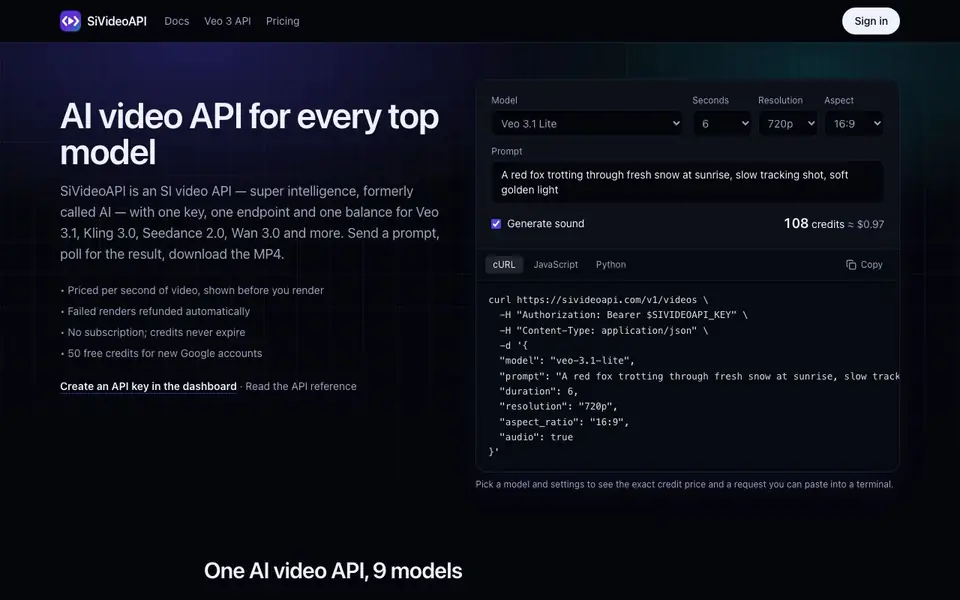
What is SiVideoAPI?
SiVideoAPI gives you a single API key and endpoint to generate videos from multiple leading AI models, including Veo 3.1, Kling 3.0, Seedance 2.0, and Wan 3.0. You send a prompt, poll for the result, and download the MP4. It's designed for developers who want to avoid managing separate accounts and billing for each vendor.
To start, you create an API key in the dashboard, then POST to /v1/videos with your chosen model and prompt. The response includes a video ID and credit cost. You poll GET /v1/videos/{id} until the status is succeeded, then fetch the video URL. For image-to-video, you upload a frame first and pass its ID.
The service is priced per second of video, with costs shown before you render. Failed renders are refunded automatically, and credits never expire. You get 80 free credits for new Google accounts. It runs on Cloudflare's network in front of fal.ai's GPU fleet, and finished clips are stored on stable URLs.
SiVideoAPI features
- One API for multiple models: Access Veo, Kling, Seedance, Wan, and more with a single key and endpoint.
- Pay per second: See exact credit costs before rendering, with no subscription or minimums per vendor.
- Automatic refunds: Failed renders return credits to your balance without needing a support ticket.
- Normalized parameters: Use the same names for durations, resolutions, and aspect ratios across all models.
- Stable video URLs: Finished clips are copied to SiVideoAPI's storage, so links don't depend on provider temp files.
What you can do with SiVideoAPI
- Generate ad variations by rendering the same product shot in multiple settings.
- Turn blog posts into short vertical clips on a scheduled basis.
- Add a 'make a video' button to your app and pass costs to users.
- Create game cutscenes or trailers before full production.
How to get started with SiVideoAPI
- Sign in to the dashboard with Google or an email link and create an API key.
- POST to /v1/videos with a model and prompt, then poll the video ID until it succeeds.
- Download the MP4 from the video_url, or upload a frame first for image-to-video.
Tips for better results with SiVideoAPI
- Start with Veo 3.1 Lite or MiniMax H3 Max Turbo for cheap test renders, then switch to higher-cost models once your prompt works well.
- Poll the video status every few seconds instead of waiting blindly, and always check the credit cost returned in the response before rendering.
- Use the same normalized parameters for duration, resolution, and aspect ratio across all models, so switching models is just a one-word change in your code.
- For image-to-video, upload your frame to /v1/uploads first and pass its ID, then verify the result before scaling up to multiple renders.
SiVideoAPI pricing
SiVideoAPI has a free way to start, with paid plans for heavier use. Check sivideoapi.com for current limits and prices.
What to check before you rely on SiVideoAPI
- Check the exact credit cost per second for your chosen model and duration in the request builder, since prices vary widely between models.
- Verify whether the model you need supports sound, because some models always include audio while others are silent or optional.
- The website does not state monthly limits, rate limits, or data retention policies, so confirm these with support before relying on it for production.
Who SiVideoAPI is for
SiVideoAPI suits developers, product teams, content teams and startups. If that is not you, the AI developer platforms below may fit better.
Similar tools compared with SiVideoAPI
| Tool | What it is | Pricing |
|---|---|---|
| SiVideoAPI | Unified API for top AI video models | Freemium |
| OpenSI | AI model comparison and pricing tool | See website |
| OpenRouter | Unified API for many AI models | Freemium |
| Ollama | Run open models locally or cloud | Freemium |
| fal | Generative media API and serverless GPU platform | Paid |
SiVideoAPI FAQ
What models does SiVideoAPI support?
It supports Veo 3.1 Lite and Fast, Kling 3.0 Turbo, MiniMax H3 Max Turbo, Wan 3.0, Seedance 2.0, 2.0 Mini, and 2.5, plus Grok Imagine 1.5. You switch models by changing one word in your request.
How does pricing work?
You buy credits and spend them per second of video, with costs shown before rendering. There's no subscription, and credits never expire. New Google accounts get 80 free credits. Failed renders are refunded automatically.
Can I generate video with sound?
Yes, for most models. Veo, Wan, and Seedance support optional audio, while Kling and Grok always include sound, and MiniMax is silent. You can set the audio parameter in your request.
Is there a free plan?
New Google accounts receive 80 free credits, which lets you test the API. The website doesn't specify a full free tier beyond that, so check the pricing page for details on credit packages.
Does SiVideoAPI offer an image-to-video feature?
Yes, SiVideoAPI supports image-to-video. You upload a frame to /v1/uploads first, get its ID, and then pass that ID in your video request. The website does not specify which models support this, so check the API reference or contact support for details.
Can I use SiVideoAPI without creating an account?
No, you need an account to use SiVideoAPI. You sign in with Google or an email link, then create an API key in the dashboard. The key is shown only once, so store it securely on your server. The free plan gives 80 credits for new Google accounts.
What output formats does SiVideoAPI provide?
SiVideoAPI returns MP4 files. The API response includes a video_url that points to a stable link on SiVideoAPI's storage. The website does not mention other formats like GIF or WebM, so if you need a different format, check the docs or contact support.


