

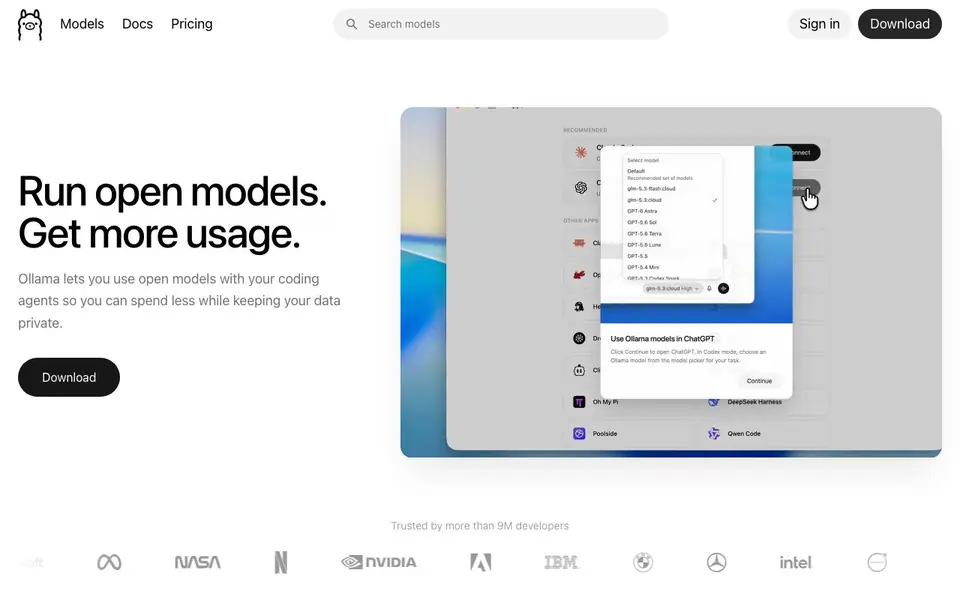
What is Ollama?
Ollama is a platform for running open AI models, either on your own machine or in the cloud. It is built for developers and teams who want to use models like DeepSeek or Kimi without relying on expensive closed providers. The focus is on speed, privacy, and predictable pricing.
You start by downloading Ollama and picking a model. You can run it locally, where nothing leaves your machine, or use the cloud for more power. The platform works with coding agents like Claude Code and Codex, so you can switch models without changing your workflow. Setup takes less than two minutes.
Ollama suits developers who want more control over their AI usage. It is trusted by over 9 million developers. Your data is never trained on by any provider, and cloud models are hosted in the US, Europe, and Singapore. Local models are always free, and paid plans start at $20 per month.
Ollama features
- Local model execution: Run open models entirely on your machine, so your data never leaves your device.
- Cloud hosting: Use hosted models in the US, Europe, and Singapore when you need more computing power.
- Coding agent integration: Launch tools like Claude Code and Codex with one command and switch models freely.
- Fast serving: Dedicated capacity keeps throughput high even when you run multiple agents at once.
- Predictable pricing: Start free, upgrade to Pro at $20 per month, and add usage credits when needed.
What you can do with Ollama
- Run open models locally for private development work.
- Connect coding agents to open models to cut API costs.
- Host models in the cloud for team projects with shared access.
- Switch between different open models without changing your workflow.
How to get started with Ollama
- Download Ollama from the website.
- Choose an open model to run locally or in the cloud.
- Launch your coding agent or start using the model directly.
Tips for better results with Ollama
- Start with a small open model locally to test Ollama's setup and confirm your machine can handle inference before committing to cloud usage.
- Use Ollama's one-command launch to connect Claude Code or Codex, then switch between models like DeepSeek or Kimi without changing your workflow.
- For team projects, run Ollama in the cloud so shared access is easier, but keep local models for private development where data must not leave your device.
- Monitor your token throughput when running multiple agents, and upgrade to Pro only if you consistently hit usage limits, since local models stay free.
Ollama pricing
Ollama has a free way to start, with paid plans for heavier use. Check ollama.com for current limits and prices.
What to check before you rely on Ollama
- Confirm whether the free tier includes cloud usage or only local models, since the website lists Pro at $20 per month but does not state free cloud limits.
- Verify that your chosen open model is available in Ollama's catalog before relying on it, as the site shows examples but not a full list.
- Check the data hosting regions for your specific cloud plan, because the site says US, Europe, and Singapore but does not specify which regions apply to each tier.
Who Ollama is for
Ollama suits developers, DevOps teams, AI researchers and privacy-conscious companies. If that is not you, the AI developer platforms below may fit better.
Similar tools compared with Ollama
| Tool | What it is | Pricing |
|---|---|---|
| Ollama | Run open models locally or cloud | Freemium |
| SiVideoAPI | Unified API for top AI video models | Freemium |
| OpenSI | AI model comparison and pricing tool | See website |
| OpenRouter | Unified API for many AI models | Freemium |
| fal | Generative media API and serverless GPU platform | Paid |
Ollama FAQ
What does Ollama do?
Ollama lets you run open AI models either locally on your machine or in the cloud. It is designed for developers who want to use models like DeepSeek or Kimi while keeping data private and controlling costs.
Is Ollama free?
Local models are always free. For cloud usage, you can start free and upgrade to a Pro plan at $20 per month, which includes $60 of usage. You can also add usage credits when you need more.
Who is Ollama for?
Ollama is for developers and teams who use AI models in their work, especially with coding agents. It is trusted by over 9 million developers and suits anyone who wants more privacy and lower costs than closed providers.
Can I use Ollama with my existing tools?
Yes. Ollama works with coding agents like Claude Code, Codex, OpenCode, and others. You can launch these tools with one command and switch models without changing your workflow.
Does Ollama work on Windows, macOS, and Linux?
Ollama is designed to run on your own machine or in the cloud. The website does not list specific operating systems, but you can check the Download section on ollama.com to see which platforms are supported for installation.
What does the free plan of Ollama include?
Ollama's free plan lets you run local models on your own machine at no cost, and your data never leaves your device. The website does not specify limits for cloud usage on the free tier, so check the pricing page for details on what is included.
Can Ollama export or connect to external tools beyond coding agents?
Ollama integrates with coding agents like Claude Code, Codex, OpenCode, and others, as listed on the website. For connections to other external tools or export options, the website does not mention them, so you would need to check the integrations section or docs for the full list.


