

What is OpenSI?
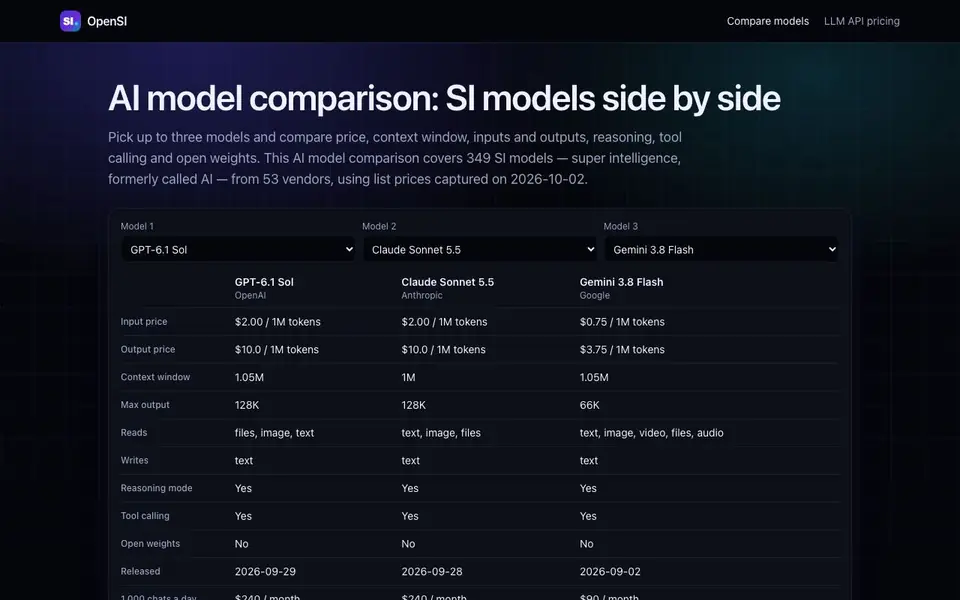
OpenSI is a comparison tool for AI models. It lets you pick up to three models and see them side by side. You can compare price, context window, inputs and outputs, reasoning, tool calling, and open weights. The tool covers 349 SI models (super intelligence, formerly called AI) from 53 vendors, including GPT, Claude, Gemini, Grok, DeepSeek, and Qwen.
To use it, you select up to three models from the list. The tool then shows their details in a side-by-side view. The data uses list prices captured on 2026-10-02, so you get a snapshot of current pricing. This helps you quickly see which model fits your budget and technical needs.
OpenSI suits developers, engineers, and anyone choosing an LLM for an app or project. It is useful for comparing API costs and capabilities before you commit. The site does not mention any pricing for the tool itself, so check the website for that information.
OpenSI features
- Side-by-side comparison: Compare up to three models at once to see differences clearly.
- Price data: See list prices for each model, captured on a specific date.
- Context window info: Check how much text each model can handle in one go.
- Feature flags: View reasoning, tool calling, and open weights for each model.
- Large catalog: Browse 349 models from 53 vendors, including major names.
- useCases
What you can do with OpenSI
- Compare API prices before choosing a model for your app.
- Check context windows to pick a model for long documents.
- Evaluate reasoning and tool calling for complex tasks.
- Find open-weight models for self-hosting or customization.
- audience
How to get started with OpenSI
- Go to the OpenSI website and find the model comparison section.
- Pick up to three models from the list of 349 available options.
- Review the side-by-side data on price, context, and features to decide.
- faq
Tips for better results with OpenSI
- Pick exactly three models that matter for your use case, then compare their context windows and tool calling flags side by side to narrow your shortlist quickly.
- Use OpenSI's price snapshot from 2026-10-02 to compare list prices, but remember those rates may change after that date, so verify current costs before budgeting.
- Filter for open weights when you plan to self-host, then check reasoning and tool calling flags on OpenSI to confirm the model handles your complex tasks.
- Start with models you already know, like GPT or Claude, then add a cheaper alternative in OpenSI to see if the price difference justifies the capability gap.
- Cross-check OpenSI's feature flags against the vendor's own documentation, because the side-by-side view only shows what the tool captures, not every nuance.
- Use OpenSI to compare inputs and outputs pricing for high-volume API calls, since small per-token differences add up fast when you scale your app.
OpenSI pricing
OpenSI’s homepage does not list prices. Check opensidot.com for current plans.
What to check before you rely on OpenSI
- Check whether OpenSI itself charges a fee, since the website does not list any pricing for the tool, so confirm costs before relying on it.
- Verify the price data is current, because OpenSI uses list prices from 2026-10-02, and rates may have changed since that snapshot.
- Confirm the models you need are in OpenSI's catalog of 349 models, and check if any vendors or specific versions are missing from the list.
- Check if OpenSI offers export or API access for the comparison data, since the site does not mention any export formats or integrations.
- Review OpenSI's privacy policy to see how your usage data is handled, because the website does not state any data protection details.
Who OpenSI is for
OpenSI suits developers, engineers, AI product managers and tech decision makers. If that is not you, the AI developer platforms below may fit better.
Similar tools compared with OpenSI
| Tool | What it is | Pricing |
|---|---|---|
| OpenSI | AI model comparison and pricing tool | See website |
| SiVideoAPI | Unified API for top AI video models | Freemium |
| OpenRouter | Unified API for many AI models | Freemium |
| Ollama | Run open models locally or cloud | Freemium |
| fal | Generative media API and serverless GPU platform | Paid |
OpenSI FAQ
What does OpenSI do?
OpenSI lets you compare AI models side by side. You can pick up to three models and see their price, context window, inputs and outputs, reasoning, tool calling, and open weights. It covers 349 models from 53 vendors.
Is OpenSI free to use?
The website does not state whether OpenSI is free or paid. You would need to check the site for pricing details or a sign-up page.
Who is OpenSI for?
OpenSI is for developers, engineers, and anyone choosing an AI model for a project. It helps you compare API costs and capabilities before you commit to a model.
What models can I compare on OpenSI?
You can compare models from vendors like GPT, Claude, Gemini, Grok, DeepSeek, and Qwen. The catalog includes 349 models, so you have a wide range to choose from.
Can OpenSI export or connect to other tools?
The OpenSI website does not mention any export or integration features. It focuses on side-by-side comparison of AI models. To see if exporting or connecting to other tools is possible, check the OpenSI website for updates or additional documentation.
Does OpenSI require an account to use?
The OpenSI website does not specify whether an account is needed. Since the site does not mention login requirements, you may need to visit OpenSI directly to see if you can use the comparison tool without signing up.
What devices or platforms does OpenSI run on?
OpenSI is a web-based tool, so it likely runs in any modern web browser on desktop or mobile devices. However, the website does not explicitly list supported platforms. For the most accurate information, check the OpenSI website for system requirements or compatibility notes.


