

What is FreeSiTools?
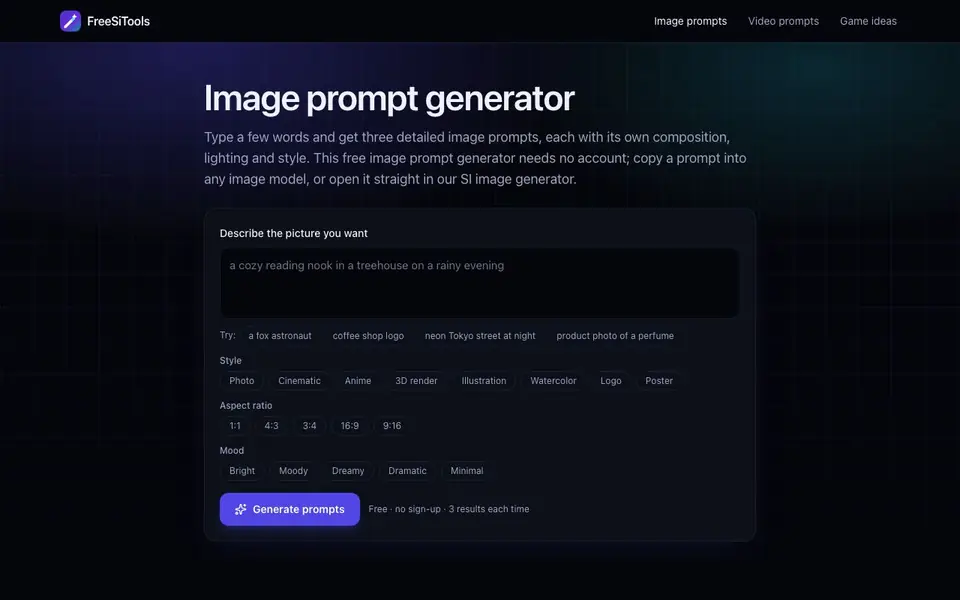
FreeSiTools is a free image prompt generator that turns a few words into three detailed prompts, each with its own composition, lighting, and style. You can use it without creating an account. It works with popular image models like Flux, Nano Banana, Seedream, GPT Image, and Midjourney.
To use it, describe the picture you want in a few words. You can pick a style, aspect ratio, or mood, or leave them blank for more variety. The tool generates three prompts, each taking a different angle on your idea. You can copy a prompt into any image model or open it directly in SiImageGen.
The generator runs on a language model and takes about five seconds. It follows a prompt structure that image models respond to best, starting with the subject and adding details in a predictable order. The website also offers tips for each image model and patterns by style.
FreeSiTools features
- Three prompts per generation: Get three different takes on your idea with varied composition, lighting, and style.
- Style presets: Choose from Photo, Cinematic, Anime, 3D render, Illustration, Watercolor, Logo, or Poster.
- Aspect ratio options: Select from 1:1, 4:3, 3:4, 16:9, or 9:16 for your prompts.
- Mood selection: Pick Bright, Moody, Dreamy, Dramatic, or Minimal to influence the prompt's tone.
- Direct integration: Press 'Make this image' to open the prompt in SiImageGen automatically.
What you can do with FreeSiTools
- Generate prompts for photorealistic portraits with specific lens and lighting details.
- Create logo prompts with flat vector style and brand name in quotes.
- Produce cinematic scene prompts with atmosphere and color grading cues.
- Blend styles like watercolor poster or anime product shot for unique results.
How to get started with FreeSiTools
- Type a few words describing the picture you want.
- Optionally select a style, aspect ratio, or mood.
- Generate prompts and copy one into your image model or open it in SiImageGen.
Tips for better results with FreeSiTools
- Start with a concrete subject and one or two details, like "a young woman with freckles, laughing," to give the generator a clear anchor for its three prompt variations.
- Leave style, aspect ratio, and mood blank if you want more variety; FreeSiTools will produce three more diverse prompts that explore different angles on your idea.
- Use FreeSiTools to generate prompts for specific models like Flux or Midjourney, then copy the prompt directly into that model to get results tuned to its strengths.
- Press "Make this image" to open the prompt in SiImageGen automatically, saving you from manual copying and pasting when you want to test the output quickly.
FreeSiTools pricing
FreeSiTools is free to use according to its website.
What to check before you rely on FreeSiTools
- Check whether the free plan has any hidden usage limits, such as a maximum number of generations per day, since the website does not state any caps.
- Verify that the generated prompts work with your chosen image model, as FreeSiTools does not guarantee compatibility with every model beyond the listed ones.
- Confirm the export options: the site mentions copying prompts and opening in SiImageGen, but does not specify whether you can save or download prompt lists.
Who FreeSiTools is for
FreeSiTools suits content creators, digital artists, marketers and hobbyists. If that is not you, the AI writing tools below may fit better.
Similar tools compared with FreeSiTools
| Tool | What it is | Pricing |
|---|---|---|
| FreeSiTools | Free AI image prompt generator | Free |
| Jenni AI | AI academic writing and research assistant | Freemium |
| Wordtune | AI writing and paraphrasing assistant | Freemium |
| Grammarly | AI writing assistant for clear communication | Freemium |
| QuillBot | AI writing and creation suite | Freemium |
FreeSiTools FAQ
Is FreeSiTools really free?
Yes, the image prompt generator is free and requires no sign-up. You get three results each time, and you can generate again for more. There are no paid plans mentioned on the website.
What image models does it work with?
The prompts are designed for Flux, Nano Banana, Seedream, GPT Image, and Midjourney. The website also provides specific tips for each of these models to help you get the best results.
Can I use my own language?
Yes, the website says any language works when describing your picture. The generator expands your idea into prompts regardless of the language you type.
How long does it take to generate prompts?
It takes about five seconds per generation. The tool runs on a language model and costs you nothing, so you can generate as many times as you like.
Does FreeSiTools work on my phone or tablet?
FreeSiTools is a web-based tool, so it should work in any modern browser on your phone, tablet, or computer. The website does not mention a dedicated mobile app, but you can access it directly from your device's browser without installing anything.
Can I use FreeSiTools without creating an account?
Yes, FreeSiTools is completely free and requires no sign-up. You can type your idea, choose options, and generate three prompts instantly. The website states 'Free · no sign-up · 3 results each time,' so you don't need to register or log in to use it.
What can I do with the prompts from FreeSiTools?
You can copy any prompt from FreeSiTools and paste it into popular image models like Flux, Midjourney, or Seedream. Alternatively, you can press 'Make this image' to open the prompt directly in SiImageGen. The tool is designed to work with any image model that accepts text prompts.


