

What is QuillBot?
QuillBot is a suite of AI tools for writing, editing, and creating. It includes a paraphraser, grammar checker, AI detector, plagiarism checker, humanizer, AI chat, image generator, translator, summarizer, and citation generator. You can use it to write, design, and build presentations, resumes, and more.
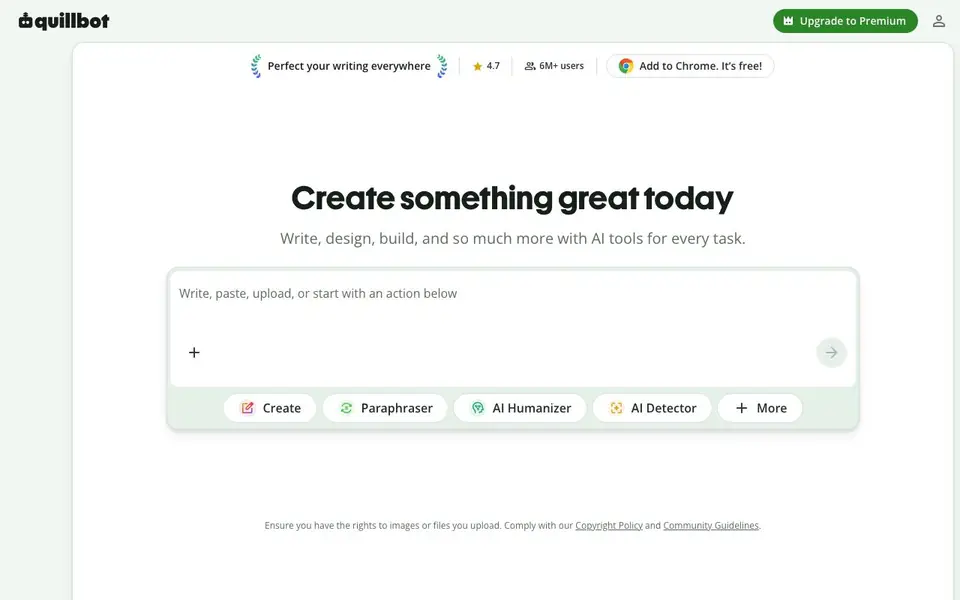
You start by writing, pasting, uploading, or choosing an action like Paraphraser or AI Detector. The tools work across web, Chrome, Edge, Safari, Word, iOS, Android, macOS, and Windows. You can also chat with PDFs, edit images, convert files, and manage PDFs.
QuillBot suits business owners, job seekers, and professionals who want to communicate with clients, tailor resumes, and publish content without sacrificing quality. The Chrome extension is free and has 6M+ users with a 4.7 rating. The site mentions a Premium upgrade, but does not state specific pricing details.
QuillBot features
- Paraphraser: Rewrites your text instantly to improve clarity and fluency.
- Grammar Checker: Fixes grammar and spelling errors in your writing.
- AI Detector: Identifies whether text was written by AI.
- Plagiarism Checker: Checks your text for plagiarism against sources.
- AI Humanizer: Makes AI-written text sound more natural and human.
- Image Generator: Creates images from text prompts for your projects.
What you can do with QuillBot
- Paraphrase a paragraph to avoid repetition in your essay.
- Check your email for grammar mistakes before sending.
- Detect if a document was written by AI.
- Generate a presentation slide deck from your ideas.
- Create a tailored resume for a specific job application.
How to get started with QuillBot
- Go to QuillBot's website and choose a tool like Paraphraser or Grammar Checker.
- Type, paste, or upload your text, or start with an action button.
- Use the tool to get rewritten text, grammar fixes, or AI detection results.
- Add the Chrome extension for free to use QuillBot across websites.
Tips for better results with QuillBot
- Start with the Paraphraser mode and compare its multiple rewrites to pick the tone that fits your audience, then run the result through the Grammar Checker for a final polish.
- Use QuillBot's AI Detector on your own drafts before submitting them, especially if you've used AI assistance, to see how the tool flags machine-written phrasing and adjust accordingly.
- For long documents, paste text into the Summarizer first to get a condensed version, then expand key points with the Paraphraser to keep your writing clear and concise.
- When building a resume or presentation, use QuillBot's dedicated generators to structure your content, then manually review and customize the output to match the specific job or project requirements.
QuillBot pricing
QuillBot has a free way to start, with paid plans for heavier use. Check quillbot.com for current limits and prices.
What to check before you rely on QuillBot
- Check whether your plan includes the specific tools you need, since the website labels QuillBot as freemium but does not list what the free tier covers versus Premium.
- Verify the AI Detector and Plagiarism Checker results against your own judgment, as no tool is perfect and the site does not state accuracy rates.
- Confirm that the file formats you need to export or convert are supported, since the website lists many features but does not specify all output options.
Who QuillBot is for
QuillBot suits business owners, job seekers, professionals and students. If that is not you, the AI writing tools below may fit better.
Similar tools compared with QuillBot
| Tool | What it is | Pricing |
|---|---|---|
| QuillBot | AI writing and creation suite | Freemium |
| FreeSiTools | Free AI image prompt generator | Free |
| Jenni AI | AI academic writing and research assistant | Freemium |
| Wordtune | AI writing and paraphrasing assistant | Freemium |
| Grammarly | AI writing assistant for clear communication | Freemium |
QuillBot FAQ
What does QuillBot do?
QuillBot is a suite of AI tools for writing and creating. It includes a paraphraser, grammar checker, AI detector, plagiarism checker, humanizer, AI chat, image generator, translator, summarizer, and citation generator. You can also create documents, presentations, and resumes.
Is QuillBot free?
QuillBot offers a free Chrome extension with 6M+ users, and the site mentions a Premium upgrade. It does not state whether the free version has limits or what Premium costs. Check the website's pricing page for details.
Who is QuillBot for?
QuillBot is for business owners who communicate with clients, job seekers creating tailored resumes, professionals polishing writing, and students who need grammar help or paraphrasing. It works across many platforms like Chrome, Word, and mobile apps.
What can I create with QuillBot?
You can create documents, presentations, resumes, cover letters, social media posts, and images. You can also edit PDFs, convert files, and use AI chat to brainstorm ideas. The website does not list every possible output, so explore the tools to see all options.
Can QuillBot export or connect to other apps like Google Docs or Microsoft Word?
QuillBot works across web browsers and has extensions for Chrome, Edge, and Safari. It also offers apps for Word, iOS, Android, macOS, and Windows. The website does not mention direct integration with Google Docs or other specific platforms, so you would need to check the app or extension details for those connections.
What devices and platforms does QuillBot run on?
QuillBot runs on web browsers, and you can use it through extensions for Chrome, Edge, and Safari. It also has apps for Word, iOS, Android, macOS, and Windows. This means you can access QuillBot on your computer, tablet, or smartphone, depending on the platform you use.
What does the free plan of QuillBot include?
QuillBot is freemium, so you can use many tools for free, like the Chrome extension, which has over 6 million users. The website mentions a Premium upgrade but does not list specific free limits or paid features. To know exactly what is free, you would need to check the pricing page or sign up.


