

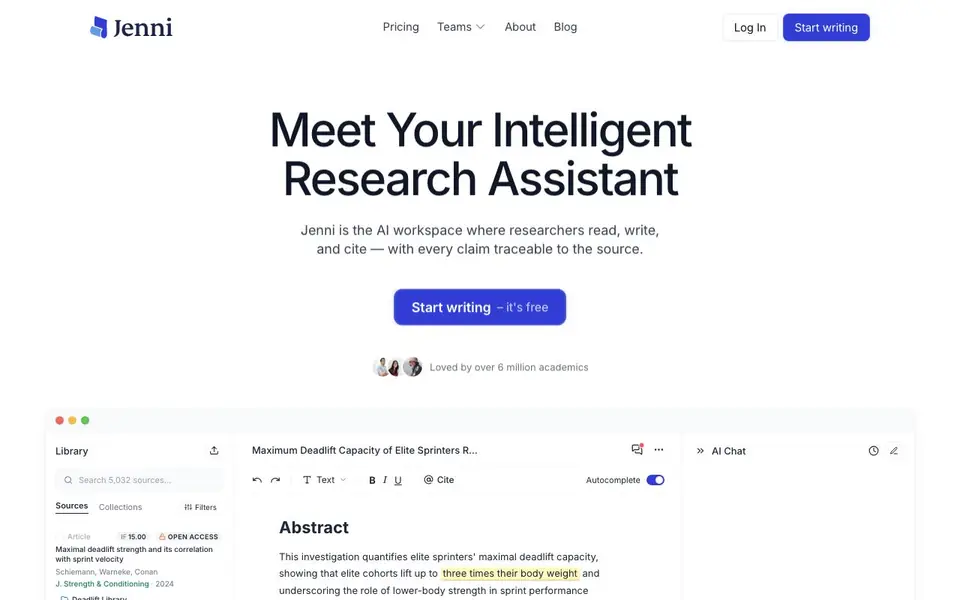
What is Jenni AI?
Jenni is an AI workspace built for academic writing. It combines a research library, an AI writing assistant, and citation tools in one place. You can read papers, write your argument, and cite sources without switching between apps.
You start by importing your sources. Drag in PDFs, bring references from Zotero or Mendeley, or search over 200 million papers. As you write, Jenni suggests complete sentences that are grounded in the papers you have added. Every suggestion is linked to the exact page and paragraph in the website, so you can verify claims in one click.
The tool suits students, researchers, and academics who need to produce cited papers. It supports over 10,000 citation styles and lets you export your work as.docx, LaTeX, or HTML. The website says it is loved by over 6 million academics, but it does not mention specific universities or limits on the free plan.
Jenni AI features
- Traceable citations: Every AI-suggested sentence links to the exact page and paragraph in your source PDF.
- Smart autocomplete: AI suggests sentences grounded in real papers, so your writing stays evidence-based.
- Source library: Import PDFs, sync from Zotero or Mendeley, or search over 200 million papers.
- One-click citations: Add inline citations in over 10,000 styles without leaving your document.
- Export options: Save your finished paper as.docx, LaTeX, or HTML for submission or sharing.
What you can do with Jenni AI
- Write a research paper with AI suggestions that cite your sources automatically.
- Build a literature review by importing PDFs and searching millions of papers.
- Verify every claim in your draft by clicking through to the original PDF.
- Format citations in your required style and export the final document.
How to get started with Jenni AI
- Create a free account and start a new document.
- Import your sources by dragging in PDFs, connecting Zotero or Mendeley, or searching the paper library.
- Write alongside the AI, accept cited suggestions, and export your paper in your chosen format.
Tips for better results with Jenni AI
- Import your PDFs or sync from Zotero or Mendeley before writing, so Jenni AI can ground its suggestions in your actual sources and link every claim to the right page.
- Click through the citation links Jenni AI provides to verify each suggested sentence matches the website paragraph, especially before you rely on it for a final draft.
- Use Jenni AI's autocomplete to build your argument paragraph by paragraph, checking that each new suggestion stays consistent with the papers you have already added to your library.
- Export your finished paper as.docx, LaTeX, or HTML directly from Jenni AI, and review the formatting in your target tool before submission to catch any citation style issues.
Jenni AI pricing
Jenni AI has a free way to start, with paid plans for heavier use. Check jenni.ai for current limits and prices.
What to check before you rely on Jenni AI
- Check whether the free plan has limits on the number of sources, AI suggestions, or exports, since the website does not state any specific restrictions.
- Verify that your required citation style is among the over 10,000 supported by Jenni AI, and test it on a sample paragraph before committing.
- Confirm that your institution or publisher accepts the export formats Jenni AI offers, and check if you need to adjust citation details manually after export.
Who Jenni AI is for
Jenni AI suits students, researchers and academics. If that is not you, the AI writing tools below may fit better.
Similar tools compared with Jenni AI
| Tool | What it is | Pricing |
|---|---|---|
| Jenni AI | AI academic writing and research assistant | Freemium |
| FreeSiTools | Free AI image prompt generator | Free |
| Wordtune | AI writing and paraphrasing assistant | Freemium |
| Grammarly | AI writing assistant for clear communication | Freemium |
| QuillBot | AI writing and creation suite | Freemium |
Jenni AI FAQ
What does Jenni AI do?
Jenni is an AI writing assistant for academic work. It helps you write essays and research papers, suggests sentences grounded in your sources, and adds citations automatically. You can also manage your research library and export documents in multiple formats.
Is Jenni AI free?
The website says you can start writing for free. It does not detail what the free plan includes or whether there are paid tiers. Check the pricing page on the site for current plan details.
Who is Jenni AI for?
It is built for students, researchers, and academics who need to produce cited academic writing. The tool is designed for serious research writing, not casual content creation, so it suits anyone working on papers, theses, or journal articles.
Can I import my own sources?
Yes. You can drag in PDFs, import references from Zotero or Mendeley, or search over 200 million papers directly in Jenni. Your sources are stored in a library that you can organize with collections and filters.
Can Jenni AI export my finished paper to formats other than DOCX, LaTeX, or HTML?
Jenni AI lets you export your work as DOCX, LaTeX, or HTML. The website does not mention any other export formats, such as PDF or plain text. If you need a different format, you can export to one of these three and then convert it using another tool.
Does Jenni AI work on mobile devices or only on desktop?
Jenni AI is described as an AI workspace for researchers, and the website does not specify whether it is available on mobile devices or only on desktop. To find out if there is a mobile app or a mobile-friendly web version, check the Jenni AI website or contact their support team.
What does the free plan of Jenni AI include, and are there any limits?
The Jenni AI website says 'Start writing – it's free' but does not detail what the free plan includes or any limits on usage, such as the number of documents or AI suggestions. For specifics on the free plan, visit the pricing page on the Jenni AI website.


