

What is GPTZero?
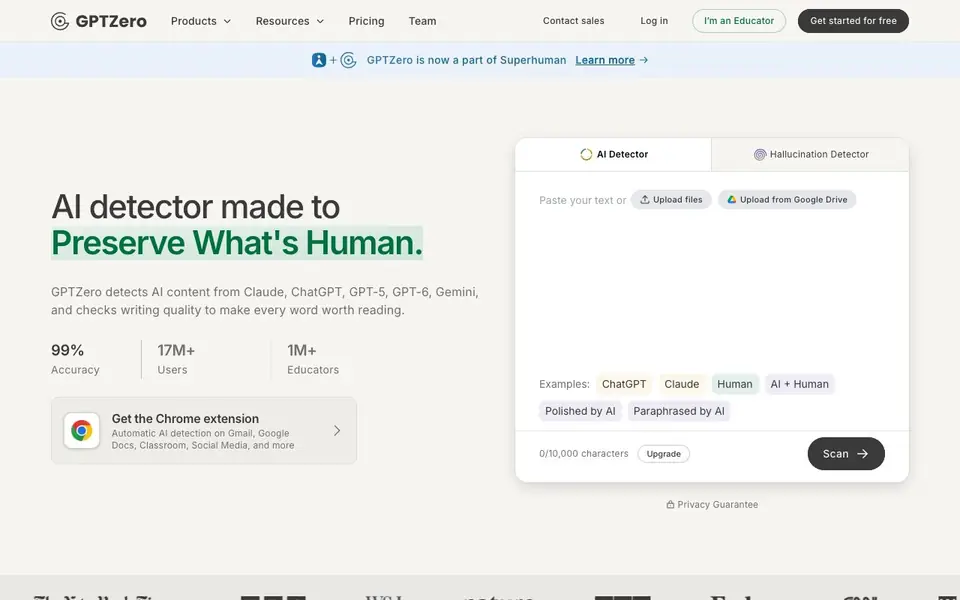
GPTZero is an AI detector that tells you whether text was written by a human or generated by tools like ChatGPT, Claude, Gemini, and others. It also checks writing quality and flags potential plagiarism. The tool is built for educators, students, and writers who want to verify authenticity in documents.
You start by pasting text or uploading files, or connecting Google Drive. The scan gives an overall AI score plus sentence-by-sentence breakdowns. An advanced scan offers deeper analysis, and a Chrome extension runs detection automatically in Gmail, Google Docs, and Classroom. You can also watch video replays of document writing to see copy-paste events and typing patterns.
GPTZero claims 99% accuracy and says it never flags humans as AI in its benchmarks. It integrates with Canvas and Google Classroom, and offers an API for custom workflows. The site mentions a free plan to get started, with paid upgrades for advanced features like plagiarism checks and writing feedback.
GPTZero features
- AI detection: Scans text from ChatGPT, Claude, Gemini, and other models to give an overall AI score.
- Sentence-level analysis: Shows which parts of your text are likely AI-generated, not just a single verdict.
- Writing Replay: Watches documents being written in Google Docs to verify human authorship visually.
- Plagiarism checker: Checks if content was copied from outside sources without proper attribution.
- Chrome extension: Runs automatic AI detection on Gmail, Google Docs, Classroom, and social media.
What you can do with GPTZero
- Verify student essays are human-written before grading.
- Check blog posts or articles for accidental AI-generated sections.
- Prove your own writing is authentic with video replay evidence.
- Scan documents for plagiarism before publishing or submitting.
How to get started with GPTZero
- Go to the GPTZero website and click to get started for free.
- Paste your text or upload a file, or connect Google Drive.
- Hit scan to see your AI score and sentence-level breakdown.
Tips for better results with GPTZero
- Paste your text directly into GPTZero and use the sentence-level breakdown to spot which parts look AI-generated, then revise those sections yourself.
- Upload a Google Doc to GPTZero and run the Writing Replay feature to see copy-paste events and typing patterns, which helps verify human authorship visually.
- Use GPTZero's Chrome extension to automatically scan text in Gmail or Google Docs, so you can check AI likelihood without leaving your workflow.
- For important documents, run an Advanced Scan in GPTZero to get a more precise verdict, especially when the standard scan gives a mixed result.
GPTZero pricing
GPTZero has a free way to start, with paid plans for heavier use. Check gptzero.me for current limits and prices.
What to check before you rely on GPTZero
- Check whether your plan includes the plagiarism checker and writing feedback, since the free plan may not cover these advanced features.
- Verify the accuracy claims against your own test samples, because GPTZero's 99% benchmark may not reflect performance on your specific text types.
- Confirm how GPTZero handles data privacy for uploaded documents, as the website does not clearly state retention or sharing policies.
Who GPTZero is for
GPTZero suits educators, students, writers and content managers. If that is not you, the AI content detectors below may fit better.
Similar tools compared with GPTZero
| Tool | What it is | Pricing |
|---|---|---|
| GPTZero | AI text and writing quality checker | Freemium |
| Originality.ai | Accurate AI detector and content checker | Freemium |
| Copyleaks | AI content and plagiarism detection platform | Freemium |
| Scite | AI research assistant with smart citations | Free trial |
| AI Image Detector | Free AI image detection tool | Free |
GPTZero FAQ
Is GPTZero free to use?
Yes, GPTZero offers a free plan to get started. The site also mentions paid upgrades for advanced features like plagiarism checks and writing feedback, so it follows a freemium model.
Which AI models can GPTZero detect?
GPTZero detects text from major AI models including ChatGPT, Claude, Gemini, Llama, and more. The site lists these as examples and says it scans top AI models.
How accurate is GPTZero?
GPTZero claims 99% accuracy and says independent benchmarking shows its Advanced Scan has best-in-class accuracy. It also states it flags zero humans as AI in its own tests.
Can I use GPTZero inside Google Docs or Classroom?
Yes, GPTZero offers a Chrome extension that works in Gmail, Google Docs, and Classroom. It also integrates with Canvas and Google Classroom for educators.
What file types can I upload to GPTZero for scanning?
GPTZero lets you upload files directly or connect Google Drive to scan documents. The website does not list specific file formats it accepts, so check the upload interface in the tool itself to see which file types are supported. For most users, pasting text is the simplest option.
Does GPTZero work on mobile devices or only on desktop?
GPTZero is primarily used through a web browser, so you can access it on any device with an internet connection, including phones and tablets. The Chrome extension is designed for desktop Chrome browsers. The website does not mention dedicated mobile apps, so you can check the site for any updates on app availability.
What does the GPTZero free plan include, and what requires payment?
GPTZero offers a free plan to get started, which lets you scan text and upload files. Paid upgrades unlock advanced features like plagiarism checks and writing feedback. The website does not specify exact limits for the free plan, so check the pricing page for current details on what each tier includes.


