

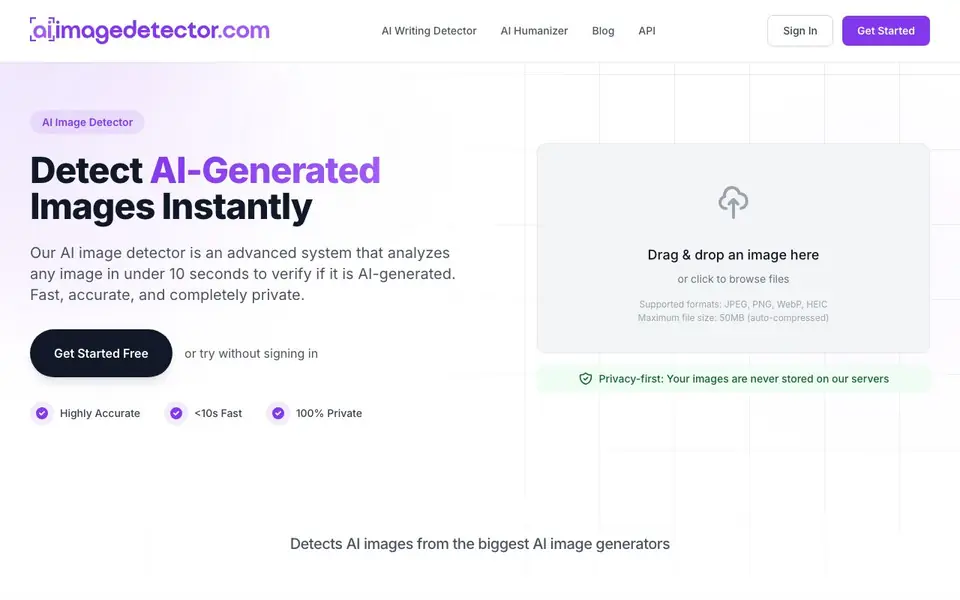
What is AI Image Detector?
AI Image Detector is a free online tool that checks whether an image was created by AI or by a human. It supports common formats like JPEG, PNG, WebP, and HEIC, and handles files up to 50MB by auto-compressing them. The tool is private: your images are never stored on its servers, and you can use it without signing up.
To use it, you drag and drop an image or click to browse files. The system analyzes the image using advanced AI models that look for subtle patterns and artifacts typical of AI generation. In under 10 seconds, you get a confidence score and a detailed explanation with visual indicators, showing whether the image is likely AI-generated, human-created, or mixed.
The tool detects images from major generators like Midjourney, DALL-E, Stable Diffusion, and Nano Banana. It's designed for journalists, educators, artists, and business professionals who need to verify authenticity. The website mentions a high accuracy rate and over 7,000 images analyzed, but does not specify exact accuracy percentages.
AI Image Detector features
- Fast results: Get a confidence score in under 10 seconds, often in under 2 seconds.
- Privacy-first: Your images are never stored on servers; analysis happens in real time.
- Multiple formats: Supports JPEG, PNG, WebP, and HEIC images up to 50MB.
- No registration needed: Start detecting immediately without signing up; sign up only to save history.
- Detailed reasoning: Receive visual indicators and a comprehensive explanation of the image's authenticity.
What you can do with AI Image Detector
- Verify news photos before publishing to avoid spreading fake propaganda.
- Check student submissions for AI-generated images in academic work.
- Scan for knockoffs of your original artwork to protect against copyright theft.
- Validate identity documents for signs of AI manipulation before signing.
How to get started with AI Image Detector
- Go to the website and click 'Get Started Free' or try without signing in.
- Drag and drop an image or click to browse files from your device.
- Wait for the analysis to complete and review the confidence score and explanation.
Tips for better results with AI Image Detector
- Use AI Image Detector on the original, unedited file whenever possible, since heavy compression or cropping can blur the subtle artifacts the tool looks for.
- For best results with AI Image Detector, test images from different generators like Midjourney or DALL-E separately to understand how the confidence score varies.
- Run a batch of similar images through AI Image Detector to spot patterns, but remember each upload takes up to 10 seconds, so plan your workflow accordingly.
- Combine AI Image Detector's score with your own visual inspection of details like hands and text, since the tool gives a probability, not absolute certainty.
AI Image Detector pricing
AI Image Detector is free to use according to its website.
What to check before you rely on AI Image Detector
- Check that your image is under 50MB and in JPEG, PNG, WebP, or HEIC format, since larger files are auto-compressed and may lose detection detail.
- Verify the accuracy rate on the website, which mentions high accuracy but does not state exact percentages, so treat results as indicative, not definitive.
- Confirm whether the free plan includes saving your detection history, since sign-up is only mentioned for that feature and limits are not specified.
Who AI Image Detector is for
AI Image Detector suits journalists, educators, artists and business professionals. If that is not you, the AI content detectors below may fit better.
Similar tools compared with AI Image Detector
| Tool | What it is | Pricing |
|---|---|---|
| AI Image Detector | Free AI image detection tool | Free |
| GPTZero | AI text and writing quality checker | Freemium |
| Originality.ai | Accurate AI detector and content checker | Freemium |
| Copyleaks | AI content and plagiarism detection platform | Freemium |
| Scite | AI research assistant with smart citations | Free trial |
AI Image Detector FAQ
Is AI Image Detector free to use?
Yes, the core detection features are completely free with no hidden costs. You can use it without signing up. Signing up is optional and only lets you save your detection history.
What image formats and sizes does it support?
It supports JPEG, PNG, WebP, and HEIC formats. The maximum file size is 50MB, and the tool auto-compresses larger files to handle them.
How does the tool determine if an image is AI-generated?
It uses advanced AI models to analyze the image for subtle patterns and artifacts that indicate AI generation. You get a confidence score from 0-100%, with 70-100% likely AI, 30-70% mixed, and 0-30% likely human.
Who is this tool intended for?
It's designed for journalists, educators, artists, and business professionals who need to verify image authenticity. It's also useful for anyone wanting to avoid AI-generated scams or deepfakes.
Can AI Image Detector analyze images from my phone or tablet?
AI Image Detector works in any web browser, so you can use it on a phone, tablet, or computer. The website does not mention dedicated mobile apps, but the drag-and-drop and file browser features should work on most devices. For the best experience, use a modern browser.
Does AI Image Detector store my images or require an account?
AI Image Detector is privacy-first: your images are never stored on its servers, and analysis happens in real time. You can use it without signing up. Signing up is only needed if you want to save your detection history. The website does not mention any data retention beyond that.
What can I export or do with the results from AI Image Detector?
AI Image Detector gives you a confidence score and a detailed explanation with visual indicators. The website does not mention exporting results or connecting to other apps. You can view the results on screen, but for saving or sharing, you would need to capture the output yourself.


