

What is SafeNew AI?
SafeWrite AI is a personalized AI humanizer. It builds a unique model for each user based on their writing style. This means rewritten text keeps your authentic voice instead of sounding generic. The tool is trained on millions of human writing samples.
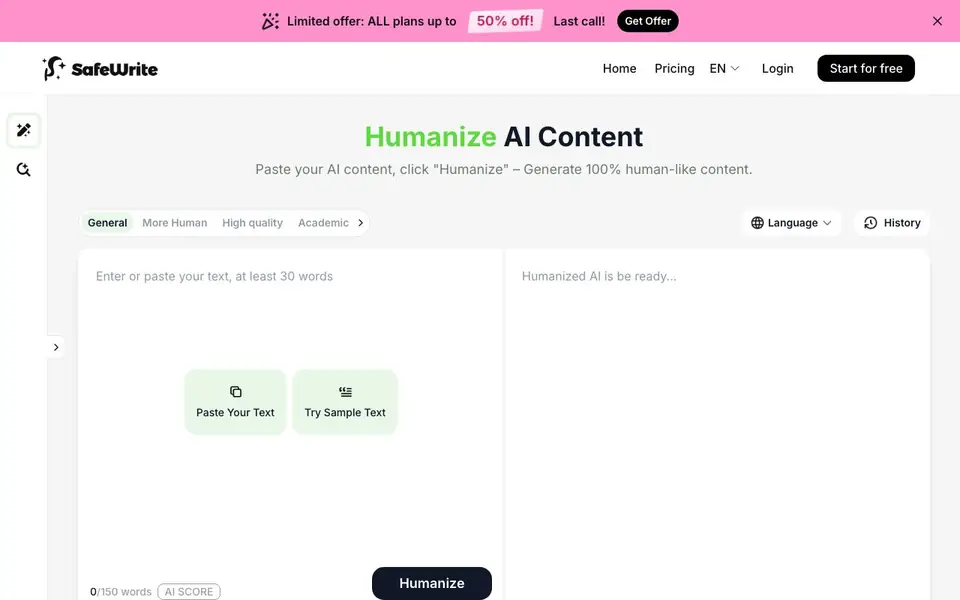
You paste your AI-generated text, choose a mode like General, More Human, or Academic, and click Humanize. SafeWrite rewrites the content to be more reader-friendly. It also fixes grammar, removes repetition, and improves overall quality. After rewriting, you can see quality scores from major verification systems.
The tool suits students, academics, SEO writers, content creators, and marketers. It helps make AI drafts sound like you wrote them personally. Over 300,000 users are mentioned. A free trial is available, and the site currently advertises up to 50% off all plans.
SafeNew AI features
- Private rewrite model: Your unique AI model learns exclusively from your writing style for authentic output.
- Human-like rewriting: Continuously rewrites AI text until it reads naturally and avoids robotic patterns.
- Quality enhancement: Fixes grammar, removes repetition, and improves overall readability while keeping meaning.
- Multiple modes: Choose General, More Human, High Quality, or Academic to match your content needs.
- Quality scores: Shows verification scores from major systems so you can check human-likeness.
What you can do with SafeNew AI
- Rewrite AI-generated essay drafts into natural academic writing for assignments.
- Transform AI-drafted articles into human-like content that ranks better in search engines.
- Humanize marketing copy for campaigns and social media to connect with readers.
- Polish AI research summaries into authentic prose for dissertations or papers.
How to get started with SafeNew AI
- Sign up for a free trial on SafeWrite's website.
- Paste your AI-generated text into the provided box.
- Pick a mode like General or Academic, then click Humanize to get rewritten content.
Tips for better results with SafeNew AI
- Paste a sample of your own writing into SafeWrite AI before humanizing so its private model learns your voice and produces output that sounds like you.
- Test each mode in SafeWrite AI, such as General, More Human, or Academic, on the same text to see which one best matches your intended tone and audience.
- Use SafeWrite AI on shorter sections first, like a paragraph, to check the rewritten quality and adjust your input before running longer documents.
- Review the quality scores SafeWrite AI shows from major verification systems after each rewrite, and re-run the tool if the score is not human-like enough.
SafeNew AI pricing
SafeNew AI offers a free trial before you pay. Check safewrite.ai for current plans.
What to check before you rely on SafeNew AI
- Check whether the free trial limits word count or number of rewrites per day, since the website does not state these limits explicitly.
- Verify if the 50% discount applies to all plans or only certain tiers, because the site does not list plan-specific pricing details.
- Confirm what happens to your uploaded text after rewriting, as the website does not clearly state its data retention or privacy policy for user content.
Who SafeNew AI is for
SafeNew AI suits students, academics, SEO writers and marketers. If that is not you, the AI content detectors below may fit better.
Similar tools compared with SafeNew AI
| Tool | What it is | Pricing |
|---|---|---|
| SafeNew AI | Personalized AI text humanizer | Free trial |
| GPTZero | AI text and writing quality checker | Freemium |
| Originality.ai | Accurate AI detector and content checker | Freemium |
| Copyleaks | AI content and plagiarism detection platform | Freemium |
| Scite | AI research assistant with smart citations | Free trial |
SafeNew AI FAQ
What does SafeWrite AI do?
It rewrites AI-generated text to sound more human-like. It creates a personal model based on your writing style, so the output keeps your authentic voice while improving readability and quality.
Is SafeWrite AI free?
A free trial is available. The website also advertises a limited offer with up to 50% off all plans, but specific pricing details are not stated on the homepage.
Who is SafeWrite AI for?
It is designed for students, academics, SEO writers, content creators, and marketing professionals who need AI content to sound authentic and human-like while maintaining their personal or brand voice.
Does SafeWrite AI check if content is human-like?
Yes, it shows quality scores from major verification systems after humanizing your text. This helps you confirm the content meets human readability standards across different platforms.
Can SafeWrite AI export my rewritten text to Word or Google Docs?
The SafeWrite AI website does not mention any direct export options to Word, Google Docs, or other platforms. After you humanize your text, you can copy the output manually and paste it into your preferred document editor. For specific integration details, check the site's feature list or contact support.
Does SafeWrite AI work on mobile devices or require a desktop app?
SafeWrite AI appears to be a web-based tool, as the website shows a browser interface with a text input area. There is no mention of a dedicated mobile app or desktop software. You can likely access it through any modern web browser on your phone, tablet, or computer. Check the site for any platform-specific notes.
What does the SafeWrite AI free trial include?
The SafeWrite AI website mentions a free trial and a 'Start for free' option, but it does not specify the exact word limit, number of uses, or duration of the trial. The pricing page likely details what the trial covers. For precise terms, visit the pricing section or start the trial to see the available features.


