

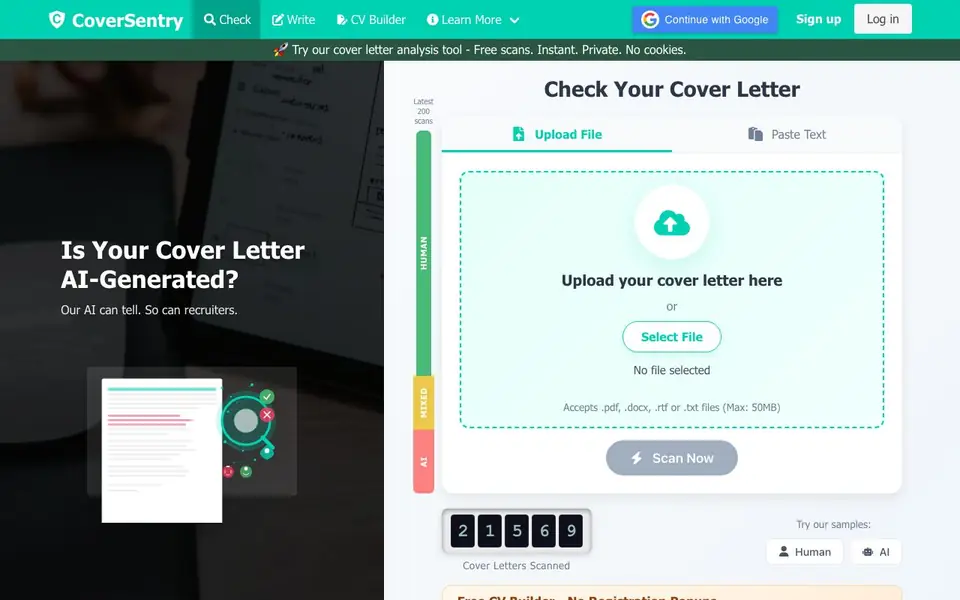
What is CoverSentry?
CoverSentry is a free online tool that checks whether a cover letter was written by a person or generated by AI. It uses a fine-tuned BERT model trained on thousands of cover letters to spot subtle patterns that separate human writing from machine text. You get a result labeled Human, Mixed, or AI, plus suggestions to improve your letter.
To use it, you upload a PDF, DOCX, RTF, or TXT file up to 50MB, or paste your text directly. The scan runs instantly and your data is not stored — letters are analyzed in memory and discarded right after. No signup is required for scans, and the site says it uses no cookies.
The tool also includes a free CV builder with templates for 1,200+ job titles, offering PDF and DOCX downloads without watermarks or registration popups. It suits job seekers who want to make sure their application materials look human-written and pass employer screening systems.
CoverSentry features
- Instant AI scan: Get immediate feedback on whether your cover letter looks human, mixed, or AI-generated.
- Privacy first: Your text is analyzed in memory and never stored or saved after processing.
- Multiple formats: Upload PDF, DOCX, RTF, or TXT files, or paste text directly into the analyzer.
- Improvement tips: Receive recommendations to revise your letter so it reads as human-written.
- Free CV builder: Create a resume with templates for 1,200+ job titles, with PDF and DOCX download.
What you can do with CoverSentry
- Check if your cover letter sounds AI-generated before sending it to employers.
- Revise an AI-written letter to make it pass as human-written for HR screening.
- Build a free ATS-friendly resume with ready-made bullet points for your job title.
- Compare human and AI sample letters to understand what detectors look for.
How to get started with CoverSentry
- Go to the CoverSentry website and click the Check Your Cover Letter button.
- Upload a PDF, DOCX, RTF, or TXT file, or paste your cover letter text into the box.
- Click Scan Now and review your Human, Mixed, or AI result along with improvement tips.
Tips for better results with CoverSentry
- Paste your text directly instead of uploading a file to avoid format conversion issues and get the most accurate scan from CoverSentry.
- Use CoverSentry's sample Human and AI letters first to calibrate your expectations before scanning your own cover letter.
- Revise your letter based on the improvement suggestions, then rescan it with CoverSentry to confirm it now reads as human-written.
- Combine CoverSentry's AI detection with its free CV builder to ensure both your cover letter and resume pass employer screening.
CoverSentry pricing
CoverSentry is free to use according to its website.
What to check before you rely on CoverSentry
- Check the website for details on accuracy rates, since it does not state specific performance metrics for CoverSentry's detection.
- Verify whether the free plan has any daily or total scan limits, as the site does not mention any caps.
- Confirm the supported languages for analysis, because the site does not list which languages CoverSentry can accurately detect.
Who CoverSentry is for
CoverSentry suits job seekers, career changers and students applying for jobs. If that is not you, the AI content detectors below may fit better.
Similar tools compared with CoverSentry
| Tool | What it is | Pricing |
|---|---|---|
| CoverSentry | AI detector for cover letters | Free |
| GPTZero | AI text and writing quality checker | Freemium |
| Originality.ai | Accurate AI detector and content checker | Freemium |
| Copyleaks | AI content and plagiarism detection platform | Freemium |
| Scite | AI research assistant with smart citations | Free trial |
CoverSentry FAQ
Is CoverSentry really free?
Yes, the website states scans are free with no signup required. It also mentions no cookies are used. There is no mention of any paid plan on the site.
How accurate is the AI detection?
The site says its system is trained on thousands of cover letters and uses a fine-tuned BERT model. It claims high accuracy but does not provide a specific accuracy percentage.
Can I check a cover letter I wrote with ChatGPT?
Yes, you can paste or upload the text. The tool will tell you if it appears human, mixed, or AI-generated, and give tips to make it more human-like.
What file formats can I upload?
You can upload PDF, DOCX, RTF, or TXT files up to 50MB. You can also paste text directly instead of uploading a file.
Does CoverSentry require creating an account or signing up to use the AI detection scan?
No, CoverSentry does not require an account or signup for its AI detection scans. You can upload a file or paste text directly and get results instantly. The website also mentions a free CV builder with no registration popups, so you can use both tools without creating an account.
What does CoverSentry do with my uploaded cover letter data after the scan?
CoverSentry states that your data is never stored. Cover letters are analyzed in memory and immediately discarded after processing. The website also says it uses no cookies, so your privacy is prioritized during the scan.
Can CoverSentry be used on mobile devices or does it require a specific operating system?
The CoverSentry website does not mention specific device or platform requirements. Since it is a web-based tool, you can likely access it from any device with a browser and internet connection. For the most accurate experience, check the site directly for any updates on compatibility.


