

What is OmniDetect?
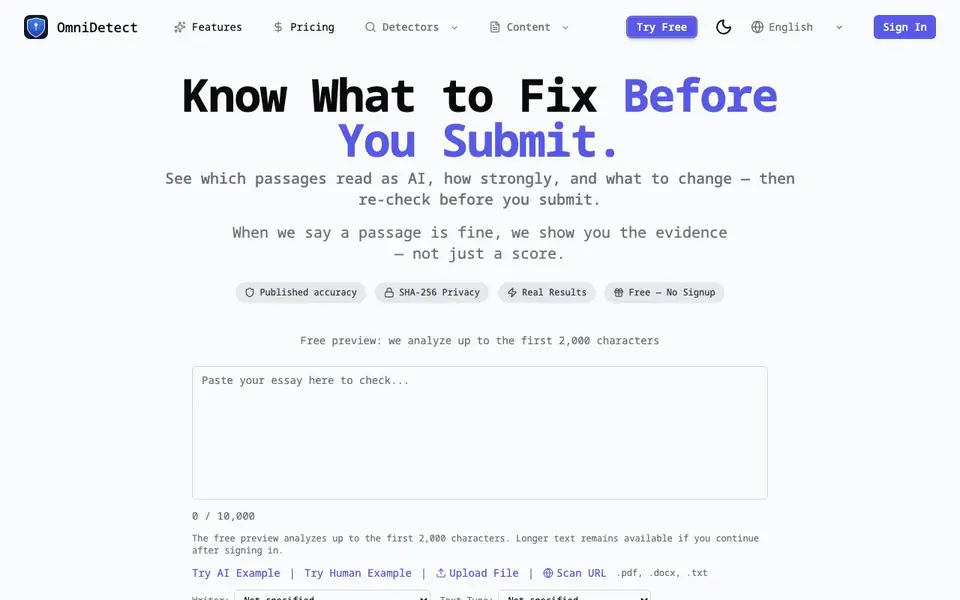
OmniDetect is an AI content detector that goes beyond a simple score. It shows you which specific passages in your text read as AI, how strongly they do so, and what you might change. The goal is to give you a transparent answer you can act on, not just a mysterious percentage.
You start by pasting up to 50,000 characters, uploading a file, or scanning a URL. OmniDetect reads the whole text, picks the detection engine based on your language using its own benchmarks, and returns a verdict along with the passages behind it. You can then review the evidence, understand the method and its limits, and if revision is supported, change only what needs attention and re-check the draft.
A free preview analyzes the first 2,000 characters without signup. A free account covers the whole document. The site publishes its measured accuracy, including misses, and keeps your documents in history until you delete them. It does not sell your text, and only the detection engines that analyze it see it.
OmniDetect features
- Passage-level analysis: See exactly which parts of your text read as AI and how strongly.
- Evidence-based verdicts: Review what the detector read and why it reached its conclusion.
- Published accuracy: The site shares its measured performance, including where it misses.
- Revision suggestions: Get focused rewrites for confidently flagged passages, which you review before applying.
- Privacy controls: Keep your documents in history, delete them anytime, and your text is not sold.
What you can do with OmniDetect
- Check an academic essay before submission to see which passages might read as AI.
- Scan blog or SEO content to identify sections that sound machine-written.
- Re-check a revised draft to confirm changes reduced AI detection flags.
- Analyze a document from a URL or file to review its AI likelihood.
How to get started with OmniDetect
- Paste your text, upload a file, or scan a URL on the OmniDetect site.
- Review the verdict, the flagged passages, and the method and limits shown.
- If revision is supported, apply the suggested changes and re-check the draft.
Tips for better results with OmniDetect
- Paste the full document into OmniDetect rather than relying on the free 2,000-character preview, since the preview only analyzes the opening and may miss flagged passages later in your text.
- Use OmniDetect's passage-level results to revise only the sections it confidently flags, then re-check the edited draft with the same word token balance to confirm the changes reduced AI detection.
- Set the writer and text type options in OmniDetect before scanning, as the tool adjusts its analysis based on your language and context, which can make the verdict and revision suggestions more accurate for your specific use case.
- Review the evidence OmniDetect shows for each flagged passage, including the method status and known limits, so you understand why it reached its conclusion before deciding whether to apply its suggested rewrites.
OmniDetect pricing
OmniDetect has a free way to start, with paid plans for heavier use. Check omnidetect.ai for current limits and prices.
What to check before you rely on OmniDetect
- Check whether the free account covers the whole document or only the preview, since the website says the free preview analyzes up to 2,000 characters but does not clearly state the full free account limits.
- Verify the pricing for paid plans beyond the freemium tier, as the website labels OmniDetect as freemium but does not list specific prices or what features require payment.
- Confirm the export formats for results, since the website mentions uploading.pdf,.docx, and.txt files but does not state whether you can download or export the analysis report in those or other formats.
Who OmniDetect is for
OmniDetect suits students, writers, content marketers and professionals submitting text. If that is not you, the AI content detectors below may fit better.
Similar tools compared with OmniDetect
| Tool | What it is | Pricing |
|---|---|---|
| OmniDetect | AI content detector with evidence | Freemium |
| GPTZero | AI text and writing quality checker | Freemium |
| Originality.ai | Accurate AI detector and content checker | Freemium |
| Copyleaks | AI content and plagiarism detection platform | Freemium |
| Scite | AI research assistant with smart citations | Free trial |
OmniDetect FAQ
Is this AI detector free?
Yes, there is a free preview that analyzes the first 2,000 characters without signup. A free account covers the whole document. The site also offers paid plans, but the free tier lets you try it before you pay.
Can it detect ChatGPT?
Yes, OmniDetect is designed to detect AI-written text, including content from models like ChatGPT. The site offers a dedicated 'Detect ChatGPT' tool and compares against other detectors.
How is my privacy protected?
Your text goes over HTTPS to the detection engine. OmniDetect keeps a copy in your history so you can find it again, and you can delete it anytime. The site states it does not sell your text.
How accurate is OmniDetect?
The site publishes its measured accuracy, including misses, so you can see real results. It also explains the method and known limits behind each verdict, rather than just giving a score.
What file formats can I upload to OmniDetect for scanning?
OmniDetect accepts.pdf,.docx, and.txt files for upload. You can also paste text directly or scan a URL. The free preview analyzes the first 2,000 characters of your document without requiring an account.
Does OmniDetect offer a free plan and what does it include?
Yes, OmniDetect has a freemium model. The free preview lets you analyze the first 2,000 characters without signing up. With a free account, you can analyze entire documents. The website does not specify limits for the free account beyond full-document coverage.
Can I use OmniDetect on my mobile device or does it require a desktop?
OmniDetect is a web-based tool, so you can access it from any device with a browser, including mobile phones and tablets. The website does not mention dedicated mobile apps, but the interface is accessible through standard web browsers.


