
What is Transor?
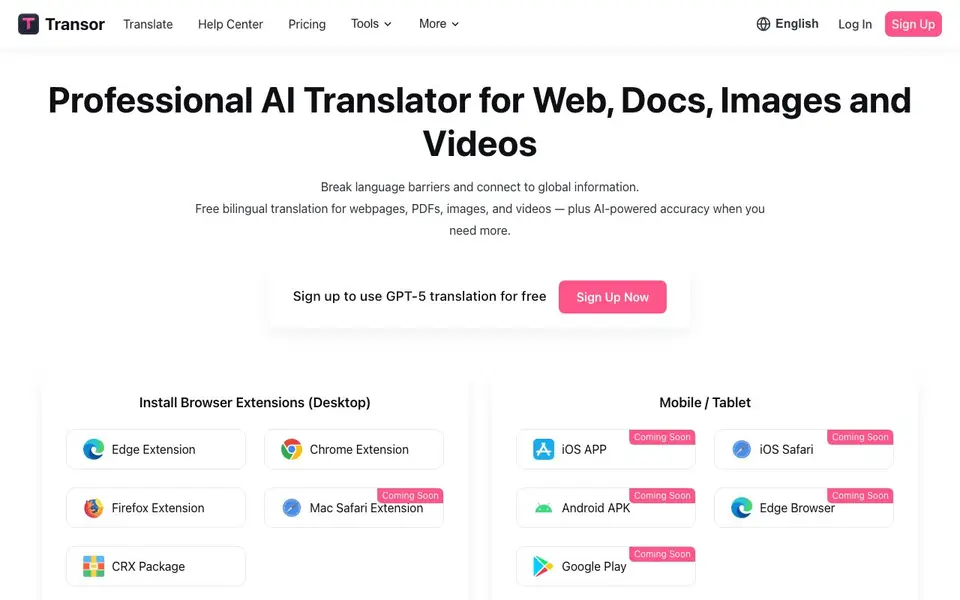
Transor is a free AI-powered translator that helps you read foreign content easily. It works on websites, YouTube and Netflix subtitles, PDF documents, and images. You can use it on the web, as a browser extension for Chrome, Edge, Firefox, or Safari, and on mobile and desktop platforms.
To get started, install the browser extension or sign up on the website. When you visit a webpage, Transor detects the main content and shows a bilingual translation. You can also right-click or hover over images to translate them, select any text for instant translation, and even translate what you type in input boxes by pressing Space three times.
The tool integrates with over 10 translation services, including OpenAI (ChatGPT), DeepSeek, and Google Gemini. This gives you flexible accuracy options. Transor is designed for anyone who wants to access global information, from students reading academic papers to professionals reviewing business contracts. The website mentions free bilingual translation for webpages, PDFs, images, and videos, with AI-powered accuracy available when you need more.
Transor features
- Web Page Translation: Automatically detects and translates the main content of web pages for low-intrusion bilingual reading.
- Bilingual Subtitles: Shows real-time bilingual captions on YouTube and Netflix to help you understand and learn.
- PDF Translation: Translates academic papers or business contracts into bilingual text with one click.
- Image Translation: Uses OCR and in-paint technology to blend translated text naturally into images on web pages.
- Text Selection Translation: Translates any selected text on a page and lets you save favorites with data export.
What you can do with Transor
- Read foreign news articles in your native language while viewing the original text.
- Watch YouTube videos with bilingual subtitles to improve your language skills.
- Translate a PDF contract or research paper into bilingual format for easy review.
- Translate text in web input boxes for searching or writing without leaving the page.
How to get started with Transor
- Sign up for a free account on the Transor website.
- Install the browser extension for Chrome, Edge, Firefox, or Safari.
- Open a webpage, PDF, or video and use the translation features like right-click or hover.
Tips for better results with Transor
- Install the Transor browser extension on Chrome or Edge first, then visit foreign pages to see bilingual translations appear automatically on the main content area.
- Use Transor's text selection translation on any paragraph you find unclear, and save important snippets to favorites for later export and review.
- For PDFs, upload academic papers or contracts directly into Transor to get one-click bilingual versions, which helps you compare technical terms side by side.
- When watching YouTube or Netflix, enable Transor's bilingual subtitles to follow the original audio while reading translations, which improves both comprehension and language learning.
Transor pricing
Transor has a free way to start, with paid plans for heavier use. Check transor.ai for current limits and prices.
What to check before you rely on Transor
- Check the Transor pricing page for current free limits on translation volume or features, since the website mentions freemium but does not specify exact caps.
- Verify which of the 10+ translation services are available on the free plan, as the site lists options like ChatGPT and Gemini but does not state per-service costs.
- Confirm that your target language is supported for input box translation, since the default is English and customization options are not detailed on the website.
Who Transor is for
Transor suits students, professionals, language learners and researchers. If that is not you, the AI translation tools below may fit better.
Similar tools compared with Transor
| Tool | What it is | Pricing |
|---|---|---|
| Transor | AI translator for web, docs, images, videos | Freemium |
| DeepL | AI translation platform for text, voice, and documents | Freemium |
| Wordtune | AI writing and paraphrasing assistant | Freemium |
| AI Manga Translator | AI manga and comic translator | Freemium |
| AI Manga Translator | AI manga and comic image translator | Freemium |
Transor FAQ
Is Transor free to use?
Yes, Transor offers free bilingual translation for webpages, PDFs, images, and videos. You can also sign up to use GPT-5 translation for free, which suggests a freemium model with optional paid AI services.
What platforms does Transor support?
Transor is available on the web, as browser extensions for Chrome, Edge, Firefox, and Safari, and on mobile and desktop. The website mentions iOS and Android apps as coming soon, with some platforms like iOS Safari and Google Play not yet available.
Can Transor translate videos and subtitles?
Yes, Transor supports real-time bilingual subtitles on major video platforms like YouTube and Netflix. It shows original audio with bilingual captions to help you understand content while improving language skills.
How does Transor handle image translation?
Transor can translate images on web pages via right-click or hover. It uses advanced OCR and in-paint technologies to blend translated text naturally into the original design for a smooth reading experience.
Can Transor export the translations or data I save?
Yes, Transor lets you save translated text to favorites and supports data export. The website mentions this feature for text selection translation. You can check the Help Center or Documentation Center for details on how to export your saved data.
Does Transor require an account to use it?
To get started with Transor, you need to install the browser extension or sign up on the website. The website does not specify whether you can use the extension without an account, but signing up is required for the free GPT-5 translation offer. Check the sign-up page for more details.
What translation services does Transor connect to?
Transor integrates with over 10 translation services, including OpenAI (ChatGPT), DeepSeek, and Google Gemini. This gives you flexible accuracy options. The website lists these as supported services, so you can choose the one that fits your needs.


