

What is ImageTranslate.AI?
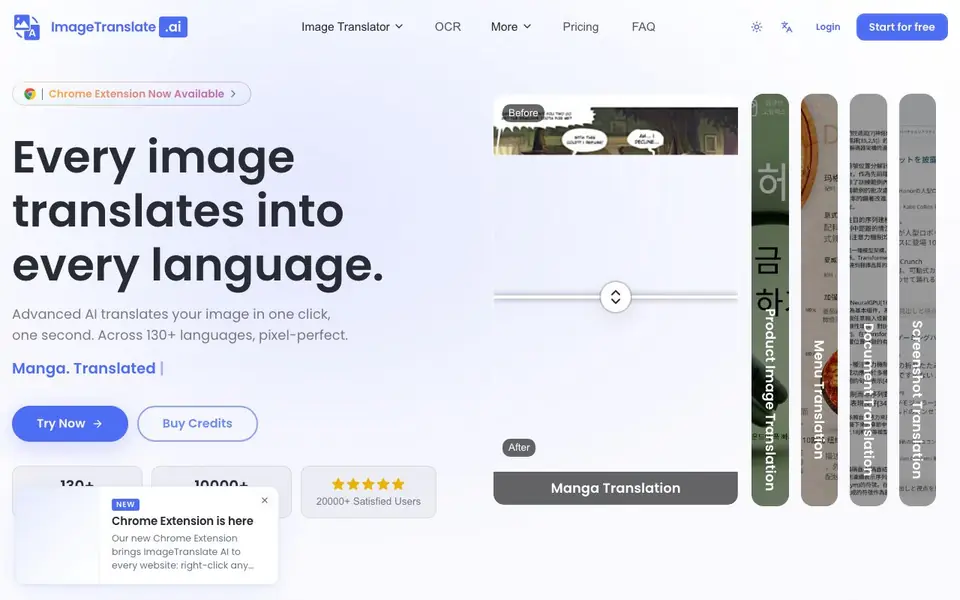
ImageTranslate.AI is an AI-powered image translator that reads text from images and translates it into over 130 languages. It works on comics, manga, product images, menus, documents, and screenshots. The tool preserves the original layout and art style, so translated images look natural and professional.
You start by uploading an image in JPG, JPEG, PNG, or WebP format. The AI detects the text, translates it, and replaces it in place—all in about one second. You can also load a saved project for continued work. A Chrome extension is available for translating images directly in your browser.
It suits e-commerce sellers, marketers, document teams, and manga readers. The website mentions batch processing and high-volume use, but does not state specific limits. Pricing is freemium: you can start for free and buy credits for more translations.
ImageTranslate.AI features
- 130+ languages: Translate image text into a wide range of global languages.
- Layout preservation: Keep the original design and text placement intact after translation.
- OCR accuracy: Reliable text detection from images, even in complex layouts.
- Batch processing: Translate multiple images at once for high-volume workflows.
- Chrome extension: Translate images directly from your browser without extra steps.
What you can do with ImageTranslate.AI
- Translate manga and comics while preserving speech bubbles and art.
- Localize product images for international e-commerce listings.
- Convert menus and documents into multiple languages for global customers.
- Translate screenshots for tutorials or support materials.
How to get started with ImageTranslate.AI
- Go to ImageTranslate.AI and click 'Start for free'.
- Drag and drop your image or choose a file from your device.
- Select your target language and let the AI translate it instantly.
Tips for better results with ImageTranslate.AI
- Upload high-resolution JPG, JPEG, PNG, or WebP images to improve OCR accuracy, especially for complex layouts like manga or dense documents.
- Use ImageTranslate.AI for batch processing to handle multiple images at once, saving time on high-volume e-commerce or documentation workflows.
- Load a saved project to continue editing translated images, ensuring consistent style and layout across your localization efforts.
- Try the Chrome extension for quick in-browser translations, but verify the output on original images to catch any layout shifts before publishing.
ImageTranslate.AI pricing
ImageTranslate.AI has a free way to start, with paid plans for heavier use. Check imagetranslate.ai for current limits and prices.
What to check before you rely on ImageTranslate.AI
- Confirm the free tier's translation limits before starting, as the website does not state specific credit amounts or batch size caps.
- Check if your images contain sensitive text, since the site does not detail data retention or privacy policies for uploaded files.
- Verify that the output format matches your needs, as the website lists input types but not export options like PNG or PDF.
Who ImageTranslate.AI is for
ImageTranslate.AI suits e-commerce sellers, marketers, document teams and manga readers. If that is not you, the AI translation tools below may fit better.
Similar tools compared with ImageTranslate.AI
| Tool | What it is | Pricing |
|---|---|---|
| ImageTranslate.AI | AI image translator for 130+ languages | Freemium |
| DeepL | AI translation platform for text, voice, and documents | Freemium |
| Wordtune | AI writing and paraphrasing assistant | Freemium |
| AI Manga Translator | AI manga and comic translator | Freemium |
| AI Manga Translator | AI manga and comic image translator | Freemium |
ImageTranslate.AI FAQ
What image formats are supported?
The website states that JPG, JPEG, PNG, and WebP files are supported. You can upload any of these formats directly to the tool.
Is there a free plan?
Yes, you can start for free. The site also offers credit purchases for more translations, so it follows a freemium model.
Can I translate manga and comics?
Yes, the tool is designed for comics and manga. It preserves the original art style and layout while translating speech bubbles and text boxes.
Does it work in a browser?
Yes, there is a Chrome extension available. You can use it to translate images directly in your browser without leaving the page.
Can ImageTranslate.AI export translated images in the same file format as the original?
ImageTranslate.AI accepts JPG, JPEG, PNG, and WebP files for upload. The website does not specify the output format for translated images. To confirm what formats you can download after translation, check the tool's documentation or contact support.
Does ImageTranslate.AI require creating an account to use the free plan?
The website shows a 'Start for free' button and a freemium pricing model, but it does not explicitly state whether an account is required to start. You can likely begin using ImageTranslate.AI by clicking 'Start for free' and following the sign-up process on the site.
How does ImageTranslate.AI handle my uploaded images and data privacy?
The website mentions that by uploading, you confirm you have the right to use the image and refers to its Terms. It does not provide specific details on data handling or privacy. For information about how ImageTranslate.AI stores or processes your images, review the Terms and Privacy Policy on the site.


