

What is AI Subtitle Translator?
AI Subtitle Translator is a web-based tool that translates subtitle files into over 50 languages. You upload files in formats like SRT, VTT, ASS, or LRC, and the AI handles the translation with context awareness. It is built for content creators who want to reach global audiences without manual subtitle work.
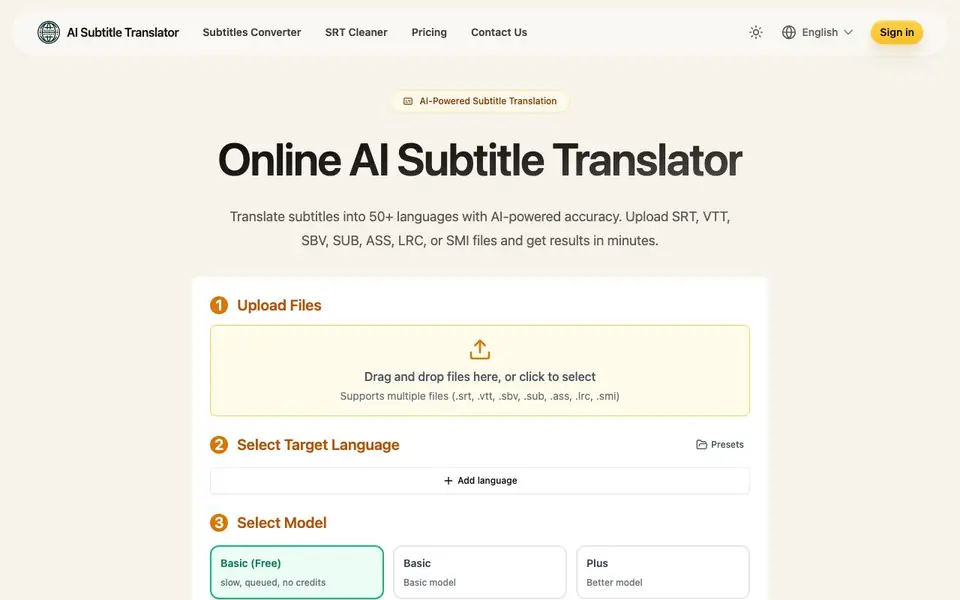
You start by dragging and dropping one or more subtitle files. Then you pick a target language or add several languages. You can choose between a Basic (free) model or a Plus model for better quality. After translation, you download the files ready to use in your videos. You can translate one file into up to 10 languages at once, or multiple files into one language.
The tool supports batch processing and smart queue management for efficient workflows. Pricing starts with a free Basic model, but it is slow and queued. Paid plans include a one-time credits pack and monthly subscriptions. The website does not state a word limit for translations, so check its FAQ for details.
AI Subtitle Translator features
- Multi-language support: Translate subtitles into 50+ languages including English, Spanish, French, German, Chinese, Japanese, and Korean.
- Format compatibility: Works with SRT, VTT, SBV, SUB, ASS, LRC, and SMI files without manual conversion.
- Batch processing: Upload multiple files and translate them into several languages at once with smart queue management.
- Model choice: Pick between a free Basic model or a Plus model for better translation quality.
- Flexible pricing: Choose a one-time credits pack or monthly subscriptions with auto-renewal options.
What you can do with AI Subtitle Translator
- Translate SRT files for YouTube videos to reach international viewers.
- Convert VTT subtitles for online courses into multiple languages.
- Batch translate ASS subtitle files for a series of episodes.
- Translate LRC lyrics files for music videos into different languages.
How to get started with AI Subtitle Translator
- Upload your subtitle file by dragging and dropping it or clicking to select.
- Choose your target language or add multiple languages from the presets.
- Select a model, optionally adjust translation config, then click Translate and download the results.
Tips for better results with AI Subtitle Translator
- Start with the free Basic model on a single file to test translation quality before spending credits on the Plus model.
- Translate one file into up to 10 languages at once to save time, but verify each output separately for accuracy.
- Use batch processing for multiple files into one language, and check the queue status to manage long jobs efficiently.
- For AI Subtitle Translator, upload files in SRT or VTT format first, since these are the most common and least likely to cause parsing errors.
AI Subtitle Translator pricing
AI Subtitle Translator has a free way to start, with paid plans for heavier use. Check aisubtitletranslator.com for current limits and prices.
What to check before you rely on AI Subtitle Translator
- Check the FAQ for the word limit per translation, since the website does not state one anywhere on the pricing or feature pages.
- Confirm whether the free Basic model includes any file size or duration caps, as the site only says it is slow and queued.
- Verify how long your uploaded and translated files are saved; the paid plans mention 7 days, but free usage may differ.
Who AI Subtitle Translator is for
AI Subtitle Translator suits content creators, video editors, educators and localization teams. If that is not you, the AI translation tools below may fit better.
Similar tools compared with AI Subtitle Translator
| Tool | What it is | Pricing |
|---|---|---|
| AI Subtitle Translator | AI subtitle translator for video files | Freemium |
| DeepL | AI translation platform for text, voice, and documents | Freemium |
| Wordtune | AI writing and paraphrasing assistant | Freemium |
| AI Manga Translator | AI manga and comic translator | Freemium |
| AI Manga Translator | AI manga and comic image translator | Freemium |
AI Subtitle Translator FAQ
Is AI Subtitle Translator free to use?
Yes, there is a free Basic model. It is slow and queued with no credits. For faster or higher-quality translations, you can buy a credits pack or subscribe to a monthly plan.
Which subtitle formats are supported?
The tool supports SRT, VTT, SBV, SUB, ASS, LRC, and SMI files. You can upload multiple files at once, and the translated files will be in the same format.
How many languages can I translate into?
You can translate subtitles into over 50 languages, including English, Spanish, French, German, Chinese, Japanese, and Korean. One file can be translated into up to 10 languages at once.
How long are my files saved?
The website states that files are saved for 7 days on paid plans. It does not specify how long free users' files are kept, so check the pricing or FAQ for more details.
Does AI Subtitle Translator require me to create an account or sign in?
The AI Subtitle Translator website shows a Sign in option, but it does not state whether an account is required to use the tool. To find out if you can translate without signing in, check the website's FAQ or contact support.
Can AI Subtitle Translator export translated subtitles in the same format as the original file?
The AI Subtitle Translator website does not specify the output format for translated subtitles. It says you can download translated subtitles ready for use in videos, but it does not list the exact formats. Check the website's FAQ for details on output formats.
Does AI Subtitle Translator work on mobile devices or only on desktop?
AI Subtitle Translator is a web-based tool, so it likely works in any browser on mobile or desktop. However, the website does not explicitly mention mobile support. For confirmation, you can try accessing the site from your mobile browser or check the website's FAQ.


