

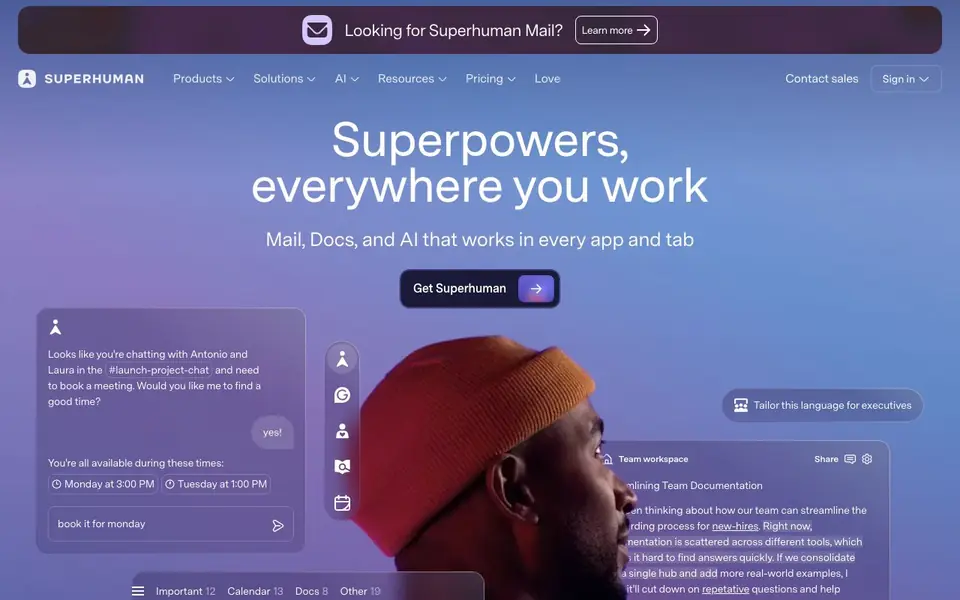
What is Superhuman?
Superhuman is an AI productivity suite that combines Mail, Docs, and a proactive AI assistant called Go. It aims to give you superpowers everywhere you work, helping you be more creative, strategic, and impactful. The suite includes Superhuman Mail, a fast email app, Grammarly for writing assistance, and Docs for team collaboration.
With Superhuman, you can fly through your inbox twice as fast, never drop the ball on follow-ups, and save time every week. The AI assistant, Go, works across your apps—like Gmail, Drive, and Jira—to offer help without you asking. For example, it can schedule meetings from a chat conversation or tailor language for executives. You can also build workflows in Docs and connect to 800+ tools instantly.
Superhuman is designed for professionals and teams who want to work faster and more efficiently. The website mentions it's trusted by innovative companies, but it doesn't specify pricing details. You can sign in or contact sales to learn more about getting the suite.
Superhuman features
- Fast email: Fly through your inbox twice as fast and save 4 hours every week.
- AI writing: Write with AI that sounds like you and adapts to your tone.
- Proactive assistant: Go offers help across apps without you having to ask.
- Meeting scheduling: Schedule meetings directly from conversations in any app.
- Team docs: Build projects, knowledge, and workflows in AI-native team hubs.
What you can do with Superhuman
- Manage your inbox faster with AI-powered email triage.
- Schedule meetings without leaving your chat conversation.
- Collaborate with your team in AI-native docs and workflows.
- Write clear, credible messages with Grammarly's assistance.
How to get started with Superhuman
- Visit superhuman.com and sign in or contact sales to get started.
- Connect your favorite apps like Gmail, Drive, and Jira.
- Use Go to get proactive help, schedule meetings, and write with AI.
Tips for better results with Superhuman
- Use Superhuman's Go assistant proactively by letting it monitor your chats and apps, then approve its suggested actions like scheduling meetings or drafting replies to save time.
- Train Superhuman's writing AI by editing its drafts to match your tone, so it learns your style and produces messages that sound like you in future tasks.
- Connect Superhuman to your core tools like Gmail, Drive, and Jira first, then build workflows in Docs to automate repetitive tasks across those connected apps.
- When using Superhuman Mail, rely on its follow-up reminders and AI triage to prioritize important messages, and set aside time weekly to clear your inbox efficiently.
Superhuman pricing
Superhuman’s homepage does not list prices. Check superhuman.com for current plans.
What to check before you rely on Superhuman
- Check whether Superhuman's pricing fits your budget, as the website does not list any plan costs and directs you to contact sales for details.
- Verify if Superhuman supports the specific apps and platforms you use daily, since the site highlights Gmail, Drive, and Jira but does not list all integrations.
- Review Superhuman's data privacy and security policies before using it with sensitive work emails, as the website does not clearly state how your data is handled.
Who Superhuman is for
Superhuman suits professionals, teams, executives and knowledge workers. If that is not you, the AI productivity tools below may fit better.
Similar tools compared with Superhuman
| Tool | What it is | Pricing |
|---|---|---|
| Superhuman | AI productivity suite for mail, docs, and more | See website |
| Mem | AI chief of staff and workspace | See website |
| Reclaim | AI calendar for work and life | Freemium |
| Otter.ai | AI meeting notetaker and transcription tool | Freemium |
| Motion | AI-powered productivity and project platform | Free trial |
Superhuman FAQ
What is Superhuman?
Superhuman is an AI productivity suite that includes Mail, Docs, and an AI assistant called Go. It helps you work faster across your apps, with features like fast email, AI writing, and meeting scheduling.
Is Superhuman free?
The website doesn't state whether Superhuman is free or paid. It has a 'Pricing' link and a 'Contact sales' option, so you'll need to check those pages or reach out for pricing details.
Who is Superhuman for?
Superhuman is for professionals and teams who want to be more productive. The site mentions it's trusted by innovative companies and shows examples of executives and team members using it.
What apps does Superhuman work with?
Superhuman connects to Gmail, Drive, Jira, and 800+ other tools. It also works with Claude, ChatGPT, Cursor, and more, so you can use it across your favorite apps.
What platforms or devices can I use Superhuman on?
Superhuman is a productivity suite that works in your browser and across apps you already use, like Gmail, Drive, and Jira. The website doesn't list specific operating systems or mobile devices, so check the sign-in or contact sales page for the most current platform availability.
Does Superhuman offer a free plan or trial?
The Superhuman website does not mention any free plan or trial. It directs you to sign in or contact sales for pricing details. To find out if a free option exists, you'll need to reach out to their sales team or check the pricing page directly.
Can Superhuman export my data or integrate with other tools?
Superhuman connects to 800+ tools instantly, including Gmail, Drive, and Jira, and works with Claude, ChatGPT, and Cursor. The website doesn't specify export options for your data. For details on exporting, check the support or contact sales for more information.


