

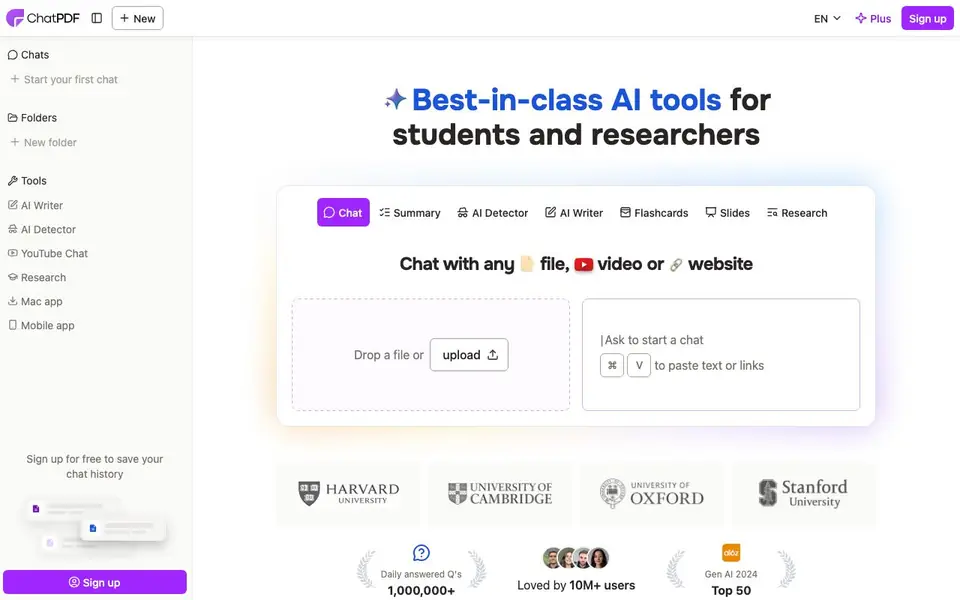
What is ChatPDF?
ChatPDF lets you talk to your PDFs like you would with ChatGPT. You upload a file, ask questions, and get clear answers with citations pointing back to the original text. It works for research papers, legal contracts, manuals, and more, in any language.
Getting started is simple. Drop a file onto the page or paste text or a link, then start asking. You can summarize a whole document, compare multiple PDFs in one conversation, or translate content into your language. A side-by-side view keeps the chat and PDF open together so you can verify answers easily.
It suits students, researchers, and professionals who need to understand documents fast. The free plan lets you analyze two documents daily without an account. Signing up adds saved history and multi-file chats. ChatPDF Plus offers unlimited document analysis for heavier use.
ChatPDF features
- Cited answers: Responses link back to the exact PDF pages so you can verify sources quickly.
- Multi-file chats: Bring several PDFs into one conversation to compare or study them together.
- Summarization: Get key insights from long papers or reports without reading everything.
- Translation: Turn PDFs from any language into readable text you can understand.
- Side-by-side view: Keep the chat and PDF open together to explore answers in context.
What you can do with ChatPDF
- Summarize a research paper to extract its main findings.
- Study for exams by asking questions about your textbook.
- Compare multiple contracts to spot differences in terms.
- Translate a foreign-language manual into your own language.
How to get started with ChatPDF
- Go to the ChatPDF website and drop your PDF file onto the upload area.
- Wait for the AI to process the document, then type your first question.
- Read the cited answers and explore the PDF side-by-side to verify details.
Tips for better results with ChatPDF
- Upload a clean, text-based PDF rather than a scanned image to get more accurate answers and citations from ChatPDF.
- Ask specific questions that reference page numbers or sections, and ChatPDF will return answers tied directly to those parts.
- Use ChatPDF's multi-file chat to compare two contracts or papers side by side, and ask it to list differences between them.
- Paste a link or raw text into ChatPDF when you have a web article or snippet, so you can summarize it without downloading a file.
ChatPDF pricing
ChatPDF has a free way to start, with paid plans for heavier use. Check chatpdf.com for current limits and prices.
What to check before you rely on ChatPDF
- Check the free plan's daily limit of two documents; the website does not state what happens if you exceed it without an account.
- Verify whether your PDF contains sensitive data, since ChatPDF's privacy policy is not detailed on the main page.
- Confirm that your PDF is not image-only, as the website does not specify how well ChatPDF handles scanned or OCR documents.
Who ChatPDF is for
ChatPDF suits students, researchers and professionals. If that is not you, the AI research tools below may fit better.
Similar tools compared with ChatPDF
| Tool | What it is | Pricing |
|---|---|---|
| ChatPDF | AI chat and summarizer for PDFs | Freemium |
| OpenSI | AI model comparison and pricing tool | See website |
| Consensus | AI search engine for research papers | See website |
| Scite | AI research assistant with smart citations | Free trial |
| SciSpace | AI research assistant for academic work | Freemium |
ChatPDF FAQ
What is ChatPDF and how can it help me?
ChatPDF lets you chat with your PDFs as if you were using ChatGPT. You can summarize documents, ask questions, and get answers with citations. It is designed for studying, researching, or analyzing documents in seconds.
Is ChatPDF free?
Yes, ChatPDF offers a free plan that lets you analyze 2 documents every day. For unlimited document analysis and more advanced features, there is a paid ChatPDF Plus plan.
Do I need to create an account to use ChatPDF?
No, you can start using ChatPDF without an account. Creating a free account unlocks extra features like saved chat history and multi-document chats, but the core functionality works right away.
Does ChatPDF support file types other than PDFs?
Yes, ChatPDF supports PDF, Word (.doc,.docx), PowerPoint (.ppt,.pptx), Markdown (.md), and Text (.txt) files. This covers academic papers, corporate presentations, and legal documents.
Can ChatPDF export my chat history or summaries to a file?
ChatPDF's website does not mention exporting chat history or summaries to files. You can save your chat history by signing up for a free account, but the site does not specify export options. For details on exporting, check the app's settings or help section after you log in.
Does ChatPDF have a mobile app or desktop app for Mac?
ChatPDF's website mentions a Mac app and a mobile app in its navigation menu, so those appear to be available. The site does not list specific platforms like Windows or Android, but you can check the app store links or the website's download section to see what is offered.
What does the ChatPDF free plan include besides two documents daily?
The ChatPDF free plan lets you analyze two documents daily without an account. If you sign up for free, you also get saved chat history and the ability to use multi-file chats. The site does not list other limitations, so check the pricing page for the most current details.


