

What is Perplexity?
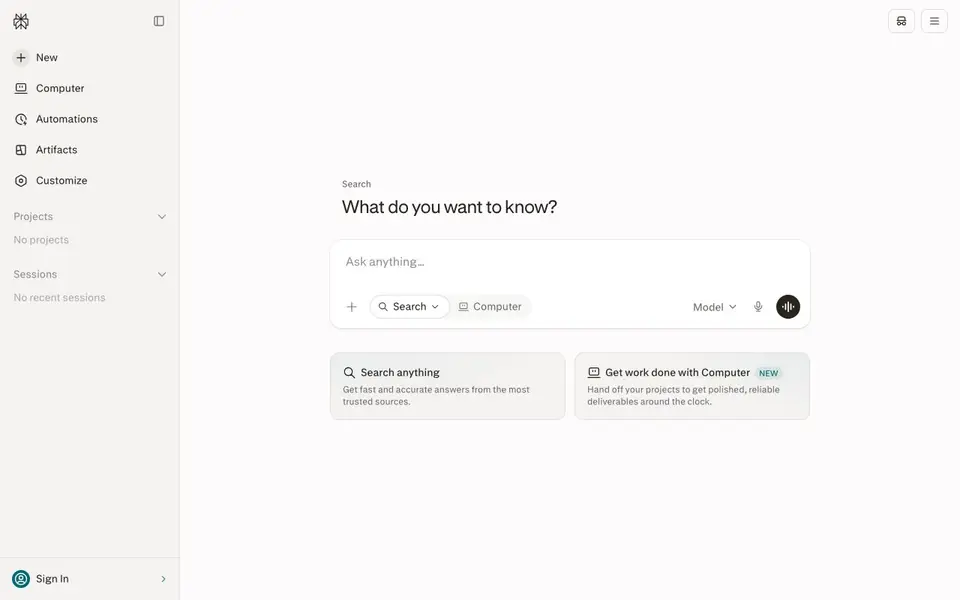
Perplexity is a free AI-powered answer engine that gives you direct, real-time answers to any question. Instead of just showing links, it pulls information from trusted sources and summarizes it for you, with citations so you can verify. It is designed for quick, reliable research without digging through search results.
You start by typing a question in the search box. Perplexity scans the web, picks relevant sources, and composes a clear answer. You can also work in a project to organize your research, use automations to hand off tasks, and view artifacts for polished deliverables. The Computer feature lets you delegate projects that run around the clock.
This tool suits anyone who needs fast answers for work, study, or personal curiosity. It is especially helpful for researchers, students, and professionals who want cited facts. The site mentions a free plan, but it does not detail limits or premium options, so check the website for current details.
Perplexity features
- Real-time answers: Get up-to-date responses drawn from the latest web information.
- Trusted sources: Answers include citations so you can verify where facts come from.
- Projects: Organize your searches and related work into dedicated spaces.
- Automations: Set up tasks that run automatically to save you time.
- Computer: Hand off projects to get polished deliverables around the clock.
What you can do with Perplexity
- Research a topic quickly for a report or presentation.
- Verify a fact or claim before sharing it with others.
- Gather cited sources for an academic paper or article.
- Delegate a research project to get a completed deliverable.
How to get started with Perplexity
- Go to Perplexity's website and type your question in the search box.
- Review the answer and check the cited sources for accuracy.
- Create a project or use automations to organize or delegate further work.
Tips for better results with Perplexity
- Ask follow-up questions in the same session to refine your answer, since Perplexity uses context from your previous queries to improve accuracy.
- Use Perplexity's citation links to verify each fact yourself, especially for time-sensitive or controversial topics where sources may conflict.
- Create a project in Perplexity to organize related searches and keep your research threads together, making it easier to review and reuse later.
- For complex tasks, try Perplexity's Computer feature to delegate a full project and receive a polished deliverable, but review the output for errors before using it.
Perplexity pricing
Perplexity is free to use according to its website.
What to check before you rely on Perplexity
- Check whether the free plan has daily or monthly query limits, since the website does not state any usage caps or premium tiers.
- Verify that the sources cited by Perplexity are from reputable domains and that the information is current, as real-time answers can still include outdated data.
- Confirm that your data and search history are handled per your privacy expectations, because the website does not clearly explain data retention or sharing policies.
Who Perplexity is for
Perplexity suits students, researchers, professionals and curious learners. If that is not you, the AI search engines below may fit better.
Similar tools compared with Perplexity
| Tool | What it is | Pricing |
|---|---|---|
| Perplexity | AI answer engine with real-time search | Free |
| You.com | AI-ready web search and answer APIs | Freemium |
| Felo | Multilingual AI search and creation platform | Freemium |
| Consensus | AI search engine for research papers | See website |
| Genspark | All-in-one AI workspace | Freemium |
Perplexity FAQ
Is Perplexity free to use?
Yes, Perplexity is described as a free AI-powered answer engine on its website. It does not mention paid plans or limits, so check the site for any premium features or usage caps.
How does Perplexity get its answers?
It searches the web in real time and pulls information from trusted sources. It then composes a direct answer with citations, so you can see where each fact comes from.
Can I use Perplexity for work projects?
Yes. The site highlights a Computer feature that lets you hand off projects to get polished, reliable deliverables around the clock. You can also use projects and automations to organize tasks.
What can I ask Perplexity?
You can ask anything—from simple factual questions to complex research topics. It is designed to give fast, accurate answers on any subject, drawing from current web sources.
Can Perplexity export or connect to other tools like Google Docs or Notion?
Perplexity's website does not mention exporting answers or connecting to external apps like Google Docs or Notion. You can copy text from answers manually. For current integration details, check the Perplexity website or its help pages.
Does Perplexity work on mobile devices or only in a web browser?
Perplexity is accessible through its website, so you can use it on any device with a web browser, including phones and tablets. The website does not mention a dedicated mobile app, so check the site for any app availability.
What does the free plan of Perplexity include, and are there limits?
Perplexity is labeled as free, and the website mentions a free plan but does not detail specific limits or premium options. You can ask questions, use projects, automations, and the Computer feature, but for exact usage caps, check the Perplexity website.


