

What is SoVideo - All-in-one ai image/video generator platfor...?
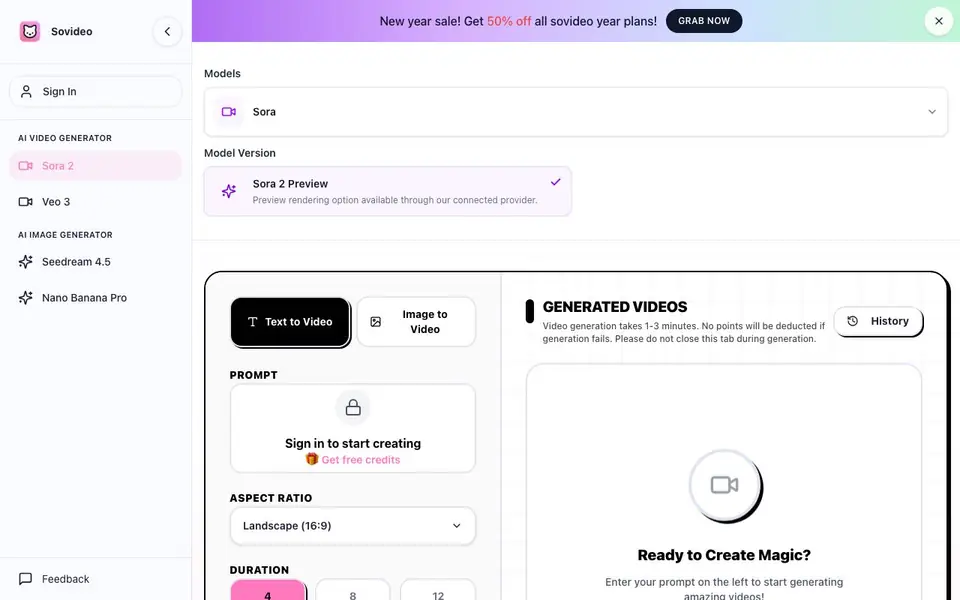
SoVideo is an independent workspace that brings AI video and image generation together. It connects you to several third-party models, including Sora 2, Veo 3, Seedream 4.5, and Nano Banana Pro, so you can switch between them without leaving the platform. The tool focuses on repeatable results, reviewability, and safer publishing for teams.
You start by picking a template like an ad, product demo, vlog, anime, or real-estate preset. Then you use the Sora-optimized prompt builder to structure subject, motion, lighting, camera, and audio cues. After generating, you can review, remix, and save winning prompts for future campaigns. Durations are optimized for 4, 8, and 12 seconds, which suits intros, hooks, and ads.
SoVideo suits content teams, marketers, and creators who want consistent multi-shot outputs and compliance checklists for consent and likeness. The site mentions instant access with a trial and no credit card required. It also notes that failed generations do not deduct points, and video generation takes 1-3 minutes.
SoVideo - All-in-one ai image/video generator platfor... features
- Sora-optimized prompt builder: Structure prompts with subject, motion, lighting, camera, and audio for consistent iterations.
- Use-case templates: Ad, product demo, vlog, anime, and real-estate presets for repeatable video workflows.
- Compliance guardrails: Consent and likeness checklists help teams keep generated outputs safe to publish.
- Multi-model access: Connect Sora 2, Veo 3, Seedream 4.5, and Nano Banana Pro in one workspace.
- Purpose-built durations: Generate 4s, 8s, or 12s clips optimized for intros, hooks, and ads.
What you can do with SoVideo - All-in-one ai image/video generator platfor...
- Create short ad clips with consistent characters and scenes.
- Generate product demo videos using templates and prompt presets.
- Produce vlog or anime-style content with multi-shot consistency.
- Use image-to-video to animate uploaded images with AI models.
How to get started with SoVideo - All-in-one ai image/video generator platfor...
- Sign in to the SoVideo workspace to access the generator.
- Pick a template or enter a prompt, then choose a duration like 4, 8, or 12 seconds.
- Generate, review, and remix variants, saving winning prompts for future use.
Tips for better results with SoVideo - All-in-one ai image/video generator platfor...
- Start with a use-case template like ad or product demo to lock in the scene structure, then refine your subject and motion cues for consistent multi-shot output.
- Use the SoVideo prompt builder to specify camera, lighting, and audio direction explicitly, since vague prompts lead to inconsistent iterations across Sora 2 and Veo 3.
- Save your winning prompts after each generation in SoVideo, then remix them for new clips to cut down on trial-and-error and keep campaign styles uniform.
- Generate at 4 or 8 seconds first to test your prompt quickly, then scale to 12 seconds once the scene and motion are stable, saving credits and time.
SoVideo - All-in-one ai image/video generator platfor... pricing
SoVideo - All-in-one ai image/video generator platfor... has a free way to start, with paid plans for heavier use. Check sovideo.org for current limits and prices.
What to check before you rely on SoVideo - All-in-one ai image/video generator platfor...
- Check the pricing page for exact credit costs per generation and what the free trial includes, since the site only mentions instant access and no credit card.
- Verify which third-party models are actually available in your plan, as SoVideo lists Sora 2, Veo 3, Seedream 4.5, and Nano Banana Pro but does not state plan-specific access.
- Review the export formats and resolution options for downloaded videos, as the website does not list supported file types or quality settings.
Who SoVideo - All-in-one ai image/video generator platfor... is for
SoVideo - All-in-one ai image/video generator platfor... suits content teams, marketers, video creators and brand teams. If that is not you, the AI video generators below may fit better.
Similar tools compared with SoVideo - All-in-one ai image/video generator platfor...
| Tool | What it is | Pricing |
|---|---|---|
| SoVideo - All-in-one ai image/video generator platfor... | AI video and image workspace | Freemium |
| SiVideoGen | AI video generator with multiple models | Freemium |
| FreeSiTools | Free AI image prompt generator | Free |
| SiVideoAPI | Unified API for top AI video models | Freemium |
| Runway | AI video, image, and audio creation suite | Freemium |
SoVideo - All-in-one ai image/video generator platfor... FAQ
What models does SoVideo connect to?
SoVideo connects to third-party models including Sora 2, Veo 3, Seedream 4.5, and Nano Banana Pro. It is an independent platform, so these names describe APIs or compatible workflows, not official affiliations.
How long are the generated videos?
SoVideo currently supports 4-second, 8-second, and 12-second generations. This is optimized for short formats like intros, hooks, and ads, giving you flexibility for preview cuts or longer story beats.
Is there a free plan or trial?
The site mentions instant access with a trial and no credit card required. It also offers free credits and a new year sale with 50% off yearly plans, so you can start without paying upfront.
What happens if a generation fails?
No points are deducted if a generation fails, according to the site. Video generation typically takes 1-3 minutes, and you should keep the tab open during that time.
Can SoVideo export videos or connect to other apps like YouTube or Slack?
SoVideo's website does not mention any export formats or integrations with other apps. You can generate and review videos within the platform, but for sharing or further editing, you would need to download or handle them manually. Check the site's feature list or contact support for specifics.
Does SoVideo work on mobile devices or only on desktop?
SoVideo's website does not specify whether it works on mobile devices or only on desktop. Since it's a web-based platform, you may be able to access it through a mobile browser, but the experience isn't guaranteed. Check the site or try it on your device to see if it works for you.
What does SoVideo's free plan include, and do I need an account to use it?
SoVideo offers instant access with a trial and no credit card required, and you get free credits when you sign in. The website doesn't detail exactly what the free plan includes beyond that, but you likely need an account to generate. Check the pricing page or sign up to see your available credits.


