

What is SoundWise.ai?
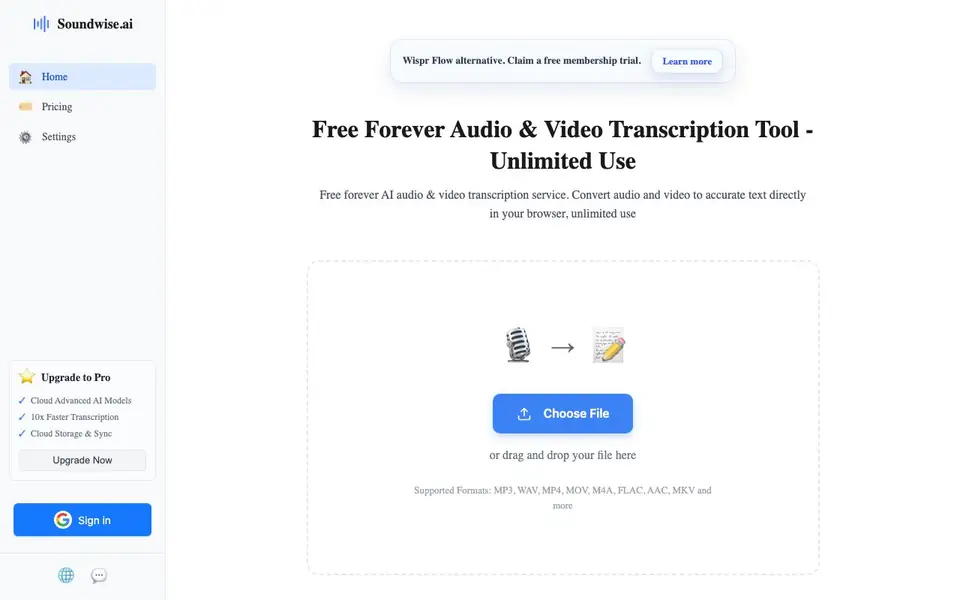
Soundwise.ai is a free, browser-based tool that turns audio and video files into accurate text. You can upload files like MP3, WAV, MP4, and MOV, and the tool handles the rest. It supports over 90 languages and claims high accuracy, making it useful for transcribing interviews, meetings, lectures, or any spoken content.
To use it, you simply choose a file or drag and drop it into the page. The transcription happens right in your browser, so you do not need to install software or create an account. The free tier is unlimited, meaning you can transcribe as many files as you like without paying. There is also an optional Pro upgrade that offers faster processing, cloud storage, and sync features.
The tool is positioned as an alternative to other transcription services like Wispr Flow and TurboScribe. It suits anyone who needs quick, no-fuss transcription without registration. The website does not mention any specific file size limits or processing time, so you may want to test it with your own files to see how it performs.
SoundWise.ai features
- Unlimited free transcription: Transcribe as many audio or video files as you want without paying or registering.
- 90+ language support: Handles transcription in a wide range of languages for global users.
- Browser-based processing: Runs directly in your browser, so no software download or installation is needed.
- Multiple file formats: Accepts MP3, WAV, MP4, MOV, M4A, FLAC, AAC, MKV, and more.
- Pro upgrade options: Paid plan offers faster transcription, cloud storage, and sync across devices.
What you can do with SoundWise.ai
- Convert recorded interviews into text for notes or articles.
- Turn lecture recordings into study notes or transcripts.
- Create subtitles or captions from video files.
- Transcribe meeting recordings for easy review and sharing.
How to get started with SoundWise.ai
- Go to Soundwise.ai's website and find the upload area on the main page.
- Choose a file or drag and drop your audio or video file into the browser window.
- Wait for the transcription to finish, then review or copy the text output.
Tips for better results with SoundWise.ai
- Upload your clearest audio file first to test SoundWise.ai's accuracy, then adjust your recording setup if transcripts contain errors.
- Use SoundWise.ai directly in your browser for quick transcriptions, and keep your original files handy in case you need to re-upload for corrections.
- For long recordings, break them into shorter segments before uploading to SoundWise.ai, as the site does not specify processing time limits.
- Check SoundWise.ai's output for language-specific terms or names, and edit the transcript manually to ensure accuracy for your final use.
SoundWise.ai pricing
SoundWise.ai has a free way to start, with paid plans for heavier use. Check soundwise.ai for current limits and prices.
What to check before you rely on SoundWise.ai
- Confirm SoundWise.ai's free tier truly has no file size or duration limits, since the website does not state any specific caps.
- Verify whether SoundWise.ai stores your uploaded files or processes them only in-browser, as the site does not detail data retention policies.
- Check if SoundWise.ai exports transcripts in formats you need, like PDF or plain text, because the site only mentions MP3 to PDF conversion.
Who SoundWise.ai is for
SoundWise.ai suits journalists, students, content creators and business professionals. If that is not you, the AI transcription tools below may fit better.
Similar tools compared with SoundWise.ai
| Tool | What it is | Pricing |
|---|---|---|
| SoundWise.ai | Free browser-based audio and video transcription tool | Freemium |
| Otter.ai | AI meeting notetaker and transcription tool | Freemium |
| Fireflies.ai | AI meeting assistant for transcription and notes | Freemium |
| Fathom | AI notetaker for online meetings | Freemium |
| Turboscribe | Unlimited audio and video transcription | Freemium |
SoundWise.ai FAQ
Is Soundwise.ai really free?
Yes, the website says the service is free forever and offers unlimited use without registration. There is also a paid Pro plan with extra features like faster processing and cloud storage.
What file formats can I transcribe?
You can upload MP3, WAV, MP4, MOV, M4A, FLAC, AAC, MKV, and more. The tool accepts both audio and video files for transcription.
Do I need to create an account to use it?
No, the site states that no registration is required for the free service. You can upload and transcribe files directly in your browser.
What languages does it support?
The website says it supports over 90 languages. It does not list the specific languages, so you can check the site or test with your own file to confirm.
Can SoundWise.ai export transcripts to PDF or other formats?
SoundWise.ai mentions MP3 to PDF on its website, but it does not specify other export options like DOCX or SRT. You can check the tool's interface after transcription to see what export buttons are available, or contact the support email listed on the site for more details.
Does SoundWise.ai work on mobile devices or only desktop browsers?
SoundWise.ai runs in your browser, so it should work on any device with a modern browser, including phones and tablets. The website does not mention specific mobile apps or limitations, so you may want to test it on your device to confirm the experience.
What does the free plan of SoundWise.ai include besides unlimited transcription?
The free plan of SoundWise.ai includes unlimited transcription of audio and video files in over 90 languages, directly in your browser, without needing an account. It does not mention cloud storage or sync, which are part of the Pro upgrade, so free users likely rely on local downloads.


