

What is Sora 2 AI?
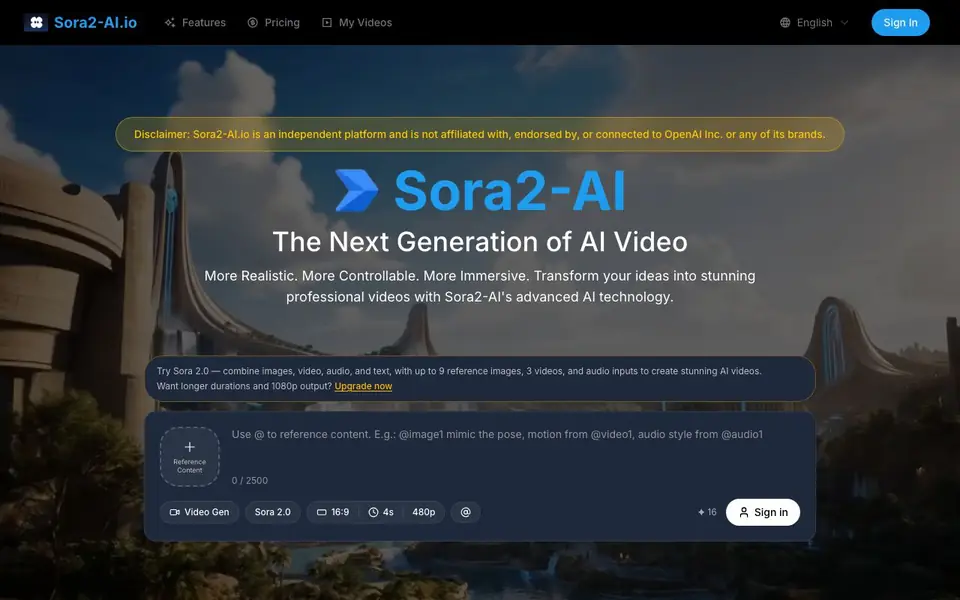
Sora2-AI is an AI video generation platform that turns text prompts and images into videos. It is designed for creators, marketers, and businesses who want professional results without video editing experience. The tool uses advanced AI to produce realistic motion and natural details, with output up to 1080p and synchronized audio.
To create a video, you start by describing your idea in plain English or uploading an image. Then you customize settings like duration, aspect ratio, and quality. After clicking generate, the AI produces your video in under two minutes. You can preview it, make adjustments, and download the final file.
The platform suits social media creators, marketers, and startups. It offers a free tier to try, with premium plans for watermark-free 1080p videos, commercial usage rights, and faster processing. The site notes it is independent and not affiliated with OpenAI.
Sora 2 AI features
- Text to Video: Type any prompt and get a video with strong semantic understanding and visual quality.
- Image to Video: Upload a single image or start and end frames to create smooth animated transitions.
- Multiple Inputs: Combine up to 9 reference images, 3 videos, and audio inputs for richer results.
- Custom Settings: Choose duration, aspect ratio, and quality options like 16:9 or 4s clips.
- Fast Generation: Get professional videos in under 2 minutes, with 1080p output on premium plans.
What you can do with Sora 2 AI
- Create social media videos for Instagram, TikTok, or YouTube Shorts from static photos.
- Turn product photos into marketing videos for brand campaigns.
- Generate corporate presentation clips from text descriptions.
- Animate creative concepts like ads or short film scenes for portfolios.
How to get started with Sora 2 AI
- Describe your video idea in plain text or upload an image on the platform.
- Customize duration, aspect ratio, and quality settings to match your needs.
- Click generate, preview the result, adjust if needed, and download your video.
Tips for better results with Sora 2 AI
- Describe your video idea in plain English with specific details about motion, lighting, and subject to help Sora2-AI generate more accurate results.
- Upload up to 9 reference images or start and end frames when using Sora2-AI to create smooth animated transitions between scenes.
- Combine multiple inputs like images, videos, and audio in Sora2-AI for richer output, but keep your prompt under 2500 characters to avoid truncation.
- Preview the generated video and adjust settings like duration and aspect ratio before downloading to ensure Sora2-AI matches your intended style.
Sora 2 AI pricing
Sora 2 AI has a free way to start, with paid plans for heavier use. Check sora2-ai.io for current limits and prices.
What to check before you rely on Sora 2 AI
- Check the free tier's resolution and watermark limits, since 1080p and watermark-free output require a premium plan not fully detailed on the site.
- Verify whether the free plan includes commercial usage rights, as the website only mentions these rights for premium plans.
- Confirm your export format options before relying on Sora2-AI, because the site does not list supported file types or download formats.
Who Sora 2 AI is for
Sora 2 AI suits social media creators, marketers, business owners and startups. If that is not you, the AI video generators below may fit better.
Similar tools compared with Sora 2 AI
| Tool | What it is | Pricing |
|---|---|---|
| Sora 2 AI | AI video generator from text and images | Freemium |
| SiVideoGen | AI video generator with multiple models | Freemium |
| FreeSiTools | Free AI image prompt generator | Free |
| SiVideoAPI | Unified API for top AI video models | Freemium |
| Runway | AI video, image, and audio creation suite | Freemium |
Sora 2 AI FAQ
What can I create with Sora2-AI?
You can create videos from text prompts or images, including marketing clips, social media content, and creative animations. The tool supports combining multiple images, videos, and audio inputs for more complex results.
Is Sora2-AI free to use?
The site says you can try it free. Premium plans offer extra features like 1080p output, watermark-free videos, commercial usage rights, and faster processing, but specific pricing details are not listed on the homepage.
Who is Sora2-AI for?
It is built for social media creators, marketers, businesses, and startups who need professional videos without editing skills. The tool is positioned as a low-cost alternative for corporate and marketing video production.
How long does it take to generate a video?
The site states generation takes under 2 minutes. You can create multiple videos quickly, and premium access provides faster processing times for those who need quicker turnaround.
Can Sora2-AI export videos in formats other than MP4?
The Sora2-AI website mentions downloading your video file after generation but does not specify which file formats are available beyond the 1080p output. To find out if other formats like MOV or AVI are supported, check the platform's download options or contact their support team.
Does Sora2-AI offer a mobile app or is it only web-based?
Sora2-AI is accessed through its website at sora2-ai.io, and the site does not mention a dedicated mobile app. You can use it on any device with a web browser, but for the best experience, a desktop or laptop is recommended. Check the site for any future app releases.
What does the free plan of Sora2-AI include?
The free tier of Sora2-AI lets you try the tool, but the website does not list specific limits like video length or resolution for free users. It does mention that premium plans offer watermark-free 1080p videos and faster processing. For exact free plan details, check the pricing page.


