

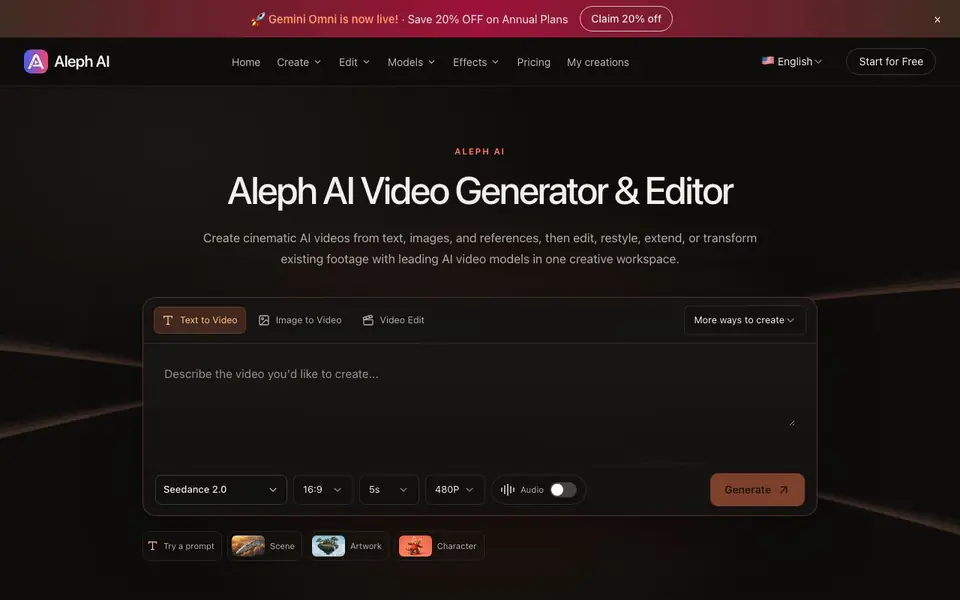
What is Runway Aleph AI?
Aleph AI is a video creation and editing workspace. You can generate new clips from a written prompt, a still image, or a mix of references. It also lets you edit existing footage by describing changes in plain language, like restyling a video into anime or changing the background.
To start, you pick a mode: text to video, image to video, reference to video, first and last frame, or video extend. You write a prompt describing the subject, action, and camera movement, then choose a model, aspect ratio, duration, and resolution. The tool generates your clip, and you can move on to editing it further.
Aleph AI suits creators, marketers, and hobbyists who want a single place to generate and refine videos. The site mentions free credits to start, and annual plans with a 20% discount. It supports multiple AI video models, including Seedance 2.0, and offers effects like style transfer and object removal.
Runway Aleph AI features
- Text to Video: Turn a written prompt into a cinematic video clip with control over subject, action, and camera.
- Image to Video: Animate a still photo or product image by adding movement to the subject or camera.
- Reference to Video: Combine image, video, and audio references with a prompt to guide your scene.
- Video Extend: Add an existing clip and describe what happens next to generate a continuation.
- Style Transfer: Restyle existing footage into anime, cartoon, or cinematic looks while preserving details.
What you can do with Runway Aleph AI
- Create a cinematic scene from a text description for a short film.
- Animate a product photo to showcase it in motion for marketing.
- Restyle a video into anime for a creative project.
- Extend an existing clip to continue a story or scene.
How to get started with Runway Aleph AI
- Sign up for a free account to get free credits.
- Choose a creation mode like text to video or image to video.
- Write a prompt, pick settings, and generate your clip.
Tips for better results with Runway Aleph AI
- Write prompts that specify subject, action, lighting, and camera movement, as Aleph AI uses these details to generate more accurate clips.
- Start with a still image in Aleph AI's image-to-video mode when you need consistent subject identity, then add motion through your prompt.
- Use the first and last frame mode in Aleph AI to control the start and end of your clip, which helps create smoother transitions.
- For restyling footage, describe the new style and the details you want to preserve, so Aleph AI keeps the original content intact.
Runway Aleph AI pricing
Runway Aleph AI has a free way to start, with paid plans for heavier use. Check alephai.app for current limits and prices.
What to check before you rely on Runway Aleph AI
- Check whether the free credits cover the resolution and duration you need, since the site does not list specific credit costs per generation.
- Verify if your chosen model and effects are included in the free plan, as the site does not detail which features require payment.
- Confirm the export formats and resolution limits before relying on Aleph AI for final delivery, as the site does not state these options.
Who Runway Aleph AI is for
Runway Aleph AI suits video creators, marketers, content creators and hobbyists. If that is not you, the AI video generators below may fit better.
Similar tools compared with Runway Aleph AI
| Tool | What it is | Pricing |
|---|---|---|
| Runway Aleph AI | AI video generator and editor | Freemium |
| SiVideoGen | AI video generator with multiple models | Freemium |
| FreeSiTools | Free AI image prompt generator | Free |
| SiVideoAPI | Unified API for top AI video models | Freemium |
| Runway | AI video, image, and audio creation suite | Freemium |
Runway Aleph AI FAQ
What can I create with Aleph AI?
You can generate videos from text, images, or references, and also edit existing footage. Modes include text to video, image to video, first and last frame, and video extension. You can also restyle videos or change backgrounds.
Is Aleph AI free to use?
The site says you can start for free and get free credits. It also offers annual plans with a 20% discount, so it uses a freemium model. Specific pricing details are not listed on the homepage.
Who is Aleph AI for?
It's for anyone who wants to create or edit videos with AI, including content creators, marketers, and hobbyists. You don't need video editing experience since you work with prompts.
Can I edit existing videos with Aleph AI?
Yes. You can restyle footage, change backgrounds, add or remove objects, and extend clips. You describe the change in a prompt, and the tool applies it.
What video formats and resolutions can I export from Runway Aleph AI?
The website shows you can choose from 480P and 720P resolutions, and aspect ratios like 16:9, 4:3, 1:1, 3:4, and 9:16. It does not mention other export formats or higher resolutions. For the full list of export options, check the export settings within the tool.
Does Runway Aleph AI have a mobile app or is it only web-based?
The website does not mention a mobile app for Runway Aleph AI. It appears to be a web-based tool you access through your browser. To confirm if a mobile app is available, check the official website or app stores.
Can I use Runway Aleph AI without creating an account?
The website says you can start for free, but it does not specify whether you need an account. Typically, you need an account to save and manage your creations. For exact requirements, check the sign-up process on the site.


