

What is RecipeFix?
RecipeFix is an AI tool that takes any recipe you bring—via link, pasted text, or a photo from a cookbook—and rewrites both the ingredients and the cooking steps to fit your dietary needs. It supports diets like gluten-free, dairy-free, vegan, and keto, plus more. The tool changes only what must change, keeping the dish's method and flavor intact.
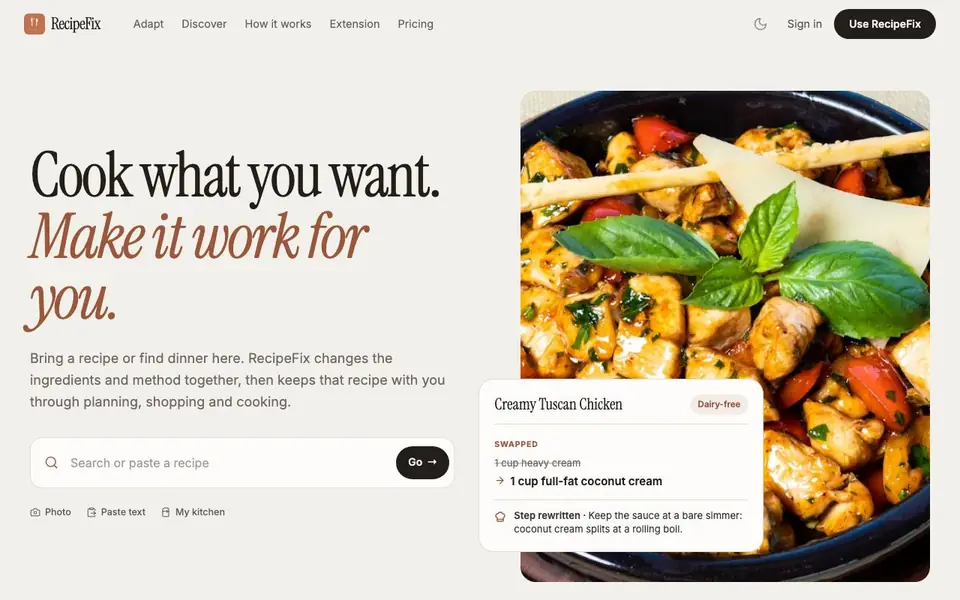
You start by pasting a recipe link, text, or photo, or by searching RecipeFix's own collection. The tool shows you exactly what it swapped, why, and how the steps adjust—like replacing heavy cream with coconut cream and telling you to simmer gently instead of boiling. You can scale servings, and the adapted recipe stays with you through planning, shopping, and cooking.
RecipeFix works on the web, iPhone, and iPad, and offers a browser extension that reads recipes directly from any page. It also includes meal planning for the week, a merged grocery list, and Cook Mode with timers. the website says a Plus plan that adds meal planning, grocery lists, nutrition targets, and kitchen integration, but pricing details are not stated on the site.
RecipeFix features
- Recipe adaptation: Changes ingredients and steps together for your diet, like swapping cream for coconut cream.
- Multiple input methods: Accepts recipe links, pasted text, or photos from cookbooks.
- Diet converters: Supports gluten-free, dairy-free, vegan, keto, and other diets.
- Meal planning: Builds a week of meals with servings per night, not per week.
- Cook Mode: Provides step-by-step instructions with timers that keep running.
What you can do with RecipeFix
- Adapt a creamy chicken recipe to be dairy-free with coconut cream and adjusted steps.
- Scale a recipe to serve more or fewer people by multiplying or dividing ingredients.
- Search your cookbook and the web to find dinners that already fit your diet.
- Plan a week of meals and generate one merged grocery list from all recipes.
How to get started with RecipeFix
- Paste a recipe link, text, or photo, or search RecipeFix's collection.
- Choose your diet, like dairy-free or vegan, and see the swapped ingredients and rewritten steps.
- Scale servings, plan your week, and use Cook Mode with timers while you cook.
Tips for better results with RecipeFix
- Paste a recipe link, text, or photo directly into RecipeFix to see exactly which ingredients and steps change, so you can verify the swaps before cooking.
- Use RecipeFix's Cook Mode with timers to follow the rewritten steps precisely, especially for dishes where substitutions like coconut cream require gentler heat.
- Scale servings in RecipeFix before planning your week, so your meal plan and merged grocery list match the actual number of people you're cooking for.
- Search RecipeFix's collection and your saved recipes first to find dishes that already fit your diet, saving you from unnecessary adaptations.
RecipeFix pricing
RecipeFix’s homepage does not list prices. Check recipefix.app for current plans.
What to check before you rely on RecipeFix
- Check whether RecipeFix's free plan includes all features you need, since the website does not state what the free tier covers or its limits.
- Verify that RecipeFix supports your specific diet and input method, like photo capture, before relying on it for a critical meal.
- Confirm how RecipeFix handles your uploaded recipes and photos, as the website does not clearly state its data privacy or retention policies.
Who RecipeFix is for
RecipeFix suits home cooks, people with dietary restrictions, meal planners and health-conscious eaters. If that is not you, the AI productivity tools below may fit better.
Similar tools compared with RecipeFix
| Tool | What it is | Pricing |
|---|---|---|
| RecipeFix | AI recipe converter for any diet | See website |
| Mem | AI chief of staff and workspace | See website |
| Reclaim | AI calendar for work and life | Freemium |
| Otter.ai | AI meeting notetaker and transcription tool | Freemium |
| Motion | AI-powered productivity and project platform | Free trial |
RecipeFix FAQ
How does RecipeFix adapt a recipe?
It rewrites both the ingredients and the cooking method together. For example, it swaps heavy cream for coconut cream and changes the step to simmer gently instead of boiling, so the dish still works.
What diets does RecipeFix support?
The site lists gluten-free, dairy-free, vegan, and high-protein converters, and mentions 8 more diets. It also shows examples like keto, so check the site for the full list.
Can I use RecipeFix on my phone?
Yes, RecipeFix works on the web, iPhone, and iPad. There's also a browser extension that reads recipes from any page, so you can adapt without leaving the site.
Is there a free plan or pricing?
The website mentions a Plus plan that adds meal planning, grocery lists, nutrition targets, and kitchen integration, but it does not state pricing or a free tier. Check the Pricing page on the site for details.
Can RecipeFix export the adapted recipe or connect to other apps?
The RecipeFix website does not mention exporting recipes or connecting to other apps. It focuses on adapting recipes and keeping them within its own planning, shopping, and cooking tools. For the latest information on integrations, check the app's official page or contact support.
Does RecipeFix require an account to use it?
The RecipeFix website does not specify whether an account is required. It shows a sign-in option, but you may be able to try the tool without one. To know for sure, visit the site and attempt to use a feature, or check the pricing page for details.
What does the free plan of RecipeFix include?
The RecipeFix website does not list what the free plan includes. It mentions a Plus plan that adds meal planning, grocery lists, nutrition targets, and kitchen integration, but pricing and free plan details are not stated. For specifics, check the pricing page on the site.


