

What is Pixwit?
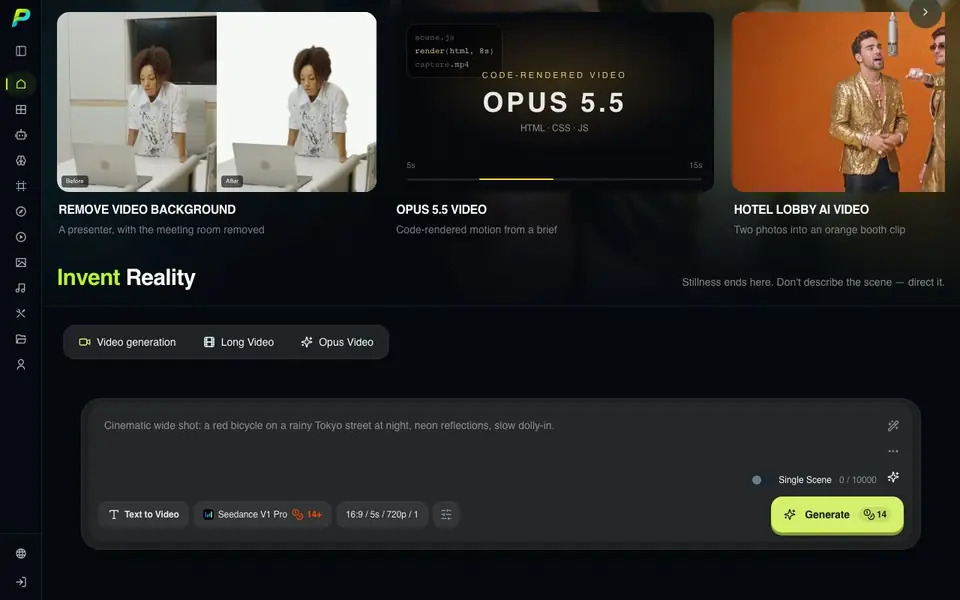
Pixwit is an all-in-one AI video creation platform. It turns text, images, or scripts into high-quality videos. You can create UGC ads, talking avatars, and long-form stories. The platform includes many tools beyond basic generation.
You start by describing your scene or uploading reference images. Then you pick a model, format, and duration. You can direct camera movement and refine the result. Pixwit also offers a chat-based agent that plans and generates for you. A node-based canvas lets you build visual workflows.
Beyond video generation, Pixwit includes tools for image editing, background removal, face swap, and upscaling. It suits marketers, content creators, and filmmakers. The website mentions a free version but does not state its limits. It also does not list pricing details.
Pixwit features
- Text to Video: Generate video clips from a written scene description.
- Image to Video: Animate still photos into moving footage with effects.
- AI Avatar: Create talking characters with consistent looks across clips.
- Video Upscaler: Enhance and restore AI-generated video quality.
- Background Removal: Cut the subject out of a video instantly.
What you can do with Pixwit
- Create UGC-style ads from product stills for social media.
- Turn a script into a full video cut with multiple scenes.
- Generate cinematic product launch clips for marketing.
- Build a talking avatar for explainer videos or content.
How to get started with Pixwit
- Describe your scene or upload reference images and frames.
- Choose a model, format, duration, and camera direction.
- Preview the result, refine settings, then download or edit.
Tips for better results with Pixwit
- Start with a clear scene description or reference image, then choose a model and duration before refining camera movement for better control over the final clip.
- Use Pixwit's node-based canvas to build visual workflows when you need consistent multi-step outputs, linking tools like background removal and upscaling in sequence.
- Try the chat-based agent in Pixwit to plan and generate a full video from a script, then review each scene and adjust prompts for stronger adherence.
- Leverage Pixwit's motion control by copying motion from a reference clip to match camera moves, which helps maintain style across different scenes.
Pixwit pricing
Pixwit’s homepage does not list prices. Check pixwit.ai for current plans.
What to check before you rely on Pixwit
- Check the free version's limits on video duration, resolution, or number of generations, since the website does not state them.
- Verify whether Pixwit's pricing is listed anywhere on the site before committing, as the website does not provide pricing details.
- Confirm which export formats and platforms Pixwit supports for your final videos, as this information is not clearly documented on the site.
Who Pixwit is for
Pixwit suits marketers, content creators, filmmakers and advertisers. If that is not you, the AI video generators below may fit better.
Similar tools compared with Pixwit
| Tool | What it is | Pricing |
|---|---|---|
| Pixwit | All-in-one AI video creation platform | See website |
| SiVideoGen | AI video generator with multiple models | Freemium |
| FreeSiTools | Free AI image prompt generator | Free |
| SiVideoAPI | Unified API for top AI video models | Freemium |
| Runway | AI video, image, and audio creation suite | Freemium |
Pixwit FAQ
What is Pixwit and how does it work?
Pixwit is an AI video creation platform. You describe a scene or upload images, pick a model and settings, then generate a video. It also offers tools for avatars, effects, and editing.
Do I need technical skills to use Pixwit?
No. The platform is designed for easy use. You write a prompt, choose options, and generate. A chat-based agent can also plan and create videos for you.
What types of videos can I create?
You can create UGC ads, TV commercials, micro-dramas, long-form stories, avatar videos, and motion graphics. You can also turn a product URL into a video.
What are the limitations of the free version?
The website mentions a free version but does not state its limits. Check the pricing page or contact them via email for details.
Can Pixwit export videos in different formats or resolutions?
The Pixwit website does not mention specific export formats or resolutions. You can check the platform's export options after you create a video, or contact their support team for detailed specifications.
Does Pixwit have a mobile app or is it only web-based?
The Pixwit website does not mention a mobile app. It appears to be a web-based platform, so you can likely use it through your browser on any device. For confirmation, check the website's FAQ or contact support.
What does the Pixwit free plan include?
The Pixwit website mentions a free version but does not list its specific limits. To find out what the free plan includes, you can sign up and explore the available features, or check the website's pricing page for more details.


