

What is PixVerse?
PixVerse is an AI video generator that creates short videos from your text prompts and photos. It focuses on making fun, shareable content with trending effects like AI Kiss, Hug, and Muscle, plus categories for ads, cinematic narratives, anime, and music. You can also build dynamic 3D scenes and even play or make games on its world model.
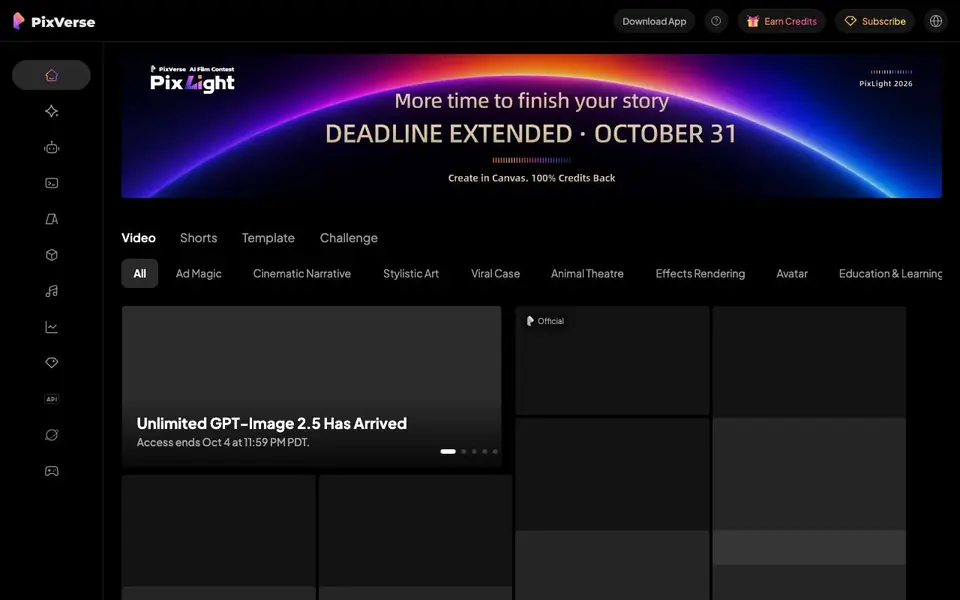
To start, you pick a mode like Video, Shorts, or Template, then choose a category such as Ad Magic or Stylistic Art. You provide a text prompt or upload a photo, and the AI generates a video for you. The app is available for download, and you can earn credits or subscribe for more usage.
PixVerse suits content creators, marketers, and anyone who wants quick, eye-catching videos for social media. The site highlights an unlimited GPT-Image 2.5 feature that ends soon, so some offers are time-limited. It does not state specific pricing details on its homepage.
PixVerse features
- Text-to-video: Generate videos from your written prompts in various styles.
- Photo-to-video: Turn your uploaded photos into animated video clips.
- Viral effects: Apply trending effects like AI Kiss, Hug, and Muscle to your content.
- 3D scene building: Create dynamic 3D scenes using the PixVerse plugin.
- Game world model: Play and make games within PixVerse's world model.
What you can do with PixVerse
- Create fun AI videos of friends with viral effects for social media.
- Produce cinematic narrative videos for storytelling or brand ads.
- Generate anime-style clips or music videos for entertainment.
- Build 3D scenes or game worlds for interactive projects.
How to get started with PixVerse
- Download the PixVerse app or visit the website.
- Choose a mode like Video, Shorts, or Template, and pick a category.
- Enter your text prompt or upload a photo, then let the AI generate your video.
Tips for better results with PixVerse
- Start with a clear, detailed text prompt that describes the subject, action, and style you want, since PixVerse relies on your wording to shape the video.
- Use PixVerse's Template mode to apply trending effects like AI Kiss or Hug to your photos, which saves time and gives you polished, shareable results.
- Experiment with different categories like Ad Magic or Cinematic Narrative in PixVerse to match your video's tone, and refine your prompt based on the output you see.
- Check the time-limited offers, such as the unlimited GPT-Image 2.5 feature, and plan your projects around them if you want to use those capabilities before they end.
PixVerse pricing
PixVerse’s homepage does not list prices. Check app.pixverse.ai for current plans.
What to check before you rely on PixVerse
- Confirm the credit system and subscription costs before committing, since the PixVerse homepage does not list specific pricing or plan limits.
- Verify whether your generated videos can be exported in the formats you need, as the website does not state available export options.
- Review PixVerse's data and privacy policy to understand how your uploaded photos and prompts are handled, since this information is not provided on the main page.
Who PixVerse is for
PixVerse suits content creators, social media marketers, casual users and game enthusiasts. If that is not you, the AI video generators below may fit better.
Similar tools compared with PixVerse
| Tool | What it is | Pricing |
|---|---|---|
| PixVerse | AI video generator from text and photos | See website |
| SiVideoGen | AI video generator with multiple models | Freemium |
| FreeSiTools | Free AI image prompt generator | Free |
| SiVideoAPI | Unified API for top AI video models | Freemium |
| Runway | AI video, image, and audio creation suite | Freemium |
PixVerse FAQ
What can I make with PixVerse?
You can create short AI videos from text or photos, with options for ads, cinematic narratives, anime, music, and viral effects like AI Kiss or Hug. You can also build 3D scenes or make games.
Is PixVerse free to use?
The website does not state pricing details. It mentions earning credits and subscribing, which suggests a freemium model, but you should check the app or site for current plans.
Who is PixVerse for?
It is for content creators, marketers, and anyone who wants quick, engaging videos for social platforms. The variety of categories also appeals to anime fans, gamers, and advertisers.
Can I use my own photos with PixVerse?
Yes, you can transform your photos into AI videos. The site highlights photo-to-video capabilities, including effects like AI Kiss and Hug that work on your images.
What can PixVerse export or connect to?
PixVerse lets you download the videos you create, but the website does not mention exporting to other platforms or connecting to external tools like YouTube or social media schedulers. Check the app's download or share options after generating a video to see what's available.
On which devices or platforms does PixVerse run?
PixVerse is available as a downloadable app, and you can also use it through the website at app.pixverse.ai. The site does not specify which operating systems are supported, so check the app store or the website's download section for device compatibility details.
Does PixVerse require an account to use?
The PixVerse website mentions earning credits and subscribing, which suggests you need an account to track usage and manage your plan. However, the site does not explicitly state whether an account is required. Visit the app or website to see the sign-up process when you start.


