

What is Pikodee?
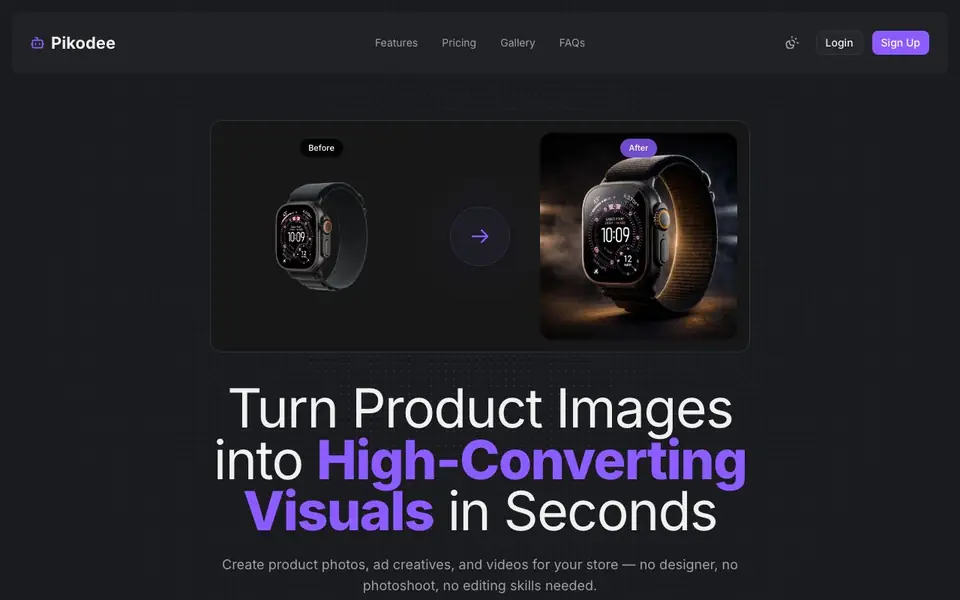
Pikodee is an AI studio built for online store owners and marketers. You upload a simple product photo, and it transforms it into professional-looking visuals. It covers product photos, ad creatives for social media, and short product videos. The goal is to replace photoshoots and designer work with quick, automated results.
You start by uploading a product image in PNG or JPG format, up to 5MB. Then you pick what you want: an image, an ad, or a video. Next, choose a style like studio or lifestyle, and hit generate. The site says it takes about 10 seconds. You can also enhance prompts automatically, upscale images, replace backgrounds, and manage your generation history.
Pikodee suits ecommerce sellers, social media managers, and small teams who need consistent product content. It offers a free plan with one free product visual and 3 credits per day. Paid plans start at $9 per month for regular creators, and $29 per month for unlimited use. The website mentions commercial usage rights and no watermarks on paid plans.
Pikodee features
- Product Videos: Turn product images into engaging videos for your store and ads.
- Ad Creatives: Generate scroll-stopping visuals for Facebook, TikTok, and Instagram ads.
- Image Enhancer: Automatically refine images to make them look more professional.
- Background Replacement: Place your product in realistic, high-converting environments instantly.
- Upscaler: Increase image resolution without losing quality while preserving details.
What you can do with Pikodee
- Create product photos for your online store without a photoshoot.
- Generate ad creatives for Facebook, TikTok, and Instagram campaigns.
- Make short product videos for social media posts and ads.
- Upscale and enhance existing product images for better quality.
How to get started with Pikodee
- Upload a product photo in PNG or JPG format, up to 5MB.
- Choose what to create: an image, an ad creative, or a video.
- Pick a style like studio or lifestyle, then generate your visual in about 10 seconds.
Tips for better results with Pikodee
- Upload a clean, well-lit product photo in PNG or JPG under 5MB to give Pikodee the best starting point for generating professional visuals.
- Choose a specific style like studio or lifestyle before generating, and experiment with different options to see which matches your brand best.
- Use Pikodee's automatic prompt enhancement and upscaler to refine outputs, especially when you need higher resolution images for ads or store listings.
- Manage your generation history in Pikodee to reuse successful prompts, saving credits and keeping your product visuals consistent across campaigns.
Pikodee pricing
Pikodee has a free way to start, with paid plans for heavier use. Check pikodee.com for current limits and prices.
What to check before you rely on Pikodee
- Check your plan's credit limits: the free plan gives 1 visual and 3 credits daily, while paid plans start at $9 monthly, but the website does not list all limits for each plan.
- Verify the commercial usage rights and watermark policy for your plan, since the website mentions these only for paid plans, not the free tier.
- Confirm that Pikodee supports your workflow: it accepts PNG or JPG up to 5MB, but the website does not state export formats or integration with platforms like Shopify.
Who Pikodee is for
Pikodee suits ecommerce sellers, marketers, social media managers and small business owners. If that is not you, the AI video generators below may fit better.
Similar tools compared with Pikodee
| Tool | What it is | Pricing |
|---|---|---|
| Pikodee | AI product visual and video maker | Freemium |
| SiVideoGen | AI video generator with multiple models | Freemium |
| FreeSiTools | Free AI image prompt generator | Free |
| SiVideoAPI | Unified API for top AI video models | Freemium |
| Runway | AI video, image, and audio creation suite | Freemium |
Pikodee FAQ
Is Pikodee free to use?
Yes, Pikodee has a free plan. It gives you 1 free product visual and 3 credits per day. You can try it without a credit card. Paid plans start at $9 per month for more credits and features.
How does Pikodee work?
You upload a product photo, choose what you want to create (image, ad, or video), pick a style, and generate. The process takes about 10 seconds. No design skills or setup are needed.
Do I need design skills to use Pikodee?
No. Pikodee is designed for people without design or editing skills. You just upload a product image and select options. The AI handles the rest, from background replacement to video creation.
Who owns the images generated on Pikodee?
The website states that paid plans include image ownership and commercial usage rights. This means you can use the generated visuals for your business. The free plan may have limitations, but the site does not detail them.
Can Pikodee export images or videos in formats I can use directly on my online store or social media?
Pikodee generates product images, ad creatives, and short videos that are ready to use. The website does not specify export file formats or direct integrations with platforms like Shopify or Instagram. For details on available downloads, check the platform after generating or contact support.
Does Pikodee work on mobile devices or only on desktop?
Pikodee is a web-based tool, so you can access it from any device with a browser, including smartphones and tablets. The website does not mention dedicated mobile apps. For the best experience, use a modern browser on your preferred device.
What does the free plan on Pikodee include besides the one free product visual?
The free plan gives you one free product visual and 3 credits per day, as stated on the website. You can use these credits to generate images, ads, or videos. The site does not list other free-plan features, so check your account dashboard for the exact daily limits.


