

What is Pieces for Developers?
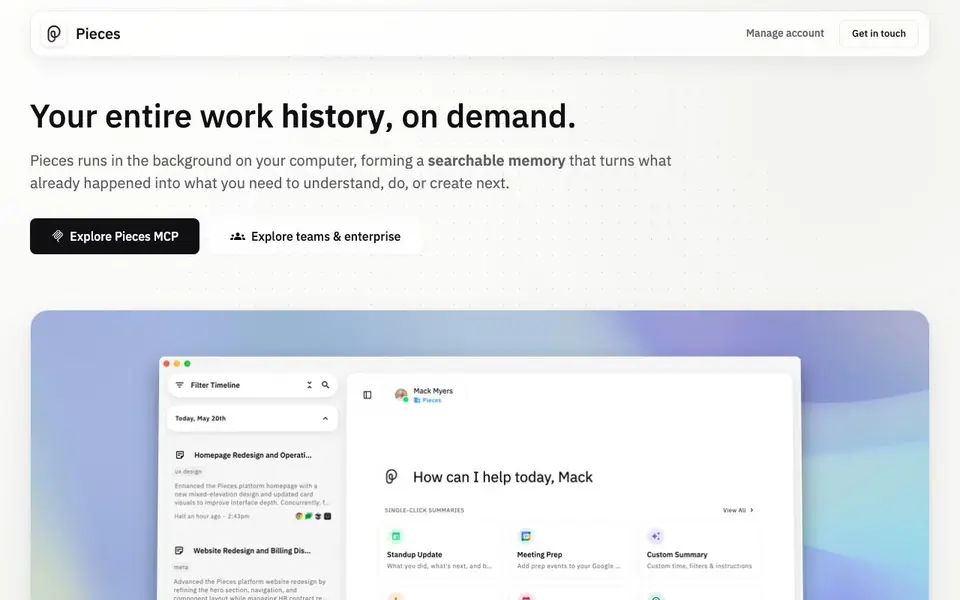
Pieces runs quietly in the background on your computer, building a chronological memory of everything you do across your apps. It captures what you see and copy, plus optional meeting audio, turning your scattered work into a searchable timeline. You can ask questions about past actions, filter by time or source, and revisit any moment without retracing steps.
To get started, you install Pieces and let it run while you work. It automatically forms memories every two seconds from your focused app and clipboard. For meetings, you opt in to capture audio. Then you can search or prompt Pieces to find information, generate standup updates, morning briefs, meeting prep, or day recaps from your real context.
Pieces suits developers, researchers, writers, and anyone juggling many tools. It connects with Gmail, Slack, Chrome, VS Code, Figma, ChatGPT, and more. Privacy is a priority: memories stay on-device by default, and you can pause capture anytime. The website does not state pricing details, so check their site for plan options.
Pieces for Developers features
- Living timeline: Captures your app activity chronologically for easy search and filtering.
- Context search: Ask questions about past work and scope by time, source, or topic.
- Instant recaps: Generate standup updates, briefs, and day recaps from your real context.
- App integrations: Connects with email, chat, browsers, docs, and coding tools.
- On-device privacy: Stores memories locally by default with pause controls.
What you can do with Pieces for Developers
- Draft a follow-up from the latest conversation and open questions.
- Compose an update from this week's progress without retracing steps.
- Turn scattered notes and chats into a coherent first draft.
- Write a recap of a meeting you didn't take notes in.
How to get started with Pieces for Developers
- Install Pieces on your computer and let it run in the background.
- Work as usual across your apps; Pieces captures your activity automatically.
- Search or prompt Pieces to find past context or generate recaps.
Tips for better results with Pieces for Developers
- Let Pieces run in the background for at least a few days before searching, so it builds enough memory to answer useful questions about your work patterns.
- When you ask Pieces a question, scope it by time or source, like "this week in Slack," to get more precise answers instead of broad summaries.
- Use Pieces to generate standup updates or day recaps from your captured context, then edit the output to match your team's tone and detail level.
- Pause capture when you work on sensitive or personal tasks, since Pieces records your focused app and clipboard by default every two seconds.
Pieces for Developers pricing
Pieces for Developers’s homepage does not list prices. Check pieces.app for current plans.
What to check before you rely on Pieces for Developers
- Check the website for pricing details, since the site does not state any plan costs or limits for Pieces.
- Verify which integrations you actually use are supported, because Pieces lists many apps but coverage may vary by platform.
- Confirm how long your captured memory is retained and whether you can delete specific moments, as the site does not specify retention policies.
Who Pieces for Developers is for
Pieces for Developers suits developers, researchers, writers and knowledge workers. If that is not you, the AI productivity tools below may fit better.
Similar tools compared with Pieces for Developers
| Tool | What it is | Pricing |
|---|---|---|
| Pieces for Developers | AI memory layer for your work | See website |
| Mem | AI chief of staff and workspace | See website |
| Reclaim | AI calendar for work and life | Freemium |
| Otter.ai | AI meeting notetaker and transcription tool | Freemium |
| Motion | AI-powered productivity and project platform | Free trial |
Pieces for Developers FAQ
What does Pieces capture?
Pieces captures what you see in your focused app and what you copy and paste, forming memories every two seconds. You can opt in to capture audio from meetings and conversations. It does not capture everything unless you enable it.
Is Pieces free?
The website does not state pricing details. It mentions teams and enterprise options, so there are likely paid plans. Check the Pieces website for current pricing and free trial availability.
Who is Pieces for?
Pieces is for anyone who works across many apps and wants to recall past decisions or generate recaps. It suits developers, researchers, writers, and planners who need context from emails, chats, docs, and coding tools.
How private is my data?
By default, all memories are saved on-device, meaning they live on your machine. You have control to pause capture at any time. The website emphasizes privacy and security as fundamentals.
Does Pieces for Developers work on Windows, Mac, or both?
Pieces for Developers runs on your computer in the background, but the website does not specify which operating systems are supported. To confirm whether it works on Windows, macOS, or both, check the official Pieces website for system requirements or platform details.
Can Pieces for Developers export my captured memories or data?
The Pieces for Developers website does not mention export options for your captured memories or data. It focuses on searching and generating recaps from your timeline. For details on exporting or managing your data, check the Pieces website or contact their support team.
What does the free plan of Pieces for Developers include?
The Pieces for Developers website does not state specific free plan features or limitations. It highlights core features like the living timeline, context search, and instant recaps, but pricing details are not provided. Visit the Pieces website to see current plan options and what the free tier includes.


