

What is NoteGPT?
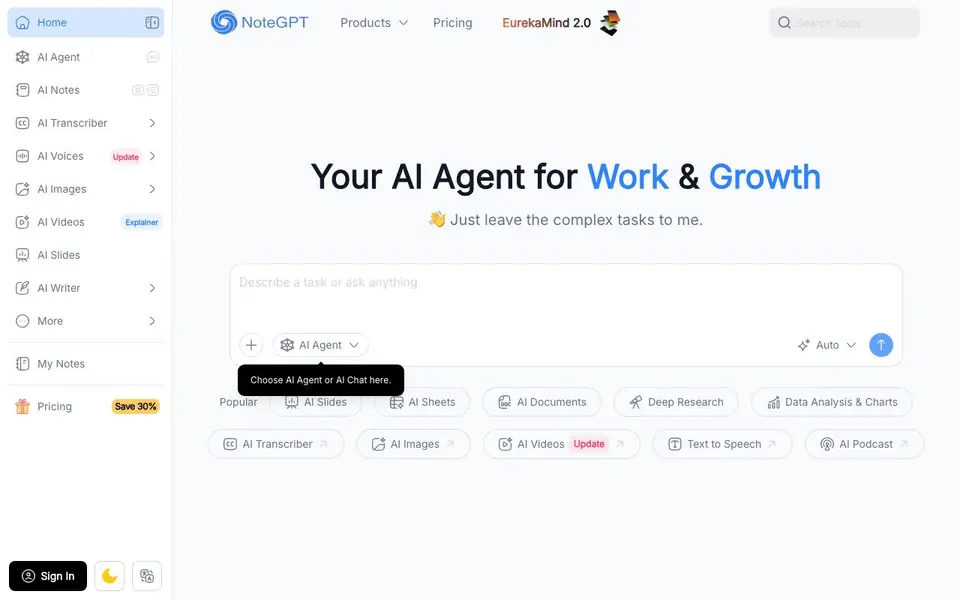
NoteGPT is an AI agent designed to handle a wide range of work tasks in one place. It can research topics, summarize content from videos, audio, and PDFs, write documents, create slides and spreadsheets, and generate images, audio, and videos. The tool aims to simplify complex tasks so you can focus on higher-level work.
You start by telling the agent your goal, context, and requirements. It then makes a plan, breaking the task into clear steps. The agent executes automatically, searching the web, writing content, creating files, and drawing charts. Finally, it delivers an editable file that you can refine by giving feedback until you are satisfied.
NoteGPT is designed for educators, professionals, researchers, creators, and college students. It claims to have over 80 million users worldwide and 12,000 schools and teams. The website mentions that it smartly routes tasks across GPT, Claude, Gemini, and DeepSeek to balance quality, speed, and cost.
NoteGPT features
- Everyday Chat & Search: Ask questions, search the web, and get key points organized with sources automatically.
- Summarize Anything: Summarize YouTube videos, audio, PDFs, and more into clear visual insights.
- Transcribe Audio & Video: Separate speakers and transcribe speech with timestamps, removing filler words.
- Create Slides: Generate polished, editable presentations from structure, text, layout, and visuals.
- Deep Research: Produce detailed visual reports with cited sources, rigorously verified for accuracy.
What you can do with NoteGPT
- Create slides for a curriculum framework with learning objectives and assessment methods.
- Research renewable energy adoption and generate a data-driven presentation with charts.
- Transcribe a lecture or meeting with speaker separation and timestamps.
- Draft a report from an outline and refine it until it meets your requirements.
How to get started with NoteGPT
- Go to NoteGPT's website and sign in or create an account.
- Describe your task, including your goals, context, and any requirements.
- Review the plan, let the agent execute, and refine the delivered file as needed.
Tips for better results with NoteGPT
- Start each task by clearly stating your goal, context, and requirements so NoteGPT can build an accurate plan and avoid rework.
- Use NoteGPT to summarize long videos or PDFs first, then ask follow-up questions to extract the specific details you need.
- Refine NoteGPT's output by giving targeted feedback on structure, tone, or content until the editable file meets your standards.
- For research tasks, ask NoteGPT to include sources and citations in its deep research reports so you can verify the information later.
NoteGPT pricing
NoteGPT’s homepage does not list prices. Check notegpt.io for current plans.
What to check before you rely on NoteGPT
- Check whether your plan includes enough credits or usage for large tasks like video transcription or deep research, as pricing is not listed on the site.
- Verify that NoteGPT's output files, such as slides or documents, export in formats compatible with your usual software before relying on them.
- Review the privacy policy to confirm how your uploaded files and conversations are handled, since the website does not state data retention details.
Who NoteGPT is for
NoteGPT suits educators, professionals, researchers, creators and college students. If that is not you, the AI productivity tools below may fit better.
Similar tools compared with NoteGPT
| Tool | What it is | Pricing |
|---|---|---|
| NoteGPT | AI agent for work and growth | See website |
| Mem | AI chief of staff and workspace | See website |
| Reclaim | AI calendar for work and life | Freemium |
| Otter.ai | AI meeting notetaker and transcription tool | Freemium |
| Motion | AI-powered productivity and project platform | Free trial |
NoteGPT FAQ
What can NoteGPT do?
NoteGPT is an AI agent that handles research, summarization, transcription, document writing, slide creation, spreadsheet generation, and media creation like images, audio, and videos. It works across multiple AI models to balance quality, speed, and cost.
Who is NoteGPT for?
NoteGPT is designed for educators, professionals, researchers, creators, and college students. It helps with tasks like lesson planning, research, report writing, content creation, and studying.
How does NoteGPT work?
You describe your goal and requirements. NoteGPT makes a plan, breaks it into steps, and executes automatically. It searches the web, writes content, creates files, and draws charts. You can give feedback and it refines the final file until you are satisfied.
Does NoteGPT have a free plan?
The website does not state whether NoteGPT offers a free plan. You can check the Pricing page on their site for details on plans and costs.
Can NoteGPT export my work to other formats or connect with other apps?
The NoteGPT website does not mention specific export formats or integrations with other apps. It focuses on generating editable files that you can refine within the tool. To find out what export options or connections are available, check the pricing page or contact support directly.
What devices or platforms can I use NoteGPT on?
The NoteGPT website does not specify which devices or platforms it supports. It appears to be a web-based tool, but for details about mobile apps or browser compatibility, you should check the official site or contact their support team for the most accurate information.
Does NoteGPT require an account to use its features?
The NoteGPT website does not explicitly state whether an account is required. Since it offers a sign-in option and mentions user registration data, it likely requires an account for full functionality. For confirmation, visit the sign-in page or review the terms of service on the site.


