

What is Lipsync AI?
Lip Sync AI makes any face talk by syncing mouth movements to an audio track. You can upload a photo, a cartoon, or a video clip, add speech audio, and get back a realistic talking avatar. It supports side-view faces, natural motion, and recordings up to 5 minutes for precise lip alignment.
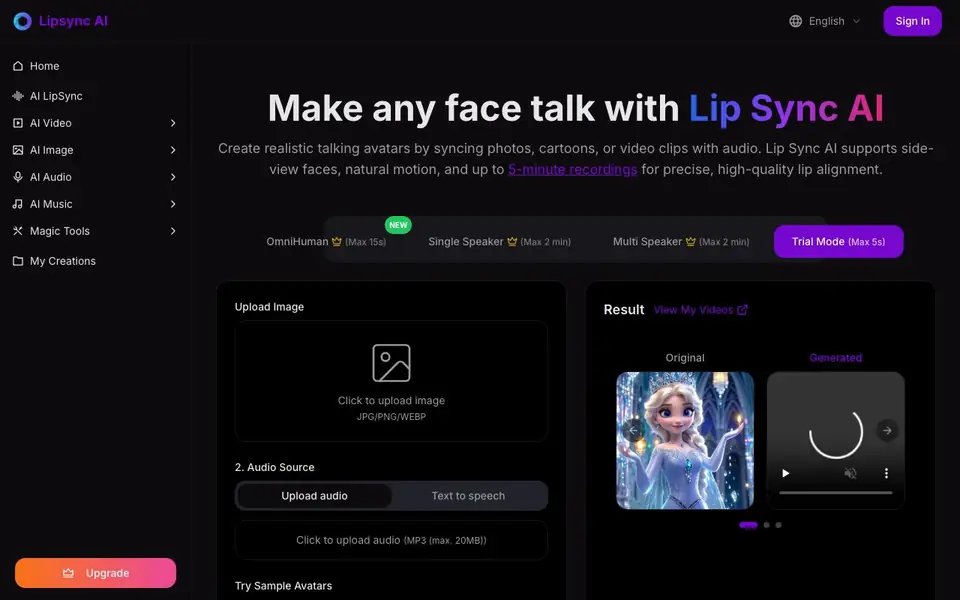
To use it, you upload an image or video, then add an audio file in MP3 format (up to 20MB). The AI analyzes the speech and generates matching lip movements. You can also try sample avatars or use trial mode for short 5-second clips. Text-to-speech is planned for a future update, so for now you need your own audio.
The tool suits presentations, marketing, and education. It handles non-human characters like cartoons and animals, preserves emotions, and outputs high-definition videos. Full-body avatars are supported too. Processing takes about 3-5 minutes for a 10-second video. You can use it commercially, and uploaded content is not used to train models.
Lipsync AI features
- Precise Mouth Animation: Analyzes audio to create accurate lip movements matching speech patterns and phonemes.
- Multi-language Support: Syncs lips to speech in various languages while keeping natural facial expressions.
- Emotion Preservation: Retains emotional context and facial expressions while adding synchronized lip movements.
- Full-Body Avatar Support: Creates animated videos with full-body characters, not just face close-ups.
- Rapid Generation Speed: Processes videos quickly with an optimized AI engine for fast turnaround.
What you can do with Lipsync AI
- Create talking avatars for marketing videos from a single photo.
- Animate cartoon characters or animals with accurate lip sync.
- Generate educational content with a lifelike presenter.
- Sync a video clip with a new audio track for presentations.
How to get started with Lipsync AI
- Upload a video or image of the face you want to animate.
- Add an audio file (MP3, up to 20MB) that will drive the lip movements.
- Click generate, preview your talking video, and download it.
Tips for better results with Lipsync AI
- Upload a high-resolution, front-facing image with clear lighting to help Lip Sync AI map mouth movements accurately and reduce artifacts in the final video.
- Keep your audio file under 20MB and use clean, noise-free MP3 speech so Lip Sync AI can match phonemes precisely without background interference.
- Test Lip Sync AI with a 5-second trial clip first to check lip alignment and emotion preservation before committing to longer recordings up to 5 minutes.
- For full-body avatars, choose a video clip with the whole body visible and minimal movement so Lip Sync AI can focus on syncing the mouth naturally.
- Use sample avatars to experiment with different languages and expressions in Lip Sync AI, then apply the same settings to your own uploads for consistent results.
Lipsync AI pricing
Lipsync AI has a free way to start, with paid plans for heavier use. Check lipsyncai.net for current limits and prices.
What to check before you rely on Lipsync AI
- Check whether the free plan includes the video length and audio size you need, since the website does not list specific limits for each mode.
- Verify the export formats and resolution available on your plan, as the website does not state which download formats are included for free users.
- Confirm the processing time for your video length, since the website only mentions 3-5 minutes for a 10-second clip and does not guarantee longer wait times.
Who Lipsync AI is for
Lipsync AI suits marketers, educators, content creators and presenters. If that is not you, the AI video generators below may fit better.
Similar tools compared with Lipsync AI
| Tool | What it is | Pricing |
|---|---|---|
| Lipsync AI | AI talking avatar and lip sync maker | Freemium |
| SiVideoGen | AI video generator with multiple models | Freemium |
| FreeSiTools | Free AI image prompt generator | Free |
| SiVideoAPI | Unified API for top AI video models | Freemium |
| Runway | AI video, image, and audio creation suite | Freemium |
Lipsync AI FAQ
How do I use Lip Sync AI?
Upload your video and audio files to the platform. The AI automatically syncs lip movements with the speech. Image uploads and text-to-speech are planned for future updates, so currently you need your own audio.
How long can the generated video be?
The video length matches your uploaded audio. If your audio is longer than the video, you need to trim it. If audio is shorter, the final video matches the audio length. Recordings up to 5 minutes are supported.
Can I use Lip Sync AI for commercial projects?
Yes, you can use it commercially for marketing videos, presentations, educational content, and entertainment. The service is designed for professional use across various industries.
How long does it take to generate a video?
Processing time depends on video length. A 10-second video typically takes about 3-5 minutes. Longer videos take proportionally more time. The website doesn't state exact times for longer videos.
What file formats can I upload to Lip Sync AI?
Lip Sync AI accepts images in JPG, PNG, or WEBP format, and audio files in MP3 format up to 20MB. You can upload either a photo or a video clip as the visual input, though the website does not specify video file format limits. Check the upload interface for exact options.
Does Lip Sync AI work on mobile devices?
The website does not mention specific device or platform support for Lip Sync AI. It appears to be a web-based tool that you access through a browser, so it may work on mobile browsers, but the site does not confirm this. For the best experience, try it on a desktop or laptop.
What does the free plan of Lip Sync AI include?
Lip Sync AI offers a trial mode that lets you generate short 5-second clips for free. The website also mentions a freemium pricing model, but it does not detail what other features or limits the free plan includes beyond trial mode. To see full free plan details, visit the upgrade or pricing page on the site.


