

What is Inkr?
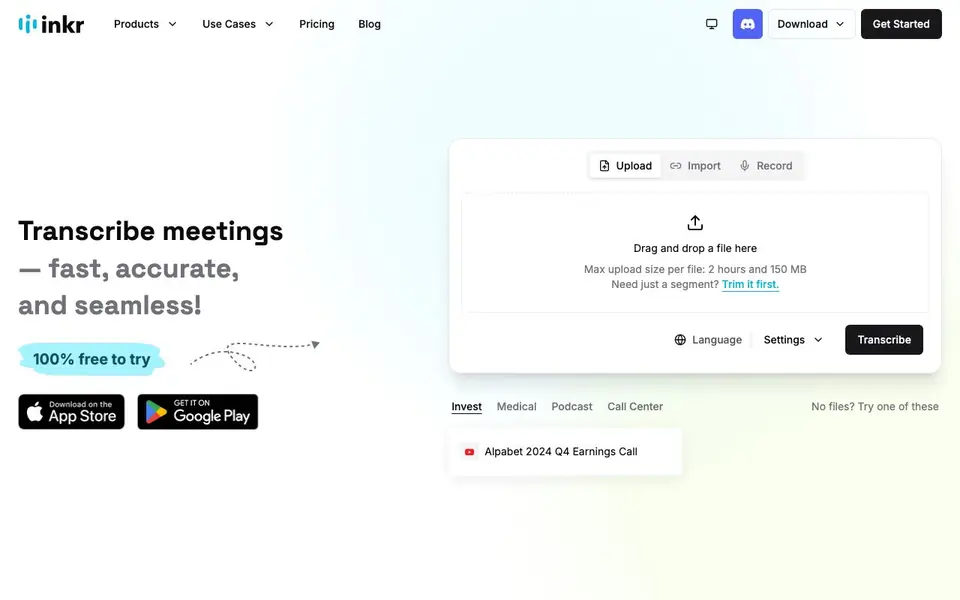
Inkr turns your audio and video files into clean, organized transcripts in minutes. It supports over 100 languages and identifies different speakers automatically, so you can easily follow who said what. You can upload files up to 2 hours and 150 MB, or record directly in the app.
To start, you drag and drop a file, trim it if you only need a segment, choose your language, and hit transcribe. Inkr claims to be 8x faster than some other models, delivering results in seconds. After transcription, you can edit individual words, ask questions about the content, and use templates to draft or polish notes.
The free plan gives you 120 minutes of transcription per week, with up to 35 minutes per file and two transcriptions daily. Paid plans start at about ¥10,260 per year and offer more hours, unlimited daily transcriptions, and watermark-free downloads. The mobile app is available on iOS and Android for on-the-go recording and transcription.
Inkr features
- Lightning-Fast Results: Transcribe long audio files into text in just a few minutes, saving you hours.
- Accept All Formats: Upload and export transcripts in all popular audio and video formats.
- Multilingual Support: Transcribe audio in over 100 languages to break cultural barriers.
- Speaker Identification: Automatically label different speakers in your transcript for clarity.
- Ask Inkr: Ask questions and get instant answers from your transcript using AI.
What you can do with Inkr
- Transcribe meeting recordings to capture every decision and action item.
- Convert podcast episodes into searchable text for show notes and clips.
- Turn medical dictations into accurate, organized patient notes.
- Analyze call center recordings to identify customer pain points and trends.
How to get started with Inkr
- Go to the Inkr website and drag and drop your audio or video file into the upload area.
- Trim the file if you only need a segment, select your language, and click Transcribe.
- Review the transcript, use Smart Edit to fix words, and export or share your notes.
Tips for better results with Inkr
- Trim your file before transcribing to focus only on the segment you need, saving time and staying within the 35-minute free file limit.
- Choose the correct language manually before hitting transcribe in Inkr to improve accuracy, especially for accented or technical speech.
- Use Inkr's Ask feature to query specific parts of your transcript instead of reading everything, speeding up review and note-taking.
- Export transcripts in your preferred format early, then edit words in Inkr, as the free plan only saves your last three edits per file.
Inkr pricing
Inkr has a free way to start, with paid plans for heavier use. Check inkr.app for current limits and prices.
What to check before you rely on Inkr
- Check the free plan's weekly 120-minute limit and daily two-transcription cap, as these reset periodically and may interrupt long projects.
- Verify the paid plan's actual cost in your currency, since the website shows only an estimated conversion and final charges vary on Stripe.
- Confirm whether the free plan's watermark on downloads is acceptable for your use, as removing it requires a paid subscription.
Who Inkr is for
Inkr suits journalists, researchers, podcasters and business professionals. If that is not you, the AI transcription tools below may fit better.
Similar tools compared with Inkr
| Tool | What it is | Pricing |
|---|---|---|
| Inkr | AI audio and video transcription tool | Freemium |
| Otter.ai | AI meeting notetaker and transcription tool | Freemium |
| Fireflies.ai | AI meeting assistant for transcription and notes | Freemium |
| Fathom | AI notetaker for online meetings | Freemium |
| Turboscribe | Unlimited audio and video transcription | Freemium |
Inkr FAQ
Is Inkr free to use?
Yes, Inkr has a free forever plan that gives you 120 minutes of transcription per week. It allows up to 35 minutes per file and two transcriptions per day, with watermark-free downloads.
What languages does Inkr support?
Inkr supports transcription in over 100 languages. You can select your language in the settings before transcribing, making it suitable for global teams and multilingual content.
Can I transcribe live meetings with Inkr?
Yes, Inkr offers live transcription as a paid feature. You can record and transcribe in real time using the app, which is useful for meetings and events where you need instant notes.
What file formats and sizes can I upload?
Inkr accepts all popular audio and video formats. The maximum upload size per file is 2 hours and 150 MB. If you only need a segment, you can trim the file before transcribing.
Can I use Inkr on my phone or tablet?
Yes, Inkr has a mobile app available for iOS and Android. You can record audio directly in the app and transcribe on the go. The website also mentions downloading from the App Store and Google Play, so you can use Inkr on your smartphone or tablet.
Does Inkr let me export transcripts to Word, PDF, or other formats?
Inkr's website says it supports uploading and exporting transcripts in all popular audio and video formats. It does not specify document formats like Word or PDF. For exact export options, check the app's export menu or the pricing page for details.
Is Inkr suitable for journalists or researchers who need to analyze interviews?
Yes, Inkr can help you transcribe interviews quickly and identify different speakers automatically. You can also ask questions about the transcript using the Ask Inkr feature. The free plan includes 120 minutes per week, which may be enough for smaller projects. For heavy use, paid plans offer more hours.


