

What is ImagineGo?
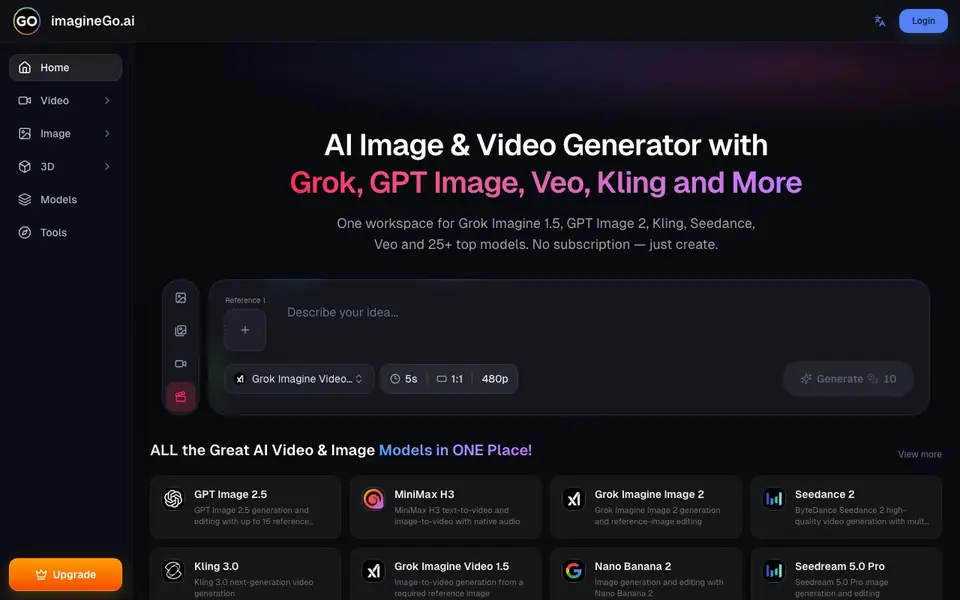
ImagineGo is a single platform that brings together many leading AI image and video models. You can generate visuals with Grok Imagine, GPT Image, Veo, Kling, Seedance, and more. Instead of paying for separate subscriptions, you buy credits once and use them across all available models.
To create, you pick a model and choose your input. For videos, you can use text-to-video or image-to-video. For images, you can use text-to-image or image-to-image. The interface shows options like duration, aspect ratio, and resolution. You generate, then view or download your result.
It suits creators who want flexibility and access to many models without committing to multiple paid plans. The website lists models like GPT Image 2.5, MiniMax H3, Kling 3.0, and Seedream 5.0 Pro. It does not state a free tier, but the pricing page likely explains credit costs.
ImagineGo features
- Multiple models: Access 25+ top AI models for images and videos in one place.
- No subscription: Buy credits once and use them across all models, no recurring fees.
- Text to video: Generate videos from a text prompt using models like Veo and Kling.
- Image to video: Turn a reference image into a video with models like Grok Imagine Video 1.5.
- Image editing: Use GPT Image 2.5 or Nano Banana 2 to generate and edit images with reference images.
What you can do with ImagineGo
- Create marketing videos from text prompts using Veo or Kling.
- Generate product images with GPT Image 2.5 for your online store.
- Turn a photo into a short animated clip with image-to-video models.
- Edit an existing image by providing reference images to Nano Banana 2.
How to get started with ImagineGo
- Go to ImagineGo's website and log in or create an account.
- Choose a model from the video or image sections, like Veo or GPT Image.
- Enter your text prompt or upload a reference image, then generate and download your result.
Tips for better results with ImagineGo
- Pick the model that matches your task, like Veo for text-to-video or GPT Image 2.5 for editing, since ImagineGo hosts many options with different strengths.
- Set the duration, aspect ratio, and resolution before generating on ImagineGo, because these choices directly affect the output quality and credit usage.
- Use image-to-video with a clear reference image on ImagineGo to get more consistent motion, especially with models like Grok Imagine Video 1.5.
- Experiment with the same prompt across different models in ImagineGo, like Kling versus Seedance, to see which style fits your project best.
ImagineGo pricing
ImagineGo has a free way to start, with paid plans for heavier use. Check imaginego.ai for current limits and prices.
What to check before you rely on ImagineGo
- Check whether the free tier actually exists, since the website does not state one despite the freemium label, and confirm credit costs on the pricing page.
- Verify if generated images or videos have watermarks, as the FAQ mentions the question but the website does not provide a clear answer.
- Confirm commercial usage rights and export formats before relying on ImagineGo for client work, since the site does not list these details explicitly.
Who ImagineGo is for
ImagineGo suits content creators, marketers, designers and small business owners. If that is not you, the AI video generators below may fit better.
Similar tools compared with ImagineGo
| Tool | What it is | Pricing |
|---|---|---|
| ImagineGo | AI image and video generator hub | Freemium |
| SiVideoGen | AI video generator with multiple models | Freemium |
| FreeSiTools | Free AI image prompt generator | Free |
| SiVideoAPI | Unified API for top AI video models | Freemium |
| Runway | AI video, image, and audio creation suite | Freemium |
ImagineGo FAQ
How do I get started with ImagineGo?
You visit the website, log in or sign up, then pick a model and a mode like text-to-video or image-to-image. You enter your prompt or upload an image, and generate. The site does not detail a free plan, but you likely need credits.
Is ImagineGo free to use?
The website says there is no subscription, meaning you pay per generation with credits. It does not explicitly state if there is a free tier. Check the Pricing page for credit costs and any free credits.
What models can I use?
ImagineGo offers 25+ models, including Grok Imagine 1.5, GPT Image 2.5, Veo 3.1 Lite, Kling 3.0, Seedance 2, MiniMax H3, and Seedream 5.0 Pro. You can switch between them without separate subscriptions.
Can I use ImagineGo for commercial purposes?
The website lists a question about commercial use in its FAQ, but the visible text does not provide the answer. You should check the FAQ section or Terms of Service on the site for details.
Does ImagineGo offer a free plan or trial credits?
ImagineGo is labeled as freemium, but the website does not explicitly state whether a free tier or trial credits are available. To find out if you can start without paying, check the pricing page or contact support at support@imaginego.ai for the most accurate information.
What can I export or download from ImagineGo?
ImagineGo lets you generate images and videos, and you can view or download your results directly from the interface. The website does not mention specific export formats or integrations with other platforms. For details on available download options, refer to the FAQ or contact support.
Which devices or platforms does ImagineGo run on?
ImagineGo is a web-based platform, so you can access it through a browser on any device with an internet connection. The website does not mention dedicated mobile apps or desktop software. For the best experience, use a modern browser on a computer or tablet.


