

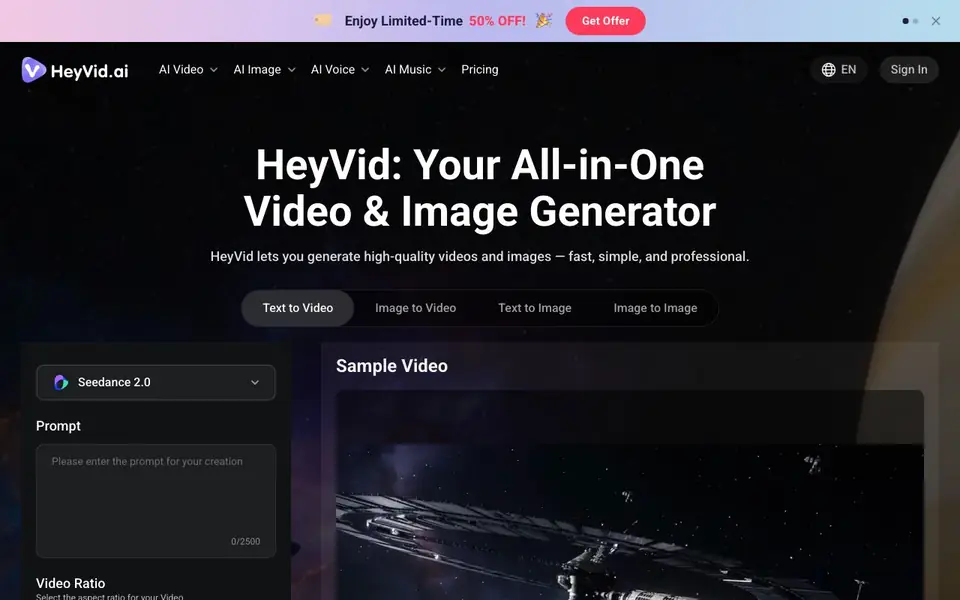
What is HeyVid?
HeyVid is an all-in-one creative studio that lets you generate videos and images from text prompts or uploaded images. It gives you access to 18+ leading AI models, including Kling, Sora, Runway, Midjourney, and Flux, so you can pick the best one for each project. The platform also includes AI voice and AI music tools, covering more of your content creation needs.
To create, you describe your vision in plain language or upload an image, choose your preferred model, and adjust settings like aspect ratio, resolution, and duration. The platform handles the rest, producing professional-quality results in moments. You can generate audio for your videos too, adding sound effects to match the visuals.
HeyVid is built for beginners and professionals alike, with intuitive controls that adapt to your skill level. It serves YouTubers, marketers, educators, artists, and developers. The website mentions it is used by millions of creators worldwide, and it currently offers a limited-time 50% discount on pricing.
HeyVid features
- Multi-model access: Choose from 18+ top video and image models like Kling, Sora, Runway, and Midjourney.
- Text to video: Turn your written descriptions into professional-looking videos without filming or editing.
- Image to video: Animate your still images into moving video content with a few clicks.
- Text to image: Generate stunning visuals from natural language prompts in seconds.
- AI voice and music: Access voice generation and music tools alongside video and image creation.
What you can do with HeyVid
- Create pitch decks and product launch videos for your startup.
- Produce ad campaigns and social media content for marketing agencies.
- Build course content and tutorials for online education.
- Generate YouTube videos, short-form content, and thumbnails for social media.
How to get started with HeyVid
- Sign in to HeyVid and choose a creation mode like text to video or image to image.
- Enter your prompt or upload an image, then select your preferred AI model and settings.
- Generate your content and download or refine it within the platform.
Tips for better results with HeyVid
- Start with a specific, detailed prompt that describes scene, mood, and style, then test the same prompt across different models like Kling or Sora to see which output fits your project best.
- Use HeyVid's image-to-video feature by uploading a clear, high-resolution still image, then animate it with your chosen model to get more controlled and predictable motion than text-only prompts.
- Before generating, set the aspect ratio and resolution to match your final platform, such as 9:16 for vertical social clips or 16:9 for YouTube, to avoid cropping or rework later.
- For videos with narration or effects, enable the Generate Audio option in HeyVid to add sound effects in the same workflow, saving you from syncing audio separately afterward.
HeyVid pricing
HeyVid has a free way to start, with paid plans for heavier use. Check heyvid.ai for current limits and prices.
What to check before you rely on HeyVid
- Check the credit system and what the free tier includes, since the website lists a 50% discount but does not state exact credit costs or limits for each model.
- Verify whether the model you want, like Sora or Runway, is available on your current plan, as the site does not specify which models are restricted to paid tiers.
- Review the export formats and resolution options before committing, since the interface only shows 480p and 720p options, and the site does not list available file types or higher resolutions.
Who HeyVid is for
HeyVid suits entrepreneurs, marketers, educators, developers and creators. If that is not you, the AI video generators below may fit better.
Similar tools compared with HeyVid
| Tool | What it is | Pricing |
|---|---|---|
| HeyVid | All-in-one AI video and image generator | Freemium |
| SiVideoGen | AI video generator with multiple models | Freemium |
| FreeSiTools | Free AI image prompt generator | Free |
| SiVideoAPI | Unified API for top AI video models | Freemium |
| Runway | AI video, image, and audio creation suite | Freemium |
HeyVid FAQ
What AI models does HeyVid support?
HeyVid gives you access to 18+ top models. For video, it includes Seedance 2, Kling AI, Veo 3, Sora 2, Runway, Hailuo AI, Pika AI, and more. For images, it offers Midjourney, Flux AI, GPT-4o, Imagen, DALL-E, Stable Diffusion, and others.
Is HeyVid free to use?
The website describes HeyVid as a free AI video and image generator, and it currently advertises a limited-time 50% discount. For exact pricing details and free credit amounts, check the pricing page on HeyVid's website.
Can I generate videos from my own images?
Yes. HeyVid includes an image-to-video animation tool. You upload your image, and the platform animates it into video content. You can also use image-to-image to refine or stylize existing images.
Who is HeyVid best suited for?
HeyVid is built for creators of all backgrounds, including YouTubers, marketers, educators, artists, and developers. It also serves entrepreneurs and businesses for pitch decks, product launches, and brand stories. The controls adapt to both beginners and professionals.
What can HeyVid export or connect to?
HeyVid lets you generate videos and images, but the website does not mention specific export formats or integrations with other platforms. To see if your workflow is supported, check the HeyVid help center or contact support for details on downloading and connecting your projects.
Does HeyVid work on mobile devices?
HeyVid is described as an all-in-one creative studio, but the website does not specify whether it has mobile apps or runs on tablets. It appears to be web-based, so you can likely use it in a browser on any device. For confirmation, check the HeyVid site for system requirements.
What does the HeyVid free plan include?
HeyVid is labeled as freemium, but the website does not detail what the free plan offers or its limits. You can try generating content, but credits may be required for each generation. To know exactly what you get for free, visit the HeyVid pricing page.


