

What is Free AI Video Maker & Generator?
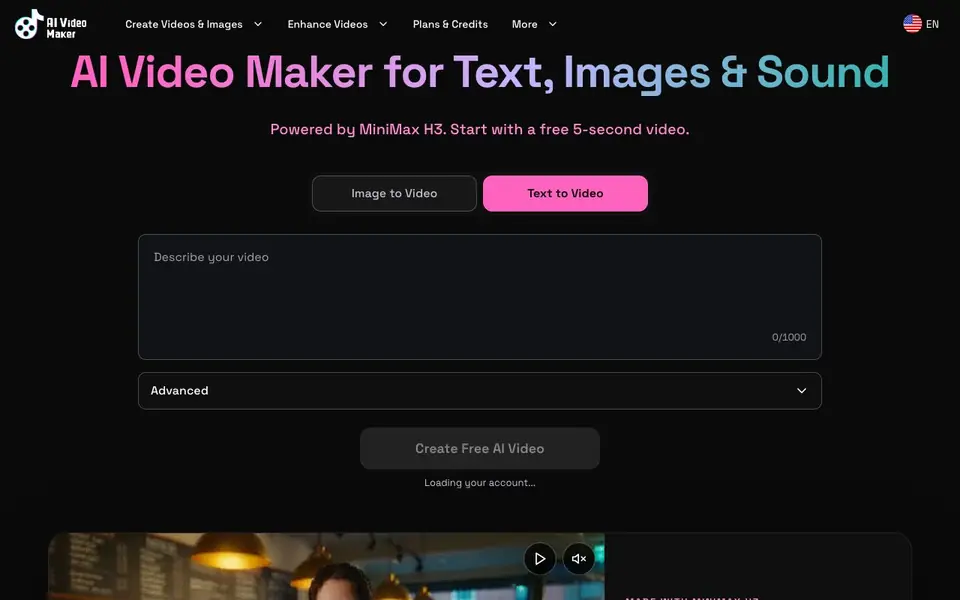
AI Video Maker is a web-based tool that creates short videos from your text prompts or uploaded images. It is powered by the MiniMax H3 model, which generates visuals and native audio together, so speech, expressions, and background sounds match the scene. You can start with a free 5-second draft at 480p, then upgrade to publish higher-quality clips.
To create a video, you describe a scene or upload a starting frame. The tool then generates a draft you can review. If you like it, you can upgrade the clip for higher resolution and more concurrent jobs. The workflow also includes an image prep path, where you can restyle, clean up, expand, or combine images before turning them into video.
The tool suits creators who want quick drafts and polished final clips. It also offers a video extender to lengthen your footage with AI-generated content. The website mentions commercial use is possible, but does not detail the exact terms. Pricing starts free, with paid plans for HD and extra jobs.
For anyone making social media clips, product shots, or cinematic scenes, this tool combines generation and enhancement in one place. The FAQ covers common questions about the model, resolutions, and watermark removal.
Free AI Video Maker & Generator features
- Text to video: Turn a written scene description into a short AI-generated video clip.
- Image to video: Upload a starting frame and let the AI animate it with motion and sound.
- Native audio: Generate dialogue, speech, and ambient sound together with the visuals.
- Free drafts: Create unlimited 5-second 480p previews before deciding what to upgrade.
- Video extender: Lengthen your existing clips with AI-generated continuation content.
What you can do with Free AI Video Maker & Generator
- Create quick social media clips from text prompts or images.
- Generate product shots with realistic motion and background audio.
- Extend short footage into longer scenes for storytelling.
- Prepare source images by restyling or cleaning them before video generation.
How to get started with Free AI Video Maker & Generator
- Go to the website and choose Text to Video or Image to Video.
- Type a scene description or upload a starting image, then click Create Free AI Video.
- Review your 480p draft, then upgrade the clips you want to publish at higher quality.
Tips for better results with Free AI Video Maker & Generator
- Describe your scene in detail, including lighting, camera movement, and character actions, to get a more accurate draft from AI Video Maker.
- Use the image prep path in AI Video Maker to clean up or restyle your starting frame before generating, so the final video looks polished.
- Generate multiple free 5-second drafts at 480p with AI Video Maker to compare options, then upgrade only the clips you want to publish.
- Try the video extender in AI Video Maker on your strongest clips to add length, but review the AI-generated continuation for consistency.
- checks
Free AI Video Maker & Generator pricing
Free AI Video Maker & Generator has a free way to start, with paid plans for heavier use. Check aivideomaker.ai for current limits and prices.
What to check before you rely on Free AI Video Maker & Generator
- Check the free plan limits: you get unlimited 5-second 480p drafts, but the website does not state how many upgrades or HD clips are included.
- Verify commercial use terms before publishing paid work, as the website mentions commercial use is possible but does not detail exact conditions.
- Confirm your export format and resolution options before relying on the tool, since the website does not list supported file types or download specs.
Who Free AI Video Maker & Generator is for
Free AI Video Maker & Generator suits content creators, social media managers, marketers and video editors. If that is not you, the AI video generators below may fit better.
Similar tools compared with Free AI Video Maker & Generator
| Tool | What it is | Pricing |
|---|---|---|
| Free AI Video Maker & Generator | AI video maker with native sound | Freemium |
| SiVideoGen | AI video generator with multiple models | Freemium |
| FreeSiTools | Free AI image prompt generator | Free |
| SiVideoAPI | Unified API for top AI video models | Freemium |
| Runway | AI video, image, and audio creation suite | Freemium |
Free AI Video Maker & Generator FAQ
What is MiniMax H3?
MiniMax H3 is the AI model that powers this video maker. It generates video frames and native audio together, so dialogue, expressions, and ambient sound match the scene you describe.
Is there a free plan?
Yes. You can start with a free 5-second video draft at 480p resolution. The website says you can create unlimited free drafts, then upgrade to HD and more concurrent jobs with a paid plan.
Can I use my videos commercially?
The website lists commercial use as a FAQ topic and implies it is allowed, but it does not spell out the exact terms on the homepage. Check the Plans & Credits or Terms of Service pages for details.
Does it support text-to-video and image-to-video?
Yes. The tool offers both creation paths. You can describe a scene in text or upload a starting image, and the AI will generate a video clip with motion and native sound.
What devices or platforms does AI Video Maker run on?
AI Video Maker is a web-based tool, so you can use it in any modern web browser on a computer, tablet, or phone. The website does not mention dedicated desktop or mobile apps. For the best experience, check the site's system requirements or contact support if you have specific device questions.
Does AI Video Maker offer a free plan and what does it include?
Yes, AI Video Maker has a free plan. With it, you can create unlimited 5-second video drafts at 480p resolution. To publish higher-quality clips or run more concurrent jobs, you need to upgrade to a paid plan. The website does not specify other free plan limits, so check the Plans & Credits page for details.
Can I use AI Video Maker for commercial projects like product ads?
AI Video Maker is suitable for creating product shots and social media clips, and the website mentions commercial use is possible. However, it does not detail the exact terms or licensing. For full clarity on commercial rights, review the Terms of Service or contact support before using your videos in paid projects.


