
What is Eyesrhythm?
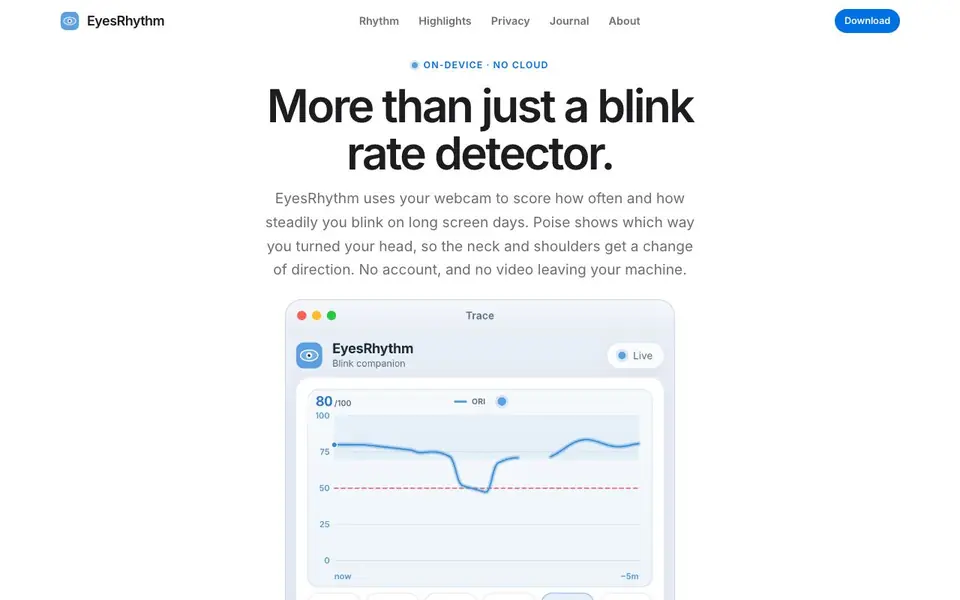
EyesRhythm is a free desktop app for Mac and Windows that uses your webcam to monitor how often and how steadily you blink while you work. It scores your blinking into an Ocular Rhythm Index (ORI) from 0 to 100, combining rate and regularity. The app also includes Poise, a dial that shows which directions you turned your head, encouraging you to vary your posture.
The app runs entirely on your device. No account, license key, or cloud upload is needed. Camera frames never leave your computer. You can see a live graph of your last five minutes of blinking, plus your daily blink count and screen time. Visual alerts appear as a quiet orange pulse, or you can enable sound alerts and optional beeps on each blink.
A two-minute Practice mode paces your blinks to help build muscle memory. The compact window stays beside your work, and you can open Settings and Reports in separate panels. EyesRhythm is a wellness companion, not a medical device. If you have lasting eye discomfort, the developer recommends seeing an eye-care professional.
Eyesrhythm features
- Ocular Rhythm Index: Scores your blink rate and regularity together on a 0 to 100 scale.
- Live blink graph: Shows the last five minutes of your blink rhythm in real time.
- Poise head dial: Displays which 30-degree directions you looked, with green for visited and red for skipped.
- Visual and sound alerts: Get a quiet orange pulse by default, or switch to sound alerts and optional beeps.
- Practice mode: A guided two-minute session that paces your blinks to build a healthier habit.
What you can do with Eyesrhythm
- Monitor your blink rate during long coding or writing sessions to prevent eye strain.
- Use Poise to remind yourself to turn your head in all directions throughout the day.
- Practice daily blinking exercises to build muscle memory for healthier screen habits.
- Track your screen time and blink totals to see patterns in your desk work.
How to get started with Eyesrhythm
- Download the free app for macOS or Windows from the website.
- Drag the app into your Applications folder on Mac, or run the Setup on Windows.
- Launch EyesRhythm and let it access your webcam to start tracking your blink rate and head movement.
Tips for better results with Eyesrhythm
- Place the EyesRhythm window beside your main work and keep the camera preview hidden so the app stays unobtrusive while it tracks your blink rhythm.
- Use the Practice mode daily for two minutes to build muscle memory for steadier blinking, and watch your Ocular Rhythm Index improve over time.
- Switch to sound alerts or enable beeps if you miss the visual pulse, so EyesRhythm can nudge you even when you are focused on the screen.
- Check the Poise dial periodically and deliberately turn your head through red directions to vary your posture and reduce neck strain during long sessions.
Eyesrhythm pricing
Eyesrhythm is free to use according to its website.
What to check before you rely on Eyesrhythm
- Confirm that your webcam is positioned to clearly see your eyes, since EyesRhythm relies on camera frames to calculate your blink rate and ORI score.
- Note that the website does not list system requirements or supported webcam models, so verify compatibility with your Mac or Windows device before relying on it.
- The site states no account or cloud upload is needed, but it does not specify how long data is stored locally or whether reports can be exported.
Who Eyesrhythm is for
Eyesrhythm suits desk workers, developers, students and remote professionals. If that is not you, the AI productivity tools below may fit better.
Similar tools compared with Eyesrhythm
| Tool | What it is | Pricing |
|---|---|---|
| Eyesrhythm | Webcam blink rate and posture tracker | Free |
| Mem | AI chief of staff and workspace | See website |
| Reclaim | AI calendar for work and life | Freemium |
| Otter.ai | AI meeting notetaker and transcription tool | Freemium |
| Motion | AI-powered productivity and project platform | Free trial |
Eyesrhythm FAQ
What is a blink rate detector?
It's a tool that uses your webcam to count how often you blink while you're at the screen. EyesRhythm also measures how regularly you blink, combining both into a single score called the Ocular Rhythm Index.
Does EyesRhythm work with a laptop webcam?
Yes, it works with standard laptop webcams. The app is tested on Intel Core i7 and Mac processors. It uses your camera locally to detect blinks and head movement.
Does any video leave my computer?
No. The app runs entirely on your device. Camera frames never leave your machine, and there is no cloud upload, analytics, or account required. Your data stays in a local folder.
Is EyesRhythm a medical device?
No, it's a wellness companion, not a medical device. It helps you build healthier screen habits, but if you have lasting eye discomfort, you should consult an eye-care professional.
Does EyesRhythm run on both Mac and Windows?
Yes, EyesRhythm is a desktop app available for both Mac and Windows. It uses your built-in webcam and works entirely on your device, so you don't need an account or an internet connection for it to function.
What does the free plan of EyesRhythm include?
EyesRhythm is completely free. There are no paid tiers or hidden costs. You get all features, including the Ocular Rhythm Index, live blink graph, Poise head dial, visual and sound alerts, Practice mode, and screen time tracking, without any subscription or license key.
Can EyesRhythm export my blink data or connect to other apps?
The EyesRhythm website does not mention any export options or integrations with other apps. It focuses on on-device tracking and displaying your data in its own interface. For specific details about data export or connections, check the app's settings or contact the developer.


