

What is Elser AI?
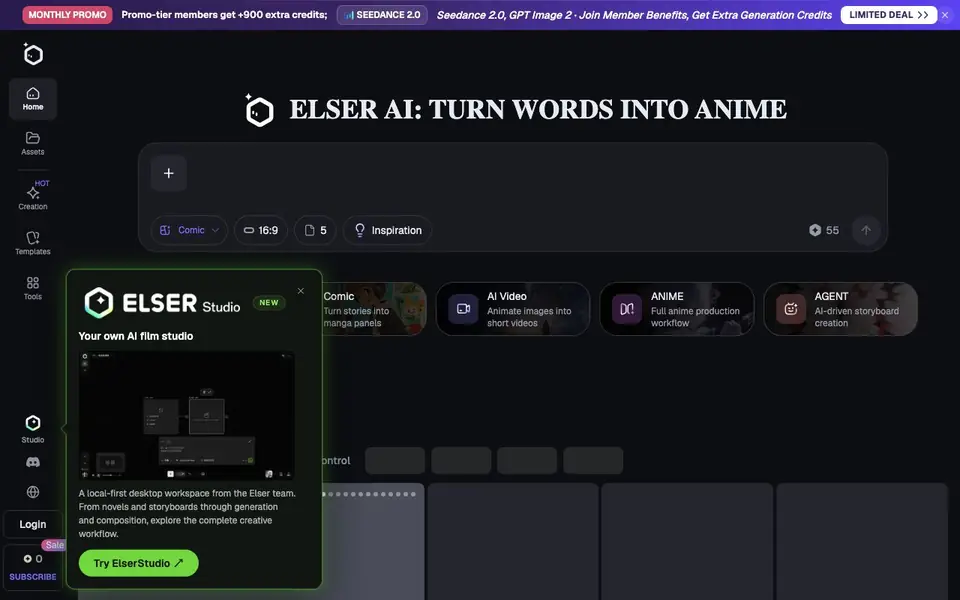
Elser AI is an all-in-one platform for creating anime-style content. You can generate images, videos, sound effects, and characters from text prompts. It also includes a comic maker that turns stories into manga panels, and an agent-driven storyboard creation workflow.
You start by typing a description of the character or scene you want. The AI image generator creates anime-style visuals, and the video generator animates those images into short clips. For bigger projects, the full anime production workflow guides you from script to storyboard to final video. The desktop app, ElserStudio, offers a local-first workspace for the complete creative process.
It suits creators who want consistent anime characters, fan art for popular franchises, or full video productions. The site lists many templates for specific styles, such as Sonic, Demon Slayer, Genshin, and Pokemon OC makers. No drawing, animation, or design skills are needed. The platform is free to start, with promo-tier members receiving extra credits each month.
Elser AI features
- AI Image Generator: Creates anime-style images from your text descriptions.
- AI Video Generator: Animates your images into short videos with motion.
- AI Character Generator: Designs consistent original characters (OCs) from prompts.
- AI Storyboard Generator: Builds storyboards automatically from your script.
- AI Sound Effect Generator: Produces sound effects to match your scenes.
What you can do with Elser AI
- Create original anime characters for your stories.
- Turn a script into a full anime video production.
- Generate fan art for popular franchises like Sonic or Genshin.
- Make manga panels from your written story ideas.
How to get started with Elser AI
- Type a text description of the character or scene you want.
- Use the AI image generator to create anime-style visuals.
- Animate your images into videos or build a storyboard from your script.
Tips for better results with Elser AI
- Start with a detailed character description in Elser AI, including hair, outfit, and pose, to get consistent anime-style results across images and videos.
- Use Elser AI's storyboard generator to plan your script visually before generating final scenes, saving credits and reducing rework.
- Try Elser AI's templates like Sonic or Genshin OC makers to quickly create fan art, then customize the prompt for unique variations.
- For full anime productions, work through Elser AI's script-to-storyboard workflow step by step, reviewing each stage before moving to video generation.
- checks
Elser AI pricing
Elser AI has a free way to start, with paid plans for heavier use. Check elser.ai for current limits and prices.
What to check before you rely on Elser AI
- Check whether the free tier includes enough credits for your project size, since the site mentions promo-tier credits but not exact free limits.
- Verify if Elser AI allows commercial use of generated content, as the FAQ mentions it but the website does not state the terms clearly.
- Confirm export formats and download options for images, videos, and storyboards, as the site does not list specific file types or resolutions.
Who Elser AI is for
Elser AI suits anime fans, content creators, storytellers and fan artists. If that is not you, the AI video generators below may fit better.
Similar tools compared with Elser AI
| Tool | What it is | Pricing |
|---|---|---|
| Elser AI | AI anime generator and OC maker | Freemium |
| SiVideoGen | AI video generator with multiple models | Freemium |
| FreeSiTools | Free AI image prompt generator | Free |
| SiVideoAPI | Unified API for top AI video models | Freemium |
| Runway | AI video, image, and audio creation suite | Freemium |
Elser AI FAQ
What can Elser AI create?
You can generate anime images, videos, sound effects, and characters from text. It also has tools for comics, manga, storyboards, voice cloning, and video enhancement. Templates for specific styles like Sonic or Genshin are included.
Is Elser AI free to use?
The site says it is free to start. Promo-tier members get over 900 extra credits each month. For full details on pricing and credit limits, check the subscription options on Elser AI's website.
Do I need drawing skills to use it?
No. The website states that no drawing, animation, or design skills are needed. You just type what you want, and the AI generates the anime art, characters, or videos for you.
Can I use Elser AI for commercial projects?
The website does not clearly state the commercial usage terms. You should review the terms of service or contact the team directly to confirm whether your projects can be used commercially.
Does Elser AI have a desktop app or is it only web-based?
Elser AI offers a desktop app called ElserStudio, which provides a local-first workspace for the complete creative process. The website also mentions a Studio section, but it does not specify if the web version has all features. Check the app download page for platform details.
What can I export from Elser AI and where can I share my creations?
Elser AI lets you download or share anime art, OC designs, and fanart, as stated in its FAQ. The website does not list specific export formats or direct sharing integrations. For details on file types or social media connections, check the app's export options or help center.
What does the free plan of Elser AI include and how do credits work?
Elser AI is free to start, and promo-tier members receive extra credits each month, like +900 credits. The website does not specify the exact number of free credits for the basic plan or what actions consume credits. For precise limits, see the pricing or subscription page.


