

What is Elephas?
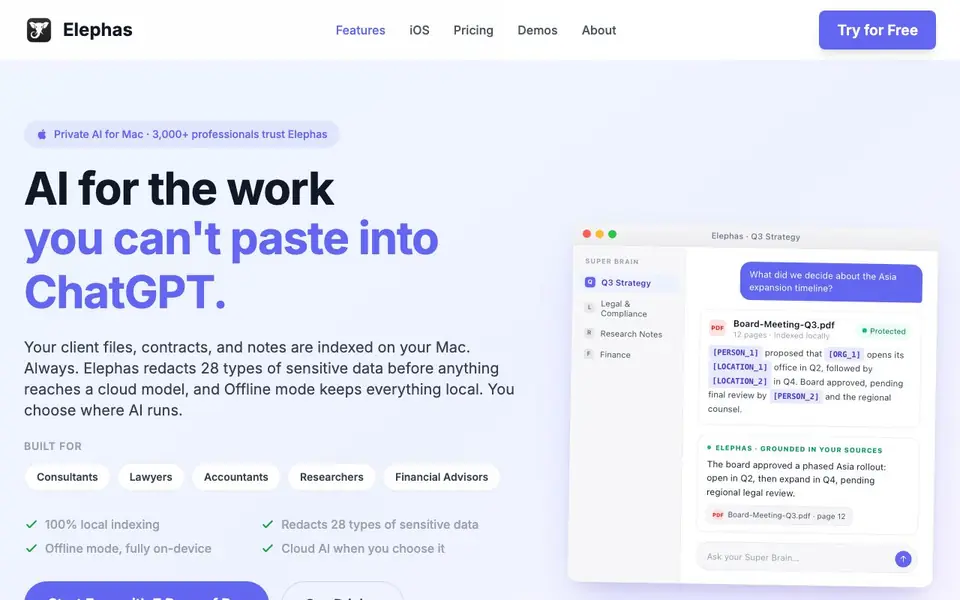
Elephas is a personal knowledge assistant for Mac, iPhone, and iPad. It indexes your PDFs, contracts, notes, and other documents on your device. You can then ask questions and get answers grounded in your own files, without pasting content into a general chatbot.
To get started, you install Elephas and let it index your documents locally. You can create specialized "brains" from specific files or folders, like client engagements or research libraries. When you ask a question, Elephas searches your indexed content and provides answers with citations. It redacts 28 types of sensitive data before any cloud call, and Offline mode runs AI entirely on your Mac.
Elephas suits professionals who handle confidential material, such as consultants, lawyers, accountants, researchers, and financial advisors. It works with GPT-5, Claude, and Gemini when you choose cloud AI. A free 7-day Pro trial is available, and Windows support is coming soon.
Elephas features
- Local indexing: Your documents are indexed on your Mac, so custody of files never changes hands.
- Data redaction: 28 types of sensitive data are redacted on your Mac before any cloud AI call.
- Offline mode: Runs AI entirely on your Mac when nothing should leave the room.
- Specialized brains: Create custom knowledge bases from your own files, notes, and web pages.
- Multi-model support: Works with GPT-5, Claude, and Gemini for cloud AI when you choose it.
What you can do with Elephas
- Ask questions about client contracts and get answers with page citations.
- Summarize board meeting PDFs and extract decisions with sources.
- Create a research brain from unpublished papers and reference PDFs.
- Review tax memos and audit prep without sending client data to cloud AI.
How to get started with Elephas
- Download Elephas from the App Store and start a free 7-day Pro trial.
- Let Elephas index your documents locally on your Mac.
- Create a specialized brain from your files and ask questions to get grounded answers.
Tips for better results with Elephas
- Create specialized brains from specific folders like client engagements or research libraries so Elephas answers from the most relevant documents instead of your entire index.
- Turn on Offline mode when handling highly confidential material, and verify Elephas still answers correctly with Wi-Fi disabled before you rely on it in a sensitive meeting.
- Review the citations Elephas provides for each answer, and open the cited page to confirm the website actually supports the claim before you use it in a deliverable.
- Use the data redaction feature for any cloud AI call, and test it with a sample document containing fake personal data to see what gets masked before you send real files.
Elephas pricing
Elephas has a free way to start, with paid plans for heavier use. Check elephas.app for current limits and prices.
What to check before you rely on Elephas
- Check whether the free plan includes offline mode and local indexing, or if those require the Pro trial, since the website does not state the free tier's exact limits.
- Confirm that Elephas supports the file types you work with daily, like scanned PDFs or spreadsheets, because the website only mentions PDFs, contracts, and notes.
- Verify how long the 7-day Pro trial lasts and what happens after it ends, since the website does not list the price or what features remain free.
Who Elephas is for
Elephas suits consultants, lawyers, accountants, researchers and financial advisors. If that is not you, the AI productivity tools below may fit better.
Similar tools compared with Elephas
| Tool | What it is | Pricing |
|---|---|---|
| Elephas | AI knowledge assistant for Mac | Freemium |
| Mem | AI chief of staff and workspace | See website |
| Reclaim | AI calendar for work and life | Freemium |
| Otter.ai | AI meeting notetaker and transcription tool | Freemium |
| Motion | AI-powered productivity and project platform | Free trial |
Elephas FAQ
How does Elephas keep my data private?
Elephas indexes your files locally on your Mac. It redacts 28 types of sensitive data before any cloud call, and Offline mode runs AI entirely on your device. You choose where AI runs.
Is there a free plan?
Elephas offers a free 7-day Pro trial with no credit card required. The website does not state whether a free plan exists after the trial, so check its pricing page for current options.
Who is Elephas for?
It is built for professionals who handle confidential documents, including consultants, lawyers, accountants, researchers, and financial advisors. It also suits anyone with private notes or journals.
What can I do with Elephas?
You can index PDFs, contracts, notes, and web pages, then ask questions and get answers with citations. You can create specialized brains from your own files for different projects or fields.
Can Elephas export answers or citations to other apps?
The Elephas website does not mention export options or direct integrations with other apps. To see if you can copy, share, or save answers and citations, check the app's documentation or contact support. You can also try the free 7-day Pro trial to explore its features.
Does Elephas work on Windows or Android?
Elephas is built for Mac, iPhone, and iPad. The website says Windows support is coming soon, but it does not mention Android. For the latest platform availability, check the Elephas website or join the Windows waitlist if you need that version.
What does the free plan of Elephas include?
Elephas offers a free 7-day Pro trial with no credit card required. The website does not specify what the free plan includes after the trial. For details on ongoing free access, check the pricing page or contact Elephas support directly.


