

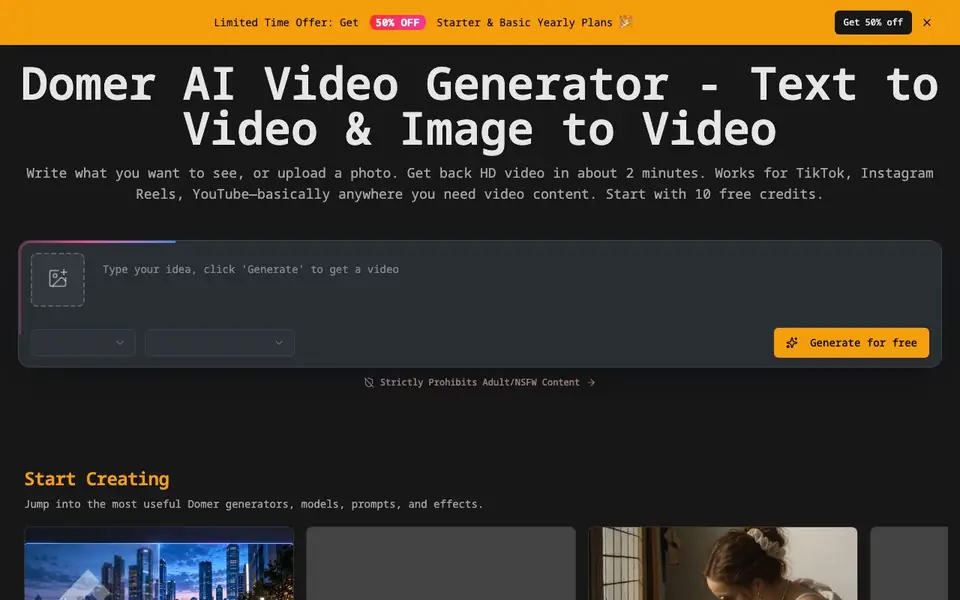
What is Domer?
Domer is an AI video generator that turns your written prompts or uploaded photos into HD videos in about two minutes. It is designed for social media content, so the videos work for TikTok, Instagram Reels, YouTube, and similar platforms. You can start with 10 free credits, and the service explicitly prohibits adult or NSFW content.
To use Domer, you write what you want to see in a video or upload a photo. The tool then generates a video based on your input. It offers a range of generators and models, including options like Seedance, Wan, and MiniMax, plus specialized tools like an AI video watermark remover and motion control. You can also browse trending prompts from top creators to get ideas.
Domer suits content creators, marketers, and anyone who needs quick video clips without editing skills. The free credits let you try it before paying, and there are paid plans for more usage. The website does not detail specific video lengths, resolution options, or export formats, so check the pricing page for those details.
Domer features
- Text to video: Turn your written description into a video in about two minutes.
- Image to video: Upload a photo and have it turned into a video clip.
- Free credits: Start with 10 free credits to try the tool without paying.
- Multiple AI models: Choose from models like Seedance, Wan, and MiniMax for different styles.
- Watermark remover: Remove watermarks from videos with a dedicated tool.
What you can do with Domer
- Create TikTok videos from text prompts in minutes.
- Turn product photos into short promotional clips for Instagram Reels.
- Generate YouTube content ideas using trending video prompts.
- Remove watermarks from existing videos before repurposing them.
How to get started with Domer
- Go to Domer's website and click Start Free Now.
- Write your video prompt or upload a photo.
- Pick a model or generator, then generate and download your video.
Tips for better results with Domer
- Write detailed prompts that specify camera angle, lighting, and motion so Domer generates closer to what you envision instead of a generic clip.
- Upload a high-resolution photo with clear subject focus when using Domer's image-to-video feature to avoid blurry or distorted movement in the output.
- Browse Domer's trending prompts from top creators and adapt one to your niche, saving time and learning what styles perform well on social feeds.
- Test different models like Seedance, Wan, or MiniMax in Domer for the same prompt to compare styles and pick the one that fits your video's mood.
Domer pricing
Domer has a free way to start, with paid plans for heavier use. Check domer.io for current limits and prices.
What to check before you rely on Domer
- Check the pricing page for video length, resolution, and export format details, since the Domer website does not list these specifications anywhere.
- Verify how many credits each generation consumes, because Domer only states you start with 10 free credits and does not explain per-video costs.
- Confirm whether the free plan includes commercial usage rights for your generated videos, as Domer's site does not state licensing terms for outputs.
Who Domer is for
Domer suits content creators, social media marketers and small business owners. If that is not you, the AI video generators below may fit better.
Similar tools compared with Domer
| Tool | What it is | Pricing |
|---|---|---|
| Domer | AI video generator from text or images | Freemium |
| SiVideoGen | AI video generator with multiple models | Freemium |
| FreeSiTools | Free AI image prompt generator | Free |
| SiVideoAPI | Unified API for top AI video models | Freemium |
| Runway | AI video, image, and audio creation suite | Freemium |
Domer FAQ
How do I start using Domer?
You start by visiting Domer's website and clicking Start Free Now. You get 10 free credits to begin generating videos without paying. Then you write a prompt or upload a photo to create your first video.
Is Domer free to use?
Domer offers a free start with 10 credits, so you can try it without paying. There are also paid plans, including Starter and Basic yearly plans that currently have a 50% discount. The website does not list exact prices on the main page.
What can I make with Domer?
You can create videos from text or images, such as social media clips for TikTok, Instagram Reels, or YouTube. It also has tools for removing watermarks, generating profile pictures, and controlling motion in videos.
Who is Domer for?
Domer is for anyone who needs quick video content, like content creators, marketers, or small business owners. It is especially useful for social media videos, and the site notes that it strictly prohibits adult or NSFW content.
What video formats and resolutions can Domer export?
The Domer website does not list specific export formats or resolution options. It only states that videos are HD and generated in about two minutes. To see if your desired format or resolution is supported, check the pricing page or contact Domer support directly.
Does Domer have a mobile app or is it only web-based?
The Domer website does not mention a dedicated mobile app. It appears to be accessible through a web browser, which means you can likely use it on any device with internet access. For the most current information about platform availability, check the Domer website or their official announcements.
What does the free plan on Domer include besides the 10 credits?
The Domer website mentions you start with 10 free credits, but it does not detail other features of the free plan. It also notes that paid plans are available for more usage. For a full breakdown of what the free plan includes, check the pricing page on the Domer website.


