

What is DeVoice?
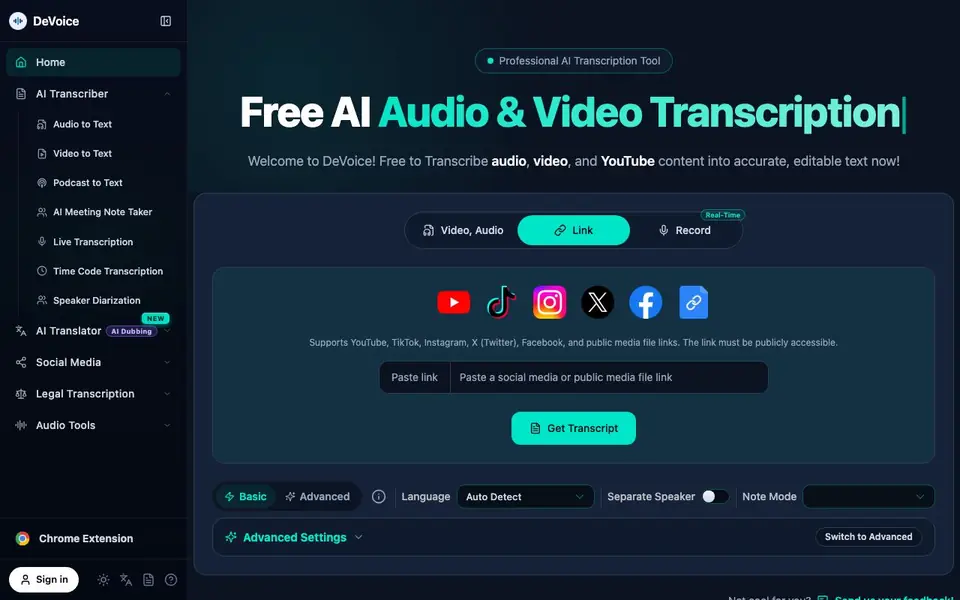
DeVoice is a free AI transcription service that turns audio, video, and YouTube content into accurate, editable text. It supports over 100 languages and includes features like speaker diarization, word-level timestamps, and AI noise reduction. You can paste a public link or upload a file directly.
To get started, you paste a link or upload your file, choose basic or advanced settings, and hit get transcript. The tool processes your content and returns a timestamped transcript you can edit inline. You can also record live audio, use the meeting note taker, or transcribe in real time.
It suits creators, researchers, legal professionals, and teams who need reliable transcripts. The website highlights support for noisy audio, diverse accents, and casual slang. You can export subtitles in SRT/VTT formats and save multiple versions of your transcripts.
DeVoice features
- Auto speaker diarization: Automatically labels who said what, keeping each speaker's lines clearly separated.
- Word-level timestamps: Click any line to jump straight to that moment in your audio or video.
- AI noise reduction: Cleans your audio before transcription for sharper, more accurate results.
- SRT/VTT export: Export professional subtitles ready for YouTube, TikTok, and your publishing workflow.
- Edit and save transcripts inline: Edit transcripts and AI summaries in-browser, with every change auto-saved to your account.
What you can do with DeVoice
- Transcribe YouTube videos into timestamped text for content repurposing.
- Record and transcribe team meetings to capture decisions and action items.
- Turn customer interviews into verbatim transcripts for research analysis.
- Generate subtitles for social media videos to fix auto-caption inaccuracies.
How to get started with DeVoice
- Go to DeVoice's website and paste a public video or audio link, or upload a file.
- Choose basic or advanced settings, such as language detection or speaker separation.
- Click get transcript and then edit, save, or export your transcript as SRT/VTT.
Tips for better results with DeVoice
- Use the Advanced settings to enable speaker diarization and word-level timestamps, which make long recordings easier to navigate and quote accurately.
- For noisy audio, rely on DeVoice's AI noise reduction before transcription, but still review the output for errors in heavily accented or slang-heavy speech.
- Paste a publicly accessible link instead of uploading a file when transcribing YouTube or social media videos, as DeVoice supports direct links from major platforms.
- Export your transcript as SRT or VTT subtitles directly from DeVoice to fix auto-caption inaccuracies on YouTube or TikTok without manual retiming.
DeVoice pricing
DeVoice is free to use according to its website.
What to check before you rely on DeVoice
- Confirm the free plan's limits on file size, recording length, or number of transcriptions per day, as the website does not state these details.
- Check whether DeVoice stores your uploaded audio or video files and for how long, since the website does not mention data retention or deletion policies.
- Verify that the speaker diarization and noise reduction features work on your specific audio quality before relying on the transcript for legal or research work.
Who DeVoice is for
DeVoice suits creators, researchers, legal professionals and teams. If that is not you, the AI transcription tools below may fit better.
Similar tools compared with DeVoice
| Tool | What it is | Pricing |
|---|---|---|
| DeVoice | Free AI audio and video transcription tool | Free |
| Otter.ai | AI meeting notetaker and transcription tool | Freemium |
| Fireflies.ai | AI meeting assistant for transcription and notes | Freemium |
| Fathom | AI notetaker for online meetings | Freemium |
| Turboscribe | Unlimited audio and video transcription | Freemium |
DeVoice FAQ
Is DeVoice really free?
Yes, the website says it is free to transcribe audio, video, and YouTube content. It also mentions that most services hide features behind a paywall or force an account, but DeVoice does neither.
What file formats and links does DeVoice support?
DeVoice supports YouTube, TikTok, Instagram, X (Twitter), Facebook, and public media file links. The link must be publicly accessible. You can also record audio directly or upload files.
Can I get speaker labels in my transcript?
Yes, DeVoice includes auto speaker diarization, which automatically labels who said what and keeps each speaker's lines clearly separated. This is useful for meetings, interviews, and legal recordings.
Can I export subtitles from DeVoice?
Yes, you can export professional subtitles in SRT and VTT formats. These are ready for YouTube, TikTok, and your publishing workflow. The website does not state whether other export formats are available.
Does DeVoice have a mobile app or desktop software?
DeVoice is a web-based tool, so you can use it in any browser on your computer, tablet, or phone. The website does not mention a dedicated mobile app or desktop program. For the most up-to-date information, check the DeVoice website or its Chrome extension page.
Can DeVoice transcribe live meetings or recordings in real time?
Yes, DeVoice offers live transcription and a meeting note taker. You can record live audio or transcribe in real time, which is useful for capturing meetings or conversations as they happen. The website highlights this feature for teams and interviewers.
What does DeVoice do with my audio or video files after transcription?
DeVoice saves your transcripts and edits to your account, and you can export them in SRT or VTT formats. The website does not specify how long files are stored or whether they are used for training. For privacy details, review DeVoice's privacy policy on their website.


