
What is Blumify?
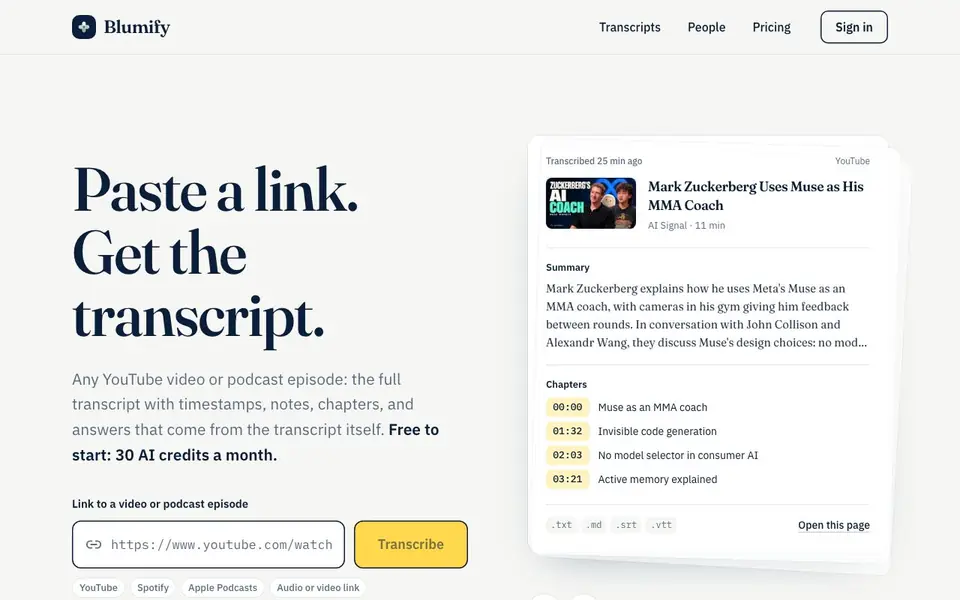
Blumify turns any YouTube video or podcast episode into a readable transcript with timestamps, a summary, key points, chapters and structured notes. It works with YouTube, Spotify, Apple Podcasts, TikTok, Instagram, direct audio or video links, and your own files. You get everything on a shareable page.
To use it, you paste a link into the site. If the video has captions, the transcript appears in seconds. If not, Blumify transcribes the audio, taking about a minute for every 15 to 20 minutes of content. You can download the transcript as plain text, Markdown notes, or SRT and VTT subtitles. You can also open the page in Chrome while watching on YouTube, Apple Podcasts or Spotify.
Blumify is free to start with 30 AI credits a month. It also works inside Claude, Chrome, and any MCP app like Cursor or VS Code, so you can ask Claude about a video or use it in your own workflows. The site shows recently transcribed pages from public figures like Sam Altman and Elon Musk, but it works for any link you paste.
Blumify features
- Full transcript: Every word in timestamped paragraphs, from captions or audio transcription.
- Summary: A few sentences covering what the video or episode is about.
- Key points: A short list of the main claims and takeaways.
- Chapters: Timestamps where the topic changes; on YouTube they jump to that moment.
- Downloads: Export as.txt,.md,.srt or.vtt files.
What you can do with Blumify
- Transcribe a YouTube interview for quick reading.
- Get notes from a podcast episode without listening fully.
- Create subtitles for a video you made.
- Ask Claude questions about a video's content using the MCP connector.
How to get started with Blumify
- Paste a YouTube, Spotify, Apple Podcasts or direct media link into the site.
- Wait for the transcript to load or be transcribed from audio.
- Read, download, or share the page with summary, chapters and notes.
Tips for better results with Blumify
- Paste a YouTube link with captions to get the transcript in seconds, then use the timestamped chapters to jump straight to the sections you care about.
- For podcasts without captions, upload the audio file directly to Blumify and wait about a minute per 15 to 20 minutes of content for the transcription to finish.
- Use Blumify's Chrome extension while watching on YouTube, Apple Podcasts, or Spotify so the transcript appears beside the video and you can follow along in real time.
- Download the notes as Markdown and paste them into your own document, then ask Claude questions about the video using the MCP connector for deeper analysis.
Blumify pricing
Blumify has a free way to start, with paid plans for heavier use. Check blumify.io for current limits and prices.
What to check before you rely on Blumify
- Check your monthly AI credit balance before transcribing long videos, since Blumify gives you 30 free credits a month and the site does not list what each transcription costs.
- Verify whether the video has captions before relying on instant results, because without captions Blumify transcribes the audio and takes longer to finish.
- Confirm the export format you need is supported, since Blumify offers.txt,.md,.srt, and.vtt downloads, but the site does not state whether other formats are available.
Who Blumify is for
Blumify suits researchers, students, content creators and podcast listeners. If that is not you, the AI transcription tools below may fit better.
Similar tools compared with Blumify
| Tool | What it is | Pricing |
|---|---|---|
| Blumify | AI transcript, summary and notes maker | Freemium |
| Otter.ai | AI meeting notetaker and transcription tool | Freemium |
| Fireflies.ai | AI meeting assistant for transcription and notes | Freemium |
| Fathom | AI notetaker for online meetings | Freemium |
| Turboscribe | Unlimited audio and video transcription | Freemium |
Blumify FAQ
Is Blumify free to use?
Yes, you get 30 AI credits a month for free. There is also an unlimited paid plan, but the site doesn't list its price.
What links does Blumify support?
It works with YouTube videos, Spotify and Apple Podcasts episodes, podcast feeds, TikTok, Instagram, direct audio or video links, and your own files.
How long can the audio be?
Up to 90 minutes of audio per link. YouTube videos with captions can run longer, but the site doesn't specify the exact limit.
Can I use Blumify with other apps?
Yes, you can add it to Chrome for YouTube, Apple Podcasts and Spotify, or connect it to Claude and any MCP app like Cursor or VS Code.
What can I export from Blumify and in which formats?
Blumify lets you download the transcript as plain text (.txt), Markdown notes (.md), or subtitles in SRT and VTT formats. You can also access a shareable page with everything. The website does not mention exporting to other formats like PDF or Word, so check the download options on your transcript page.
Does Blumify work on mobile devices or only in a browser?
Blumify is a web-based tool, so you can use it in any browser on your phone, tablet, or computer. There is also a Chrome extension that opens the transcript beside YouTube, Apple Podcasts, or Spotify. The website does not mention dedicated mobile apps, so check the site for any app availability.
What does the free plan of Blumify include?
Blumify's free plan gives you 30 AI credits per month. Each credit likely covers one transcription or set of outputs, but the website does not specify exactly how many links or minutes one credit equals. For details, check the pricing page or your account after signing up.


