

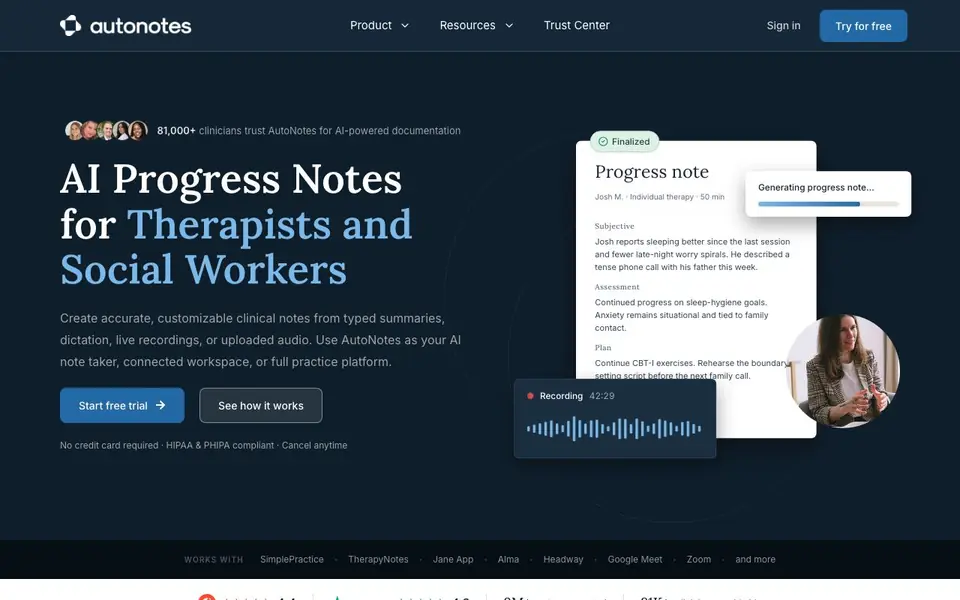
What is AutoNotes?
AutoNotes is an AI documentation tool built for therapists, social workers, and other clinicians. It turns your session input—typed summaries, dictation, live recordings, or uploaded audio—into polished clinical notes like progress notes, SOAP, DAP, BIRP, and treatment plans. The platform is HIPAA and PHIPA compliant, so you can use it with confidence in clinical settings.
You can start by capturing a session your way. AutoNotes then drafts the note for you to review and finalize. It also offers a connected workspace where you can bring notes, clients, scheduling, telehealth, forms, and recordings together. If you want to run your entire practice, the platform includes practice management features like client charts, team roles, supervision, and reporting.
AutoNotes works with popular EHRs like SimplePractice, TherapyNotes, Jane App, Alma, and Headway, as well as video tools like Google Meet and Zoom. Over 81,000 clinicians use it, and it has generated more than 9 million notes. You can start with a free trial—no credit card required—and cancel anytime.
AutoNotes features
- AI note generation: Creates progress notes, SOAP, DAP, BIRP, and treatment plans from summaries, dictation, or recordings.
- Multiple input methods: Use typed summaries, dictation, live recording, or uploaded audio to capture sessions.
- EHR integrations: Works with SimplePractice, TherapyNotes, Jane App, Alma, Headway, and more.
- Connected workspace: Brings notes, clients, scheduling, telehealth, forms, and recordings into one workflow.
- Practice management: Manages client charts, team roles, supervision, and reporting within AutoNotes.
What you can do with AutoNotes
- Generate a progress note after a 50-minute individual therapy session.
- Create a SOAP note from dictation recorded right after a client meeting.
- Upload an audio recording of a session to get a draft treatment plan.
- Use the connected workspace to manage scheduling and telehealth alongside notes.
How to get started with AutoNotes
- Sign up for a free trial on AutoNotes' website—no credit card is required.
- Choose your input method: type a summary, dictate, record live, or upload audio.
- Review the generated note, customize it as needed, and finalize it in your workflow.
Tips for better results with AutoNotes
- Dictate your session summary immediately after the appointment while details are fresh, then let AutoNotes draft the note for you to review and finalize.
- Upload a full session recording to AutoNotes and check the generated draft against your own memory, correcting any missed nuances before you finalize.
- Use AutoNotes consistently for the same client across sessions so it can build continuity between notes, making each new draft more coherent and complete.
- Review AutoNotes output for accuracy and edit it to match your clinical judgment, since the tool drafts from your input but you remain responsible for the final note.
AutoNotes pricing
AutoNotes offers a free trial before you pay. Check autonotes.ai for current plans.
What to check before you rely on AutoNotes
- Check whether the free trial includes all features you need, since the website does not list specific trial limits or what happens after it ends.
- Verify that AutoNotes' HIPAA and PHIPA compliance covers your specific jurisdiction and practice type before using it with real client data.
- Confirm that your EHR or video platform is listed as compatible, since the website names specific tools but does not guarantee every system works.
Who AutoNotes is for
AutoNotes suits therapists, social workers, clinicians and private practice owners. If that is not you, the AI productivity tools below may fit better.
Similar tools compared with AutoNotes
| Tool | What it is | Pricing |
|---|---|---|
| AutoNotes | AI clinical documentation for therapists | Free trial |
| Mem | AI chief of staff and workspace | See website |
| Reclaim | AI calendar for work and life | Freemium |
| Otter.ai | AI meeting notetaker and transcription tool | Freemium |
| Motion | AI-powered productivity and project platform | Free trial |
AutoNotes FAQ
What types of notes can AutoNotes generate?
AutoNotes can create progress notes, SOAP notes, DAP notes, BIRP notes, and treatment plans. You can generate these from typed summaries, dictation, live recordings, or uploaded audio.
Is AutoNotes HIPAA compliant?
Yes, AutoNotes states it is HIPAA and PHIPA compliant. The website highlights this compliance, which is important for therapists handling sensitive client information.
Does AutoNotes integrate with my existing EHR?
AutoNotes works with several popular EHRs, including SimplePractice, TherapyNotes, Jane App, Alma, and Headway. It also integrates with video tools like Google Meet and Zoom.
Is there a free plan or trial?
AutoNotes offers a free trial that requires no credit card. The website does not specify whether a permanent free plan exists, so you may need to check their pricing page for details.
What devices or platforms can I use AutoNotes on?
AutoNotes is a web-based platform, so you can access it from any device with an internet connection and a browser. The website does not mention dedicated mobile apps or offline mode. For the most up-to-date information on supported devices, check the AutoNotes website or contact their support team.
Does AutoNotes export notes to my EHR or other systems?
AutoNotes integrates with popular EHRs like SimplePractice, TherapyNotes, Jane App, Alma, and Headway, which means you can send your finalized notes directly to those systems. The website does not list other export formats like PDF or CSV. Check the AutoNotes website for the full list of export options.
What does the AutoNotes free trial include?
AutoNotes offers a free trial with no credit card required, and you can cancel anytime. The website does not specify the trial duration or which features are included during the trial period. To find out exactly what the trial covers, visit the AutoNotes website or reach out to their team.


