

What is Auto Gmail?
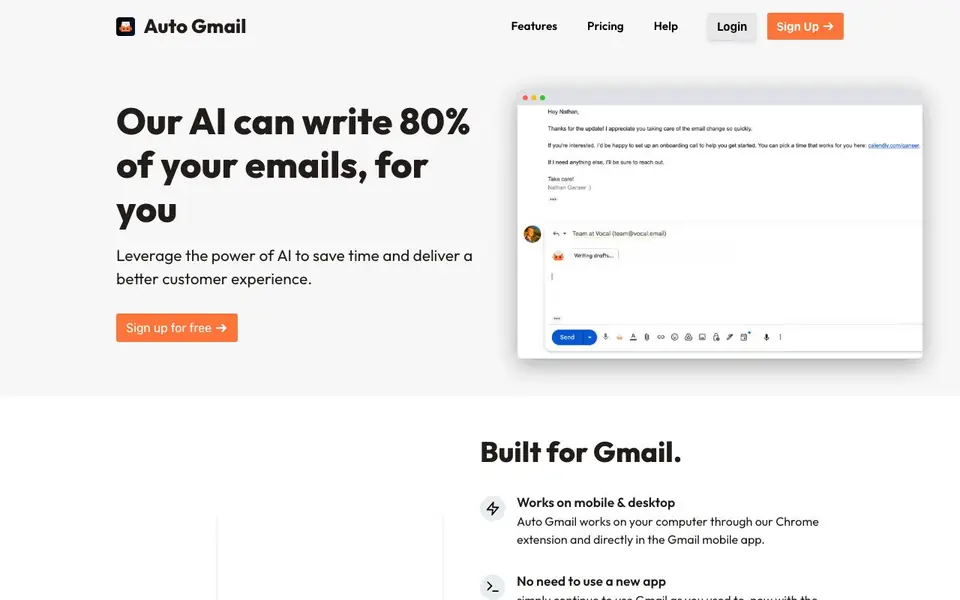
Auto Gmail is a Chrome extension and mobile app companion that brings ChatGPT-powered email drafting to your existing Gmail account. It reads through your emails to learn your writing style, tone, and preferences, then generates draft replies for you as you open each thread. You keep using Gmail as you normally would, without switching to a new app.
Once installed, Auto Gmail works automatically. When you open an email thread, it starts writing a draft using what it knows about you and the recipient. You can also enable background mode, which generates drafts even while you are away from your computer. The tool runs on desktop through the Chrome extension and directly in the Gmail mobile app.
Auto Gmail is built for anyone who handles a high volume of email, like hotel receptionists or boutique owners. The website claims its AI can write 80% of your emails. You can sign up for free, install the extension, and start saving time on routine replies.
Auto Gmail features
- Style learning: Reads your past emails to understand your tone and writing preferences.
- Automatic drafts: Generates a draft reply as soon as you open an email thread.
- Background mode: Creates drafts even when you are away from your computer.
- Mobile support: Works directly in the Gmail mobile app, not just on desktop.
- No new app needed: Integrates into your existing Gmail workflow without switching tools.
What you can do with Auto Gmail
- Draft quick replies to customer inquiries in your Gmail inbox.
- Generate follow-up emails for hotel bookings or reservations.
- Respond to routine business emails while on the go via mobile.
- Save time on repetitive email threads by letting AI write the first draft.
How to get started with Auto Gmail
- Sign up for free on the Auto Gmail website.
- Install the Chrome extension for desktop use.
- Open an email thread in Gmail to see the AI-generated draft appear.
Tips for better results with Auto Gmail
- Open a few email threads you have already replied to before relying on Auto Gmail, so it can learn your tone and style from your past writing.
- Enable background mode in Auto Gmail when you step away, so drafts are ready for you to review when you return to your inbox.
- Review every draft Auto Gmail generates before sending, especially for customer inquiries, since the AI may miss context or nuance in the thread.
- Use Auto Gmail on your mobile Gmail app for routine replies on the go, but keep critical emails for desktop where you can edit more carefully.
Auto Gmail pricing
Auto Gmail has a free way to start, with paid plans for heavier use. Check autogmail.com for current limits and prices.
What to check before you rely on Auto Gmail
- Check the free plan limits before relying on Auto Gmail daily, since the website does not state how many drafts or emails the free tier allows.
- Verify what data Auto Gmail collects from your inbox and how it is stored, as the website does not detail its privacy practices beyond a policy link.
- Confirm that Auto Gmail works with your Gmail account type, since the site does not specify support for Google Workspace or personal accounts.
Who Auto Gmail is for
Auto Gmail suits hotel receptionists, boutique owners, busy professionals and small business teams. If that is not you, the AI productivity tools below may fit better.
Similar tools compared with Auto Gmail
| Tool | What it is | Pricing |
|---|---|---|
| Auto Gmail | AI email drafting assistant for Gmail | Freemium |
| Mem | AI chief of staff and workspace | See website |
| Reclaim | AI calendar for work and life | Freemium |
| Otter.ai | AI meeting notetaker and transcription tool | Freemium |
| Motion | AI-powered productivity and project platform | Free trial |
Auto Gmail FAQ
How does Auto Gmail learn my writing style?
Auto Gmail reads through your existing emails in your inbox to learn about your tone, phrasing, and preferences. It uses this knowledge to generate drafts that match your style, so replies feel personal rather than generic.
Does Auto Gmail work on mobile?
Yes. Auto Gmail works on mobile directly in the Gmail app, in addition to the Chrome extension on desktop. You can use it on both platforms without needing a separate app.
Is there a free plan?
The website says you can 'sign up for free,' which suggests a free tier is available. It does not specify whether there are paid plans or limits on the free version, so check the pricing page for details.
Do I need to type anything to get a draft?
No. As soon as you open an email thread, Auto Gmail starts writing a draft automatically using what it knows about you and the recipient. You can also enable background mode to generate drafts while you are away.
What does Auto Gmail's free plan include?
Auto Gmail's free plan lets you sign up and install the Chrome extension to start using the tool. The website does not specify limits on drafts, emails, or features for the free tier. To see exact details, check the pricing page on autogmail.com.
Can Auto Gmail export drafts or connect to other apps?
Auto Gmail works within your Gmail account and does not mention exporting drafts or connecting to external apps like CRMs or project tools. The website focuses on drafting replies directly in Gmail. For integration details, check the features or help sections on autogmail.com.
Does Auto Gmail work on iPhone and Android?
Auto Gmail works directly in the Gmail mobile app, which is available on both iPhone and Android. The website says it works on mobile through the Gmail app, but it does not specify separate native apps for each platform. You can use it on your phone as long as you have the Gmail app installed.


