

What is AudioConvert?
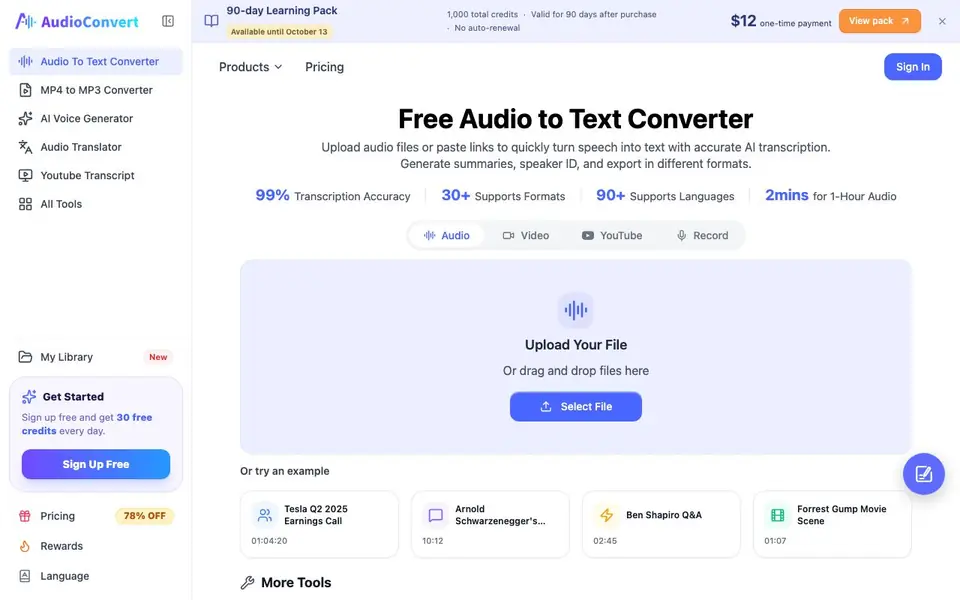
AudioConvert is an online tool that converts spoken audio and video into written text. It handles over 30 input formats, including MP3, WAV, M4A, and MP4, and supports more than 90 languages. You can upload files directly or paste links from platforms like YouTube. The tool is designed for speed, processing up to one hour of audio in under 30 seconds.
To use it, you upload your file or paste a link. The AI then transcribes the speech, automatically detecting different speakers and dialects. After transcription, you can review and edit the text in an interactive editor. You can generate summaries and action items, or export the transcript as Word, PDF, SRT, or VTT files for subtitles.
AudioConvert suits journalists, students, podcasters, and business teams who need quick, accurate transcripts. It emphasizes privacy, with files encrypted and automatically deleted within 24 hours. No signup is required for basic use, and you get 30 free credits daily with a free account.
AudioConvert features
- Fast transcription: Converts up to 1 hour of audio in under 30 seconds.
- Speaker diarization: Automatically labels different speakers as Speaker A, Speaker B, etc.
- AI summaries: Generates structured summaries and action items from your transcripts.
- Multi-language support: Transcribes in 90+ languages with specialized models for accents.
- Flexible export: Exports as Word, PDF, SRT, or VTT for reports and subtitles.
What you can do with AudioConvert
- Transcribe meeting recordings to capture decisions and action items.
- Create subtitles for YouTube videos or Premiere Pro projects.
- Convert podcast episodes into readable articles or show notes.
- Turn interview audio into searchable text for research or journalism.
How to get started with AudioConvert
- Upload your audio or video file, or paste a link to start.
- Let the AI transcribe and detect speakers in seconds.
- Edit the transcript and export it as Word, PDF, or subtitle files.
Tips for better results with AudioConvert
- Upload files up to 10 hours long, but for fastest results keep each recording under 1 hour and let AudioConvert process it in under 30 seconds.
- Use AudioConvert's speaker diarization to label different voices automatically, then edit the transcript in the interactive editor to correct any mislabeled speakers.
- Paste a YouTube link directly instead of downloading the video first, saving time and avoiding file format issues with AudioConvert's link support.
- Generate AI summaries and action items from your transcript, then export as Word or PDF for reports, or SRT or VTT for subtitles.
AudioConvert pricing
AudioConvert has a free way to start, with paid plans for heavier use. Check audioconvert.ai for current limits and prices.
What to check before you rely on AudioConvert
- Check your daily credit limit: a free account gives 30 credits per day, but the site does not state how many minutes each credit covers.
- Verify the pricing page for paid plans, as the site only lists a one-time 90-day learning pack and does not show monthly subscription costs.
- Confirm that your files are deleted within 24 hours as stated, but note the site does not specify what happens to transcripts you export or save.
Who AudioConvert is for
AudioConvert suits journalists, podcasters, students and business teams. If that is not you, the AI transcription tools below may fit better.
Similar tools compared with AudioConvert
| Tool | What it is | Pricing |
|---|---|---|
| AudioConvert | AI audio and video transcription tool | Freemium |
| Otter.ai | AI meeting notetaker and transcription tool | Freemium |
| Fireflies.ai | AI meeting assistant for transcription and notes | Freemium |
| Fathom | AI notetaker for online meetings | Freemium |
| Turboscribe | Unlimited audio and video transcription | Freemium |
AudioConvert FAQ
Is AudioConvert free to use?
Yes, you can sign up free and get 30 free credits every day. There are also paid plans, including a one-time payment option for a 90-day learning pack with 1,000 total credits.
What file formats does it support?
It supports over 30 input formats, including MP3, WAV, M4A, and MP4. You can also paste URLs from platforms like YouTube to transcribe online.
How accurate is the transcription?
The website claims up to 99% transcription accuracy. It uses advanced AI models that recognize accents, technical terms, and background noise to capture speech reliably.
Can I identify who said what in a conversation?
Yes, the tool automatically detects and labels different speakers, such as Speaker A and Speaker B. This makes it useful for interviews, panels, and meeting minutes.
Can AudioConvert export transcripts to subtitle files for video editing?
Yes, AudioConvert lets you export transcripts as SRT or VTT files, which are standard subtitle formats. You can use these files in video editing software like Premiere Pro or upload them to YouTube. The website also mentions exporting to Word and PDF for reports.
Does AudioConvert require an account to use the free plan?
AudioConvert does not require signup for basic use, but if you create a free account, you get 30 free credits daily. The website says no signup is required, and you can upload files or paste links directly. For the daily free credits, you need to sign up.
How does AudioConvert handle the privacy of my uploaded files?
AudioConvert emphasizes privacy: files are encrypted and automatically deleted within 24 hours. The website also states that your data is never used to train AI models. This applies to files you upload or links you paste for transcription.


