

What is AI Renamer?
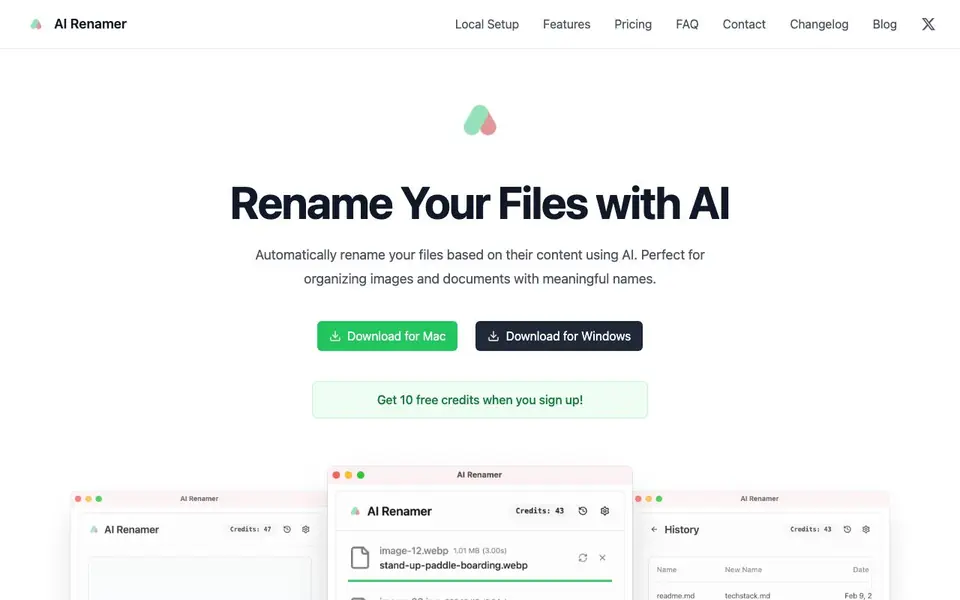
AI Renamer is a desktop app that uses AI to rename your files automatically. It looks at what is inside each file, such as image content or document text, and suggests clear, meaningful names. You can use it for images like JPG, PNG, GIF, and WEBP, as well as documents like PDF and TXT files.
You start by downloading the app for Mac or Windows. Then you can either use the cloud mode with credits or set up local models through Ollama or LM Studio for offline use. The app offers a drag-and-drop interface, lets you preview names before applying them, and supports batch processing to rename many files at once.
It suits anyone who wants to tidy up messy folders, especially those with lots of screenshots or downloaded files. the website says custom instructions for personalized naming patterns and local model support for privacy. Cloud mode has a 10MB file size limit, while local mode has no file size limit.
AI Renamer features
- Smart Recognition: AI analyzes file content and EXIF data to generate meaningful names for images and documents.
- Batch Processing: Rename multiple files at once with a drag-and-drop interface and preview before applying.
- Custom Instructions: Add your own rules to guide AI models for personalized naming patterns and formatting.
- Local Model Support: Connect to Ollama or LM Studio for private, offline renaming without sending files to the cloud.
- File Support: Works with images (JPG, PNG, GIF, WEBP) and documents (PDF, TXT, text-based files).
What you can do with AI Renamer
- Organize your desktop by renaming random screenshot files with descriptive names.
- Clean up downloaded images by giving them names based on their visual content.
- Rename PDF documents according to their text content for easier searching.
- Batch rename a folder of photos with consistent, meaningful titles before archiving.
How to get started with AI Renamer
- Download and install AI Renamer for Mac or Windows from the website.
- Sign up to get 10 free credits, or set up local models with Ollama or LM Studio.
- Drag and drop your files, preview the AI-suggested names, and apply the rename.
Tips for better results with AI Renamer
- Start with a small batch of files to test how AI Renamer names them, then adjust your custom instructions to match your preferred naming style before processing your whole folder.
- Use AI Renamer's preview feature before applying names to any batch, so you can catch mistakes and ensure the suggested names make sense for your files.
- For sensitive files, set up AI Renamer with a local model through Ollama or LM Studio to keep your data offline and avoid the 10MB cloud file size limit.
- Write specific custom instructions in AI Renamer, like including dates or project codes, to get consistent, meaningful names across large batches of images and documents.
AI Renamer pricing
AI Renamer has a free way to start, with paid plans for heavier use. Check airenamer.app for current limits and prices.
What to check before you rely on AI Renamer
- Check whether your files exceed the 10MB limit for cloud mode in AI Renamer, since the website does not state limits for local mode.
- Verify that your file types are supported by AI Renamer, as it only lists images like JPG, PNG, GIF, WEBP and documents like PDF and TXT.
- Confirm how the free credits work and what happens after they run out, because the website does not clearly state pricing details beyond the freemium label.
Who AI Renamer is for
AI Renamer suits individuals, makers, professionals and students. If that is not you, the AI productivity tools below may fit better.
Similar tools compared with AI Renamer
| Tool | What it is | Pricing |
|---|---|---|
| AI Renamer | AI file and document renamer | Freemium |
| Mem | AI chief of staff and workspace | See website |
| Reclaim | AI calendar for work and life | Freemium |
| Otter.ai | AI meeting notetaker and transcription tool | Freemium |
| Motion | AI-powered productivity and project platform | Free trial |
AI Renamer FAQ
How does AI Renamer work?
The app uses AI to analyze the content of your files, like image pixels or document text, and generates meaningful names. You can preview the suggested names before applying them, and it supports batch processing for multiple files at once.
What AI models are used in the cloud version?
The website mentions access to a curated selection of AI models in cloud mode, but it does not list specific model names. For local mode, you can use models from Ollama or LM Studio, like Llava for image analysis.
Is there a free plan?
Yes, you get 10 free credits when you sign up. Cloud mode costs $10 for 200 credits, with 1 credit per rename operation. Local mode is a one-time purchase of $19 for unlimited renaming.
Can I use AI Renamer offline?
Yes, with local mode you can set up Ollama or LM Studio to run AI models on your computer. This allows for private, offline file renaming without sending your files to the cloud.
What file types can AI Renamer handle?
AI Renamer supports images in JPG, PNG, GIF, and WEBP formats, as well as documents like PDF and TXT files. It also works with text-based files. You can use it to rename files across these formats, making it a versatile tool for organizing your folders.
Does AI Renamer work on both Mac and Windows?
Yes, AI Renamer is a desktop application available for both macOS and Windows. You can download it for either operating system from the official website. The app is optimized for both platforms, providing a consistent user experience whether you're on a Mac or a PC.
What does the free plan of AI Renamer include?
AI Renamer offers a free plan that gives you 10 credits when you sign up. These credits can be used for cloud-based renaming tasks. After you use them, you can either purchase more credits or switch to local models for free, unlimited renaming without additional costs.


