

What is AI Formatter?
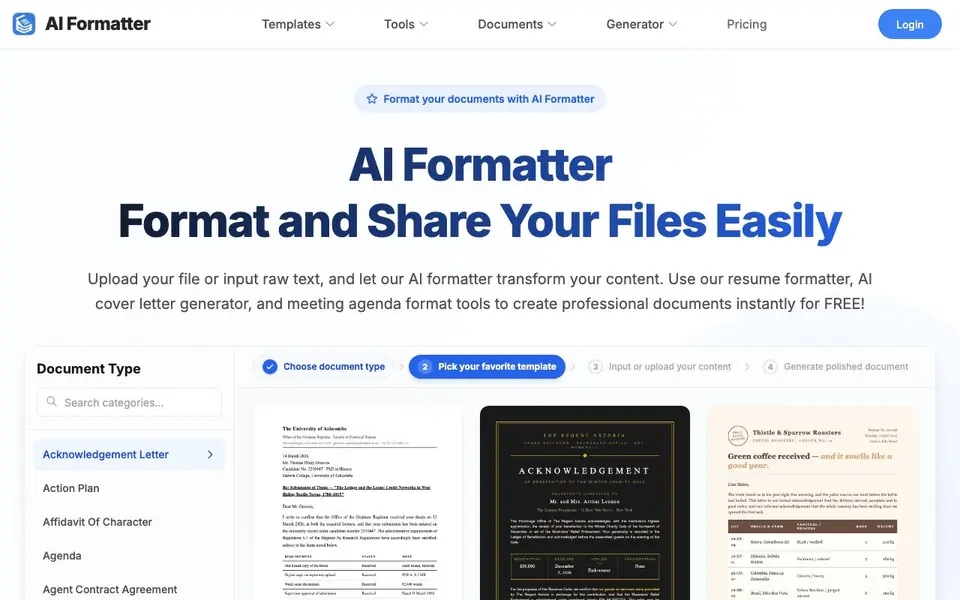
AI Formatter turns your raw text or uploaded files into polished, professional documents. It offers a huge library of templates, including resumes, cover letters, meeting agendas, invoices, and many more. You can start formatting for free.
You begin by picking a document type from the extensive list. Then you choose a template, upload your content or paste raw text, and the AI formats it automatically. After that, you can edit and customize the result in an intuitive editor before downloading it in formats like Word and PDF.
This tool suits job seekers, business professionals, and anyone who needs clean, structured documents quickly. It mentions ATS-optimized resume templates designed to pass automated screening systems. The website does not mention any limits on usage or file sizes.
AI Formatter features
- Template library: Choose from hundreds of document types, including resumes, letters, and reports.
- AI formatting: Automatically restructures your content into a clean, professional layout.
- ATS-optimized resumes: Use templates designed to pass automated applicant tracking systems.
- Multi-format download: Export your finished documents in Word, PDF, and other formats.
- Built-in editor: Review and tweak your formatted document before downloading it.
What you can do with AI Formatter
- Create a professional resume that passes automated screening systems.
- Generate a cover letter from your raw text or existing document.
- Format meeting agendas and minutes for your team.
- Turn rough notes into a structured business proposal or report.
How to get started with AI Formatter
- Choose your document type and pick a template from the library.
- Upload your file or paste raw text into the input box.
- Let the AI format your content, then edit and download it.
Tips for better results with AI Formatter
- Pick your document type from the list first, then paste raw text or upload a file to let AI Formatter structure it correctly for that template.
- Use AI Formatter's ATS-optimized resume templates when applying for jobs, and tailor your content to match the job description keywords for better screening results.
- After AI Formatter generates your document, review the text in the built-in editor and adjust wording or layout details before downloading to ensure accuracy.
- Export your finished work from AI Formatter in Word or PDF format, and check that the formatting looks right in the final file before sharing it with others.
AI Formatter pricing
AI Formatter is free to use according to its website.
What to check before you rely on AI Formatter
- Verify that AI Formatter's free plan has no hidden usage or file size limits, since the website does not state any restrictions.
- Confirm the export formats you need are available, as the site mentions Word and PDF but does not list all supported formats.
- Check AI Formatter's privacy policy to see how your uploaded files and text are handled, because the website does not detail data practices.
Who AI Formatter is for
AI Formatter suits job seekers, business professionals, students and administrative staff. If that is not you, the AI productivity tools below may fit better.
Similar tools compared with AI Formatter
| Tool | What it is | Pricing |
|---|---|---|
| AI Formatter | AI document formatter with templates | Free |
| Mem | AI chief of staff and workspace | See website |
| Reclaim | AI calendar for work and life | Freemium |
| Otter.ai | AI meeting notetaker and transcription tool | Freemium |
| Motion | AI-powered productivity and project platform | Free trial |
AI Formatter FAQ
Is AI Formatter free to use?
Yes, the website states you can start formatting for free. It does not mention any paid plans or pricing details on the homepage.
What types of documents can I create?
You can create resumes, cover letters, meeting agendas, invoices, business plans, contracts, and many more. The template library includes hundreds of document types.
How does the formatting process work?
You pick a template, upload your content or paste raw text, and the AI formats it automatically. You can then edit the result and download it in formats like Word and PDF.
Who is this tool best for?
It is useful for job seekers who need ATS-optimized resumes, professionals creating business documents, and anyone who wants to format text quickly without manual layout work.
Can I download my formatted documents from AI Formatter in formats other than Word and PDF?
AI Formatter lets you export your finished documents in Word, PDF, and other formats, as mentioned in its features. The website does not list every specific format available, so check the download options in the editor to see all your choices.
Does AI Formatter require me to create an account to use it?
AI Formatter's website does not state whether an account is required. You can start formatting for free by picking a document type and uploading your content or pasting raw text. For details on account requirements, check the login or pricing pages on the site.
What are the limits on the free plan of AI Formatter, such as file size or number of documents?
AI Formatter's website does not mention any limits on usage or file sizes, and it says you can start formatting for free. Since the site does not specify restrictions, you may want to check the pricing page or contact support for details about the free plan's boundaries.


