

What is AI Diagram Maker?
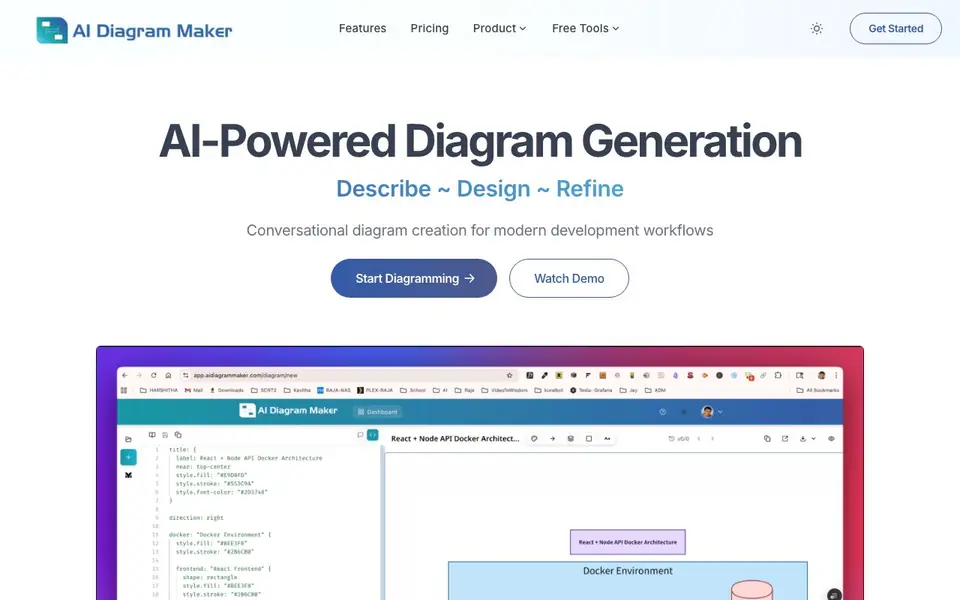
AI Diagram Maker is a conversational diagram tool built for developers and teams who want to skip the drag-and-drop. You type what you need, like a login flow or a database structure, and the AI creates a clean diagram for you. It supports software architecture, UML, flowcharts, ER diagrams, and sequence diagrams.
You start by describing your idea in plain English. The AI generates the diagram, then you can refine it by asking for changes, such as switching to a sequence diagram. You can also upload images, documents, or notes, and the tool turns them into diagrams. For code, you can connect a GitHub repository and get an architecture overview automatically.
The tool includes automatic layout and styling, so you don't worry about alignment. You can export diagrams as PNG, SVG, or diagram code. A code view lets you edit directly, and revision history is available on Plus and Max plans. An MCP server lets you generate diagrams inside Cursor, Claude Desktop, VS Code, or any MCP client. The website mentions Git-native features as coming soon.
AI Diagram Maker features
- AI-powered generation: Type plain English and get a professional diagram in seconds.
- Create from attachments: Upload images, documents, or notes and convert them into structured diagrams.
- Code to diagram: Connect a GitHub repository and visualize your codebase architecture automatically.
- Automatic layout: AI handles positioning, alignment, and styling for instant professional results.
- MCP server: Generate diagrams inside Cursor, Claude Desktop, VS Code, or any MCP client.
What you can do with AI Diagram Maker
- Visualize a login API flow with validation and redirects in seconds.
- Turn a GitHub repository into an architecture diagram for documentation.
- Convert meeting notes or whiteboard sketches into structured flowcharts.
- Create an ER diagram for a database with relationships and constraints.
How to get started with AI Diagram Maker
- Go to the website and click Start Diagramming.
- Type your diagram description in plain English, like a login flow or system architecture.
- Review the generated diagram and ask for changes conversationally, or export it as PNG, SVG, or code.
Tips for better results with AI Diagram Maker
- Start with a precise description of the flow, including decision points and error paths, to get a more accurate first draft from AI Diagram Maker.
- Refine your diagram conversationally by asking for specific changes, like switching to a sequence diagram, instead of starting over from scratch.
- Use AI Diagram Maker's attachment feature to upload meeting notes or sketches, then ask it to structure them into a flowchart for faster conversion.
- Connect your GitHub repository to AI Diagram Maker to generate an architecture overview, then review and adjust the layout before exporting.
AI Diagram Maker pricing
AI Diagram Maker’s homepage does not list prices. Check aidiagrammaker.com for current plans.
What to check before you rely on AI Diagram Maker
- Check the pricing page for plan costs and limits, as the website does not list specific prices or free tier details.
- Verify export formats and whether diagram code includes all needed data, since only PNG, SVG, and diagram code are mentioned.
- Review data privacy for uploaded documents and GitHub repositories, as the website does not state how your data is handled or stored.
Who AI Diagram Maker is for
AI Diagram Maker suits developers, software architects, technical writers and product managers. If that is not you, the AI productivity tools below may fit better.
Similar tools compared with AI Diagram Maker
| Tool | What it is | Pricing |
|---|---|---|
| AI Diagram Maker | AI diagram generator from plain text | See website |
| Mem | AI chief of staff and workspace | See website |
| Reclaim | AI calendar for work and life | Freemium |
| Otter.ai | AI meeting notetaker and transcription tool | Freemium |
| Motion | AI-powered productivity and project platform | Free trial |
AI Diagram Maker FAQ
What types of diagrams can I create?
You can create software architecture diagrams, UML diagrams, flowcharts, ER diagrams, and sequence diagrams. The tool handles complex relationships and decision points, as shown in the gallery.
Is there a free plan?
The website does not state specific pricing details. It mentions Plus and Max plans for revision history, but you should check the Pricing page for current plans and free options.
Can I generate diagrams from code?
Yes. You can connect a GitHub repository, and the AI analyzes your codebase to create architecture diagrams automatically. This works for public and private repositories.
Can I use it inside my IDE?
Yes, there is an MCP server that works with Cursor, Claude Desktop, VS Code, and any MCP client. You can generate diagrams from natural language, code, ASCII, images, or Mermaid without leaving your editor.
Can AI Diagram Maker export diagrams to formats other than PNG, SVG, or diagram code?
AI Diagram Maker lets you export diagrams as PNG, SVG, or diagram code, as shown on the website. The site does not mention other export formats like PDF or JPEG. For the latest options, check the tool's export menu or official documentation.
Does AI Diagram Maker run on mobile devices or only on desktop?
AI Diagram Maker is a web-based tool, so you can access it through a browser on most devices, including tablets and smartphones. The website does not specify dedicated mobile apps. For the best experience, use a modern browser on any device you prefer.
What does the free plan of AI Diagram Maker include, and are there any limits?
The AI Diagram Maker website highlights features like AI generation, attachments, and code-to-diagram, but it does not detail the free plan's specific limits. To know what's included for free, such as the number of diagrams or exports, check the pricing page or sign up to see the plan details.


