

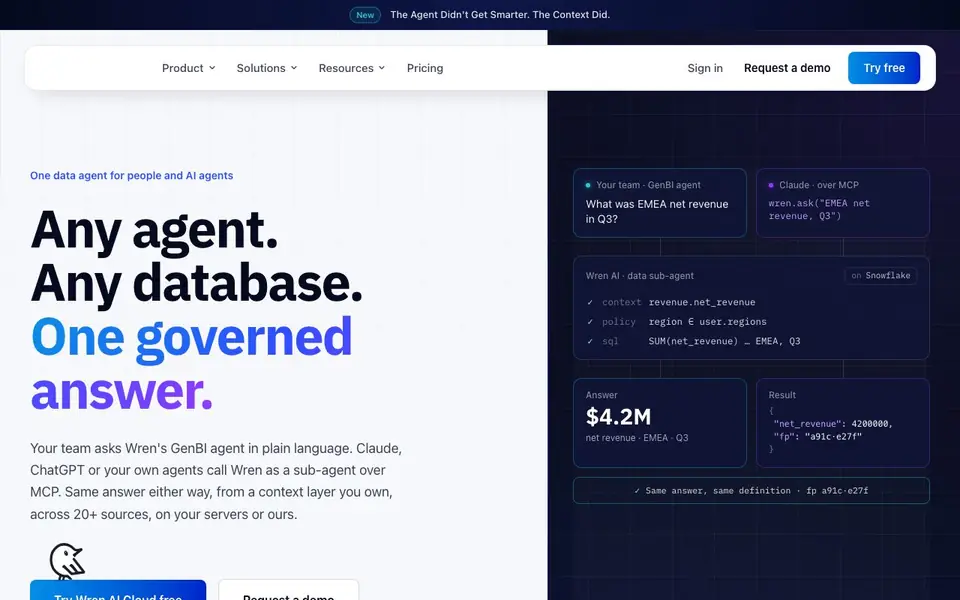
What is Wren AI Cloud?
Wren AI Cloud is a data agent that gives you one governed answer to questions about your data, whether you ask directly or through AI assistants like Claude, ChatGPT, or your own agents. It connects to 20+ data sources, including Snowflake, BigQuery, and PostgreSQL, without needing ETL or migration. You can run it in Wren's cloud, your own VPC, or fully air-gapped.
You start by connecting your database. Wren's onboarding agent helps you get set up in minutes. Then you or your team can ask questions in plain language, like "What was EMEA net revenue in Q3?" Wren's GenBI agent reasons in a sandbox, checks your data policies, and returns a verified answer with a trace you can replay. You can also build interactive dashboards from a single prompt.
The tool emphasizes governance. Every answer runs through definitions you own, versioned in git, with row- and column-level security applied at query time. You get role-based access, a full audit log, and the same answer whether a person or an AI agent asks. It's open source and priced per usage, not per seat, with unlimited users on paid plans.
Wren AI Cloud features
- GenBI agent: Ask questions in plain language and get answers with SQL and charts you can trust.
- MCP integration: Let Claude, ChatGPT, or your own agents call Wren as a sub-agent over MCP.
- Unified data policy: Apply row- and column-level security at query time across UI, API, Slack, and MCP.
- GenBI Apps: Build interactive dashboards from a single prompt, with drill-down and filters.
- Onboarding agent: Connect your data sources in minutes, not weeks, with guided setup.
What you can do with Wren AI Cloud
- Ask about EMEA net revenue for Q3 and get a governed answer with SQL.
- Build a budget variance dashboard for your CFO with one prompt.
- Let your AI agents query your database over MCP with the same policies as your team.
- Embed a branded data agent in your product for your customers.
How to get started with Wren AI Cloud
- Sign up for Wren AI Cloud and try it free.
- Connect your database using the onboarding agent.
- Ask a question in plain language or connect your AI agent over MCP.
Tips for better results with Wren AI Cloud
- Connect your database first and let the onboarding agent guide you through setup, so Wren AI Cloud can map your schema and policies before you ask any questions.
- Define your business metrics and row-level policies in git before querying, so Wren AI Cloud returns consistent, governed answers across all users and AI agents.
- Ask Wren AI Cloud for a trace after each answer, then replay the SQL and chart steps to verify the logic matches your expectations before sharing results.
- Test Wren AI Cloud with a simple question like 'What was EMEA net revenue in Q3?' to confirm your data sources and policies work, then scale to complex dashboards.
- Use the GenBI Apps feature to build a dashboard from one prompt, but refine your wording with specific filters and drill-downs to get the exact view you need.
Wren AI Cloud pricing
Wren AI Cloud has a free way to start, with paid plans for heavier use. Check getwren.ai for current limits and prices.
What to check before you rely on Wren AI Cloud
- Check whether the free tier includes all 20+ data sources and MCP integration, since the website lists features but does not state per-plan limits.
- Verify that your database credentials and connection method match Wren AI Cloud's supported sources, as setup depends on your specific warehouse.
- Confirm your data policies are versioned in git before relying on answers, because the tool applies row- and column-level security at query time.
- Review the audit log and trace output for each answer to ensure the SQL matches your expectations, especially when using AI agents over MCP.
- Check if pricing is per usage and not per seat, but note the website does not list specific prices or credit costs for the freemium plan.
Who Wren AI Cloud is for
Wren AI Cloud suits data teams, business leaders, product teams and AI developers. If that is not you, the AI data analysis tools below may fit better.
Similar tools compared with Wren AI Cloud
| Tool | What it is | Pricing |
|---|---|---|
| Wren AI Cloud | Governed data agent for teams and AI agents | Freemium |
| Julius AI | AI workspace for data and content | See website |
| Rows | AI-powered spreadsheet and data analyst | See website |
| Clay | AI platform for go-to-market workflows | Freemium |
| Semrush Copilot | SEO and AI search visibility platform | Freemium |
Wren AI Cloud FAQ
What is Wren AI Cloud?
It's a governed data agent that answers questions about your data in plain language. Your team can use it directly, or you can connect AI agents like Claude and ChatGPT over MCP to get the same answers.
Is there a free plan?
Yes, you can try Wren AI Cloud free. The website also mentions unlimited users on every paid plan, with pricing based on usage rather than seats.
Who is Wren AI Cloud for?
It's for data teams, business leaders, and product teams. You can use it internally for analytics, or embed it in your own product under your brand.
What databases does it support?
It supports 20+ sources including Snowflake, BigQuery, Databricks, Redshift, PostgreSQL, SQL Server, Oracle, MySQL, ClickHouse, Athena, Trino, and Starburst. No ETL or migration is needed.
Can Wren AI Cloud run on my own servers or in a private cloud?
Yes, Wren AI Cloud can run in Wren's cloud, in your own VPC, or fully air-gapped. The website mentions these deployment options, so you can choose where your data and queries are processed. For details on setting up a VPC or air-gapped environment, check the documentation or contact the team.
Does Wren AI Cloud work with Slack or Teams?
Wren AI Cloud can be used through Slack and Teams chat, as the website lists Slack and Teams as channels where you can get governed answers. It also mentions unified policy across UI, API, Slack, and MCP. For specifics on setting up the Slack or Teams integration, refer to the platform documentation.
What does the free plan of Wren AI Cloud include?
The website labels Wren AI Cloud as freemium and offers a free trial, but it does not specify what the free plan includes in terms of usage limits or features. For details on the free tier, such as data source limits or query volume, check the pricing page or contact Wren's team directly.


