

What is Julius AI?
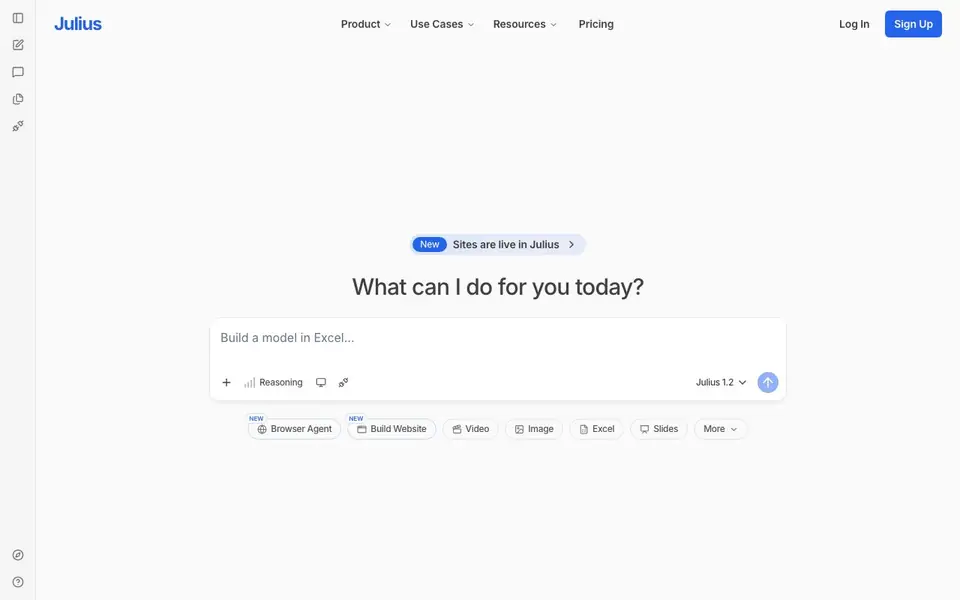
Julius AI is an AI workspace for knowledge workers. It helps you research complex topics, analyze your data, and create presentations, dashboards, websites, images, and video. You can use it for tasks like building a model in Excel or generating slides.
You start by typing what you want to do. Julius can reason through your request and produce results. It supports multiple output types, including Excel files, slides, websites, images, and video. You can also connect it to your data sources like Postgres, Snowflake, or SQL Server.
Julius is built for professionals in finance, marketing, RevOps, product, data science, scientific research, and education. It is SOC 2 Type 2 certified, which means it meets security standards. The site does not detail specific pricing plans, so you would need to check their pricing page for that.
Julius AI features
- Excel modeling: Build and analyze models directly in Excel with AI assistance.
- Presentation maker: Generate slides and presentations from your prompts or data.
- Website builder: Create live websites within the Julius workspace.
- Data connectors: Connect to databases like Postgres, Snowflake, and SQL Server.
- Custom agents: Build tailored AI agents for your specific workflows.
What you can do with Julius AI
- Analyze financial data and create reports for stakeholders.
- Build interactive dashboards from your company's database.
- Generate slide decks for marketing campaigns or product launches.
- Create a website prototype from a simple text description.
How to get started with Julius AI
- Sign up for a Julius account on their website.
- Type your task or question in the input box, like 'build a model in Excel'.
- Review the output and refine your prompt if needed.
Tips for better results with Julius AI
- Start by typing a clear, specific request like 'build a model in Excel' to let Julius reason through your task and produce the exact output you need.
- Connect Julius to your own data sources such as Postgres or Snowflake to get analysis grounded in your real numbers, not just sample data.
- Use Julius to generate slides or websites from a simple text description, then review and refine the output to match your brand and message.
- For complex workflows, create custom agents in Julius that handle repeated tasks, saving you time on routine analysis or reporting.
Julius AI pricing
Julius AI’s homepage does not list prices. Check julius.ai for current plans.
What to check before you rely on Julius AI
- Check the pricing page directly because the site does not list specific plans or costs, and you need to confirm what fits your budget.
- Verify which data connectors are available for your database, since the site mentions Postgres, Snowflake, and SQL Server but not all options.
- Confirm export formats for your deliverables, as the site lists Excel, slides, websites, images, and video but does not state file type details.
Who Julius AI is for
Julius AI suits data analysts, finance professionals, marketers and researchers. If that is not you, the AI data analysis tools below may fit better.
Similar tools compared with Julius AI
| Tool | What it is | Pricing |
|---|---|---|
| Julius AI | AI workspace for data and content | See website |
| Rows | AI-powered spreadsheet and data analyst | See website |
| Clay | AI platform for go-to-market workflows | Freemium |
| Semrush Copilot | SEO and AI search visibility platform | Freemium |
| Excelmatic | AI data analytics and dashboard maker | Freemium |
Julius AI FAQ
What can Julius AI do?
Julius AI is a workspace where you can analyze data, build Excel models, create presentations, dashboards, websites, images, and video. It is designed for knowledge workers who need to handle complex tasks in one place.
Is Julius AI free?
The website does not state whether there is a free plan. You would need to visit their pricing page to see current plans and any trial options.
Who is Julius AI for?
Julius AI is aimed at professionals in finance, marketing, RevOps, product, data science, scientific research, and education. It helps them analyze data and create content without switching between tools.
Can I connect my own data to Julius AI?
Yes. Julius AI supports popular data connectors including Postgres, Snowflake, and SQL Server. This lets you work with your own databases directly in the workspace.
What file formats can Julius AI export or generate?
Julius AI can generate Excel files, slides, websites, images, and video directly from your prompts. For specific export formats beyond these, such as PDF or CSV, the website does not mention them. Check the Julius AI help center or documentation for a complete list of supported export options.
Does Julius AI run on mobile devices or only in a web browser?
Julius AI is accessed through its website, so you can use it in any modern web browser on a computer, tablet, or phone. The site does not mention dedicated mobile apps for iOS or Android. For the best experience, use a desktop browser for complex tasks like Excel modeling or website building.
What does the free plan of Julius AI include?
The Julius AI website does not detail what the free plan includes. It only shows a signup option without specifying limits on usage, features, or output types. To know what you get for free, sign up and check your account dashboard, or visit the pricing page for current plan details.


