

What is ChartAI?
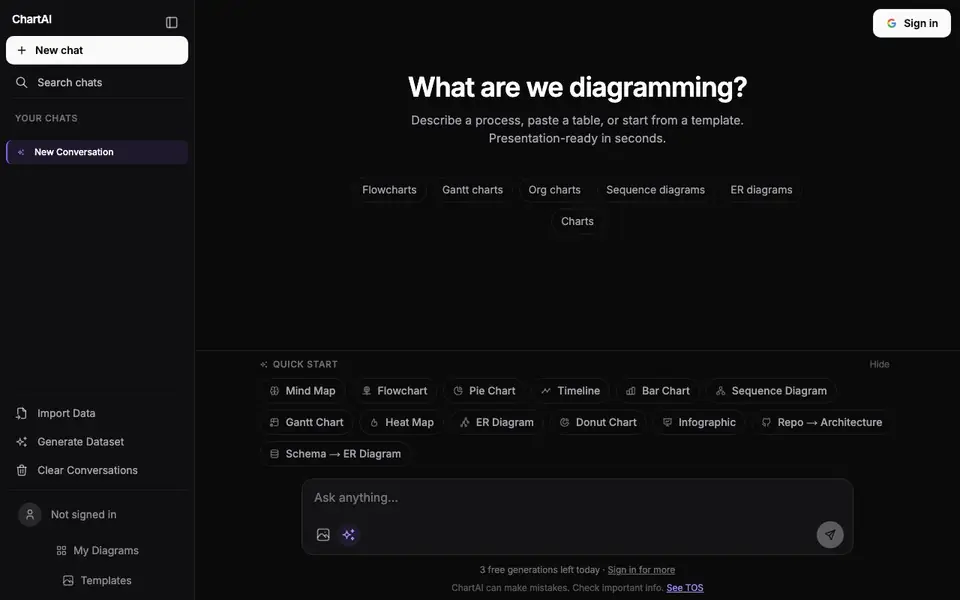
ChartAI is an AI-powered tool that turns your descriptions, tables, or templates into visual diagrams and charts. You can create flowcharts, Gantt charts, org charts, sequence diagrams, ER diagrams, and more. It works like a chat: you tell it what you want to diagram, and it generates the visual for you.
To start, you describe a process, paste a table, or pick a template. You can also import data or generate a dataset. The tool then produces a diagram you can refine through conversation. It supports many types, including mind maps, pie charts, timelines, bar charts, heat maps, donut charts, infographics, and even repo-to-architecture or schema-to-ER conversions.
ChartAI suits anyone who needs quick visuals for work or study, like project managers, developers, or analysts. The site notes it can make mistakes, so you should check important information. You get 3 free generations per day, and signing in gives you more.
ChartAI features
- Chat-based creation: Describe what you need, and ChartAI builds the diagram for you.
- Wide diagram types: Create flowcharts, Gantt charts, org charts, sequence diagrams, ER diagrams, and more.
- Data import: Paste a table or import data to turn it into a visual.
- Template library: Start from templates for common diagram types to save time.
- Dataset generation: Generate a dataset if you don't have one ready to visualize.
What you can do with ChartAI
- Map out a business process as a flowchart in minutes.
- Turn a project schedule into a Gantt chart for your team.
- Visualize database relationships with an ER diagram from a schema.
- Create an org chart to show reporting lines in your company.
How to get started with ChartAI
- Go to ChartAI's website and start a new chat.
- Describe a process, paste a table, or choose a template to begin.
- Review the generated diagram and refine it through conversation.
Tips for better results with ChartAI
- Describe your process in clear, step-by-step language, naming each element you want in the diagram, so ChartAI can map it accurately without guessing.
- Use ChartAI's chat to refine the output after the first generation, asking it to adjust colors, labels, or layout until the diagram matches your needs.
- Paste a structured table or pick a template before describing, as ChartAI handles these inputs better than vague text alone for complex charts like ER or Gantt.
- Break large diagrams into smaller parts and generate each section separately with ChartAI, then combine them, to avoid errors in dense or detailed visuals.
ChartAI pricing
ChartAI has a free way to start, with paid plans for heavier use. Check chartai.io for current limits and prices.
What to check before you rely on ChartAI
- Check that your daily free generation limit is enough for your task, since ChartAI gives only 3 free generations per day unless you sign in.
- Verify the accuracy of any critical data in the diagram, as the website states ChartAI can make mistakes and you should check important information.
- Confirm whether the freemium plan includes export options or file formats you need, since the website does not list specific export capabilities or limits.
Who ChartAI is for
ChartAI suits project managers, developers, analysts and students. If that is not you, the AI data analysis tools below may fit better.
Similar tools compared with ChartAI
| Tool | What it is | Pricing |
|---|---|---|
| ChartAI | AI chat for charts and diagrams | Freemium |
| Julius AI | AI workspace for data and content | See website |
| Rows | AI-powered spreadsheet and data analyst | See website |
| Clay | AI platform for go-to-market workflows | Freemium |
| Semrush Copilot | SEO and AI search visibility platform | Freemium |
ChartAI FAQ
What types of diagrams can ChartAI create?
ChartAI supports flowcharts, Gantt charts, org charts, sequence diagrams, ER diagrams, mind maps, pie charts, timelines, bar charts, heat maps, donut charts, and infographics. You can also convert a repo to architecture or a schema to an ER diagram.
Is ChartAI free to use?
You get 3 free generations per day without signing in. Signing in gives you more generations, but the website doesn't specify the exact limit or any paid plan details.
How do I get started with ChartAI?
Start a new chat on the website. You can describe a process, paste a table, or pick a template. ChartAI then generates the diagram, and you can refine it through the chat.
Can I import my own data into ChartAI?
Yes, you can import data or paste a table directly. There's also an option to generate a dataset if you don't have one ready.
Can ChartAI export diagrams to PNG, PDF, or other file formats?
The ChartAI website does not mention specific export formats like PNG or PDF. You can generate and refine diagrams in the chat, but for file export details, check the tool's interface or its Terms of Service. The site focuses on creating and editing diagrams rather than listing export options.
Does ChartAI work on mobile devices or only in a web browser?
ChartAI appears to be a web-based tool, as the website shows a browser interface with chat and diagram options. The site does not mention a dedicated mobile app or offline support. For the best experience, use it in a desktop or tablet web browser, and check the site for any platform updates.
What does the free plan include beyond the 3 daily generations in ChartAI?
With ChartAI's free plan, you get 3 generations per day without signing in. Signing in gives you more generations, but the site does not specify the exact number or any other free limits. For full details on what the free plan includes, check the pricing or account section on the ChartAI website.


